

 Anemo
Anemo  Hydro
Hydro
 Pyro
Pyro
 Electro
 Dendro
 Cryo
Cryo
 Geo
Geo
 Anemo Traveler
 Chasca
 Jean
Jean Kaedehara Kazuha
 Mizuki
 Varka
Varka Venti
Venti Wanderer
 Xianyun
 Xiao
Xiao Vesna
Vesna Childe
 Columbina
 Furina
 Hydro Traveler
 Ayato
Ayato Mona
Mona Mualani
 Neuvillette
 Nilou
Nilou Kokomi
 Sigewinne
 Yelan
Yelan Vodyanitsa
 Albedo
 Arataki Itto
 Chiori
 Geo Traveler
 Linnea
 Navia
Navia Xilonen
 Zhongli
 Zibai
Zibai Clorinde
 Cyno
Cyno Electro Traveler
 Flins
Flins Ineffa
 Keqing
 Raiden Shogun
 Varesa
 Yae Miko
 Mitya
Mitya Dendro
 Alhaitham
 Baizhu
 Dendro Traveler
 Emilie
 Kinich
 Lauma
Lauma Nahida
 Nefer
Nefer Tighnari
 Arlecchino
 Dehya
Dehya Diluc
Diluc Durin
Durin Hu Tao
 Klee
Klee Lyney
Lyney Mavuika
 Nicole
 Pyro Traveler
 Yoimiya
 Aloy
Aloy Citlali
 Escoffier
 Eula
Eula Ganyu
Ganyu Kamisato Ayaka
 Lohen
Lohen Qiqi
Qiqi Sandrone
 Shenhe
 Skirk
Skirk Wriothesley
 Ifa
Ifa Jahoda
 Lan Yan
 Lynette
 Prune
Prune Sayu
Sayu Shikanoin Heizou
 Sucrose
 Aino
Aino Barbara
 Candace
 Dahlia
 Xingqiu
 Gorou
Gorou Illuga
 Kachina
 Ningguang
 Noelle
 Yun Jin
 Beidou
 Dori
Dori Fischl
 Iansan
 Kujou Sara
 Kuki Shinobu
 Lisa
Lisa Ororon
 Razor
Razor Sethos
 Alyosha
 Valeriy
 Collei
 Kaveh
Kaveh Kirara
 Yaoyao
 Amber
Amber Bennett
 Chevreuse
 Gaming
 Thoma
Thoma Xiangling
 Xinyan
 Yanfei
 Charlotte
 Chongyun
 Diona
Diona Freminet
 Kaeya
Kaeya Layla
Layla Rosaria
 Danica
 Noy
Noy Tsaritsa

















 Sword
Sword Claymore
 Polearm
 Catalyst
 Bow
Bow
Cogs In The Machine Web Event Guide for Genshin Impact. See web event link, event rewards, how to play, refresh time, special event guide and more of The Cogs In The Machine.
Table of Contents
Cogs In The Machine Web Event - How To Join & Link


| Event Period |
|---|
| 2023/10/12 12:00 ~ 2023/10/17 23:59 (Server Timer) |
| Requirements |
| Reach Adventure Rank 10 or above |
How To Log In Step-By-Step Guide
| No. | Procedure |
|---|---|
| 1 | Head to the Web Event Page via the url below >> The Summer Night Mementos << |
| 2 | Log In Using Your Mihoyo Account Or UID (For PS4 or PS5 Users) |
| 3 | Play the Event |
For PS4 Users, You Can Use Your UID To Log In
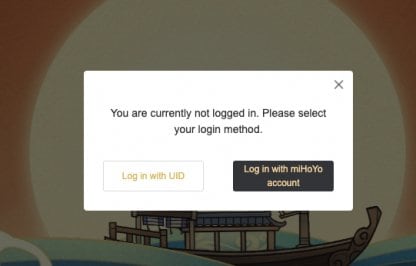
After filling out your UID and Adventure Rank, there will be a verification code sent to your in-game mail.
Log In On Your PS4 Account For Verification

You can only get the code for verification on your in-game mail and it will only be valid for 10 minutes so make sure to log in on PS4 or PS5 first before doing this web event.
Must Be Adventure Rank 10 Or Above
To be be able to play the web event, players must be at least Adventure Rank 10 in the account that they are signing in to.
Adventure Rank Farming & Rewards GuideCogs In The Machine Guide
Walkthrough Chart
| No. | Procedure |
|---|---|
| 1 | Log in to join the event. |
| 2 |  Tap the Arrow Button in the screen until you meet a character. Tap the Arrow Button in the screen until you meet a character. |
| 3 |  Inspect the character by clicking on them. Inspect the character by clicking on them. ↳ Share the event to get more inspection points. |
| 4 |  Click on items on the screen to complete inspection. Click on items on the screen to complete inspection. |
| Character | Inspection Guide |
|---|---|
| 1 | Click the wheelbarrow |
| 2 | Click the books |
| 3 | Click the box on the ground |
| 4 | Click the paper on the ground |
Increase Remaining Inspections By Doing Missions

You can increase the number of inspections you can do by doing missions that is found by clicking on the Inspection Points button.
The Summer Night Mementos Web Event Rewards
Rewards List
- Primogems x 30
- Shivada Jade Fragment x 3
- Mora x 20,000
- Mystic Enhancement Ore x2
Wriothesley Wallpaper

You can get a Wallpaper featuring Wriothesley upon doing the Web event.
Claim Rewards Via In Game Mail
Upon clearing the required criteria, claim the rewards in the event page and you will receive a mail from PAIMON containing the rewards.
Event & Wish Related Guides

Current Wish (Gacha) Banners
| Banner | Boosted Character / Weapon |
|---|---|
| Void Star's Advent 10/13/2026 - 11/4/2026 | |
| La Chanson Cerise 10/13/2026 - 11/4/2026 | |
10/13/2026 - 11/4/2026 | |
| Beginners' Wish Permanent | |
| Wanderlust Invocation Permanent | - |












