

 Anemo
Anemo  Hydro
Hydro
 Pyro
Pyro
 Electro
 Dendro
 Cryo
Cryo
 Geo
Geo
 Anemo Traveler
 Chasca
 Jean
Jean Kaedehara Kazuha
 Mizuki
 Varka
Varka Venti
Venti Wanderer
 Xianyun
 Xiao
Xiao Vesna
Vesna Childe
 Columbina
 Furina
 Hydro Traveler
 Ayato
Ayato Mona
Mona Mualani
 Neuvillette
 Nilou
Nilou Kokomi
 Sigewinne
 Yelan
Yelan Vodyanitsa
 Albedo
 Arataki Itto
 Chiori
 Geo Traveler
 Linnea
 Navia
Navia Xilonen
 Zhongli
 Zibai
Zibai Clorinde
 Cyno
Cyno Electro Traveler
 Flins
Flins Ineffa
 Keqing
 Raiden Shogun
 Varesa
 Yae Miko
 Dendro
 Alhaitham
 Baizhu
 Dendro Traveler
 Emilie
 Kinich
 Lauma
Lauma Nahida
 Nefer
Nefer Tighnari
 Arlecchino
 Dehya
Dehya Diluc
Diluc Durin
Durin Hu Tao
 Klee
Klee Lyney
Lyney Mavuika
 Nicole
 Pyro Traveler
 Yoimiya
 Aloy
Aloy Citlali
 Escoffier
 Eula
Eula Ganyu
Ganyu Kamisato Ayaka
 Lohen
Lohen Qiqi
Qiqi Sandrone
 Shenhe
 Skirk
Skirk Wriothesley
 Ifa
Ifa Jahoda
 Lan Yan
 Lynette
 Prune
Prune Sayu
Sayu Shikanoin Heizou
 Sucrose
 Aino
Aino Barbara
 Candace
 Dahlia
 Xingqiu
 Gorou
Gorou Illuga
 Kachina
 Ningguang
 Noelle
 Yun Jin
 Beidou
 Dori
Dori Fischl
 Iansan
 Kujou Sara
 Kuki Shinobu
 Lisa
Lisa Ororon
 Razor
Razor Sethos
 Alyosha
 Collei
 Kaveh
Kaveh Kirara
 Yaoyao
 Amber
Amber Bennett
 Chevreuse
 Gaming
 Thoma
Thoma Xiangling
 Xinyan
 Yanfei
 Charlotte
 Chongyun
 Diona
Diona Freminet
 Kaeya
Kaeya Layla
Layla Rosaria
 Danica
 Mitya
Mitya Noy
Noy Tsaritsa
 Valeriy
























 Sword
Sword Claymore
 Polearm
 Catalyst
 Bow
Bow
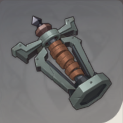
Electroculus Resonance Stone is a Gadget material (item) in Genshin Impact 7.0. Guide includes locations, how to farm, & where to get Electroculus Resonance Stone.
Table of Contents
| 7.1 Update Related Articles | |||||||||||
|---|---|---|---|---|---|---|---|---|---|---|---|
 Vesna Vesna | Vodyanitsa | ||||||||||
| Skirk | Escoffier | ||||||||||
| Cryo Traveler Build Guide | 7.1 Redeem Codes | ||||||||||
What Is Electroculus Resonance Stone?
| Category | Gadget |
|---|---|
| Detail | A stone that can be used in Inazuma to search for nearby Electroculi. This strange device can resonate with Electro Statues of The Seven. Due to this trait, it can detect the presence of Electroculi. Across the span of endless years, even the most majestic cities and sculptures would be worn down by wind and rain, and even the power of Statues of The Seven would gradually dissipate. But this faded strength would coalesce once more into the Oculi, which call out wordlessly to their Statues. |
How To Get Electroculus Resonance Stone & Location Map
| How To Get |
|---|
| Reach Lvl. 8 of the Inazuma Reputation System |
Step 1: Get Blueprint At Inazuma Reputation Reward Lv 8
 Check Out City Reputation System Guide Here
Step 2: Use The Blueprint In Precious Item Menu
You need to use the "Instructions: Electroculus Resonance Stone" in the Precious Item Menu to be able to craft the item.
Where Is Precious Item Menu?

Precious Item menu can be viewerd in the rightest tab in the inventory menu. Find the blueprint and use it here.
Step 3: Craft Electroculus resonance Stone

Go to craft bench and craft the Electroculus resonance Stone.
How To Use Electroculus Resonance Stone
How To Use Electroculus Resonance Stone
Step 1: Open Inventory & Gadget List

After crafting the item for the first time, notification will prompt. Press B to open the inventory to view your gadgets.
Step 2: Equip Electroculus Resonance Stone

In the Inventory Menu, select the item to equip.
Step 3: Use It With Shortcut
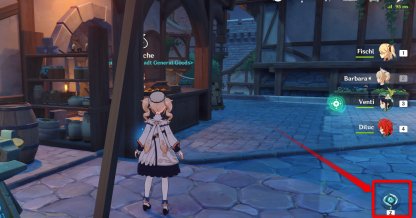
You can assign a shortcut for the gadget. The picture shows the PC interface. For PS4 players, press R1+ the shortcut button selected during the equip phase to use.
Can Only Be Used Once
Electroculus Resonance Stone can only be used once per craft. Once used a blue circle will appear on the map signifying the location of one or more Anemoculus in the specified area.
Check Out Our In-house Electroculus Map
We've created an interactive map for those who want to find all Electroculus. With the help of this map and Electroculus Resonance Stone, we hope you will be able to find all Electroculus!
Electroculus Location & Interactive MapHow to Create Electroculus Resonance Stone by Alchemy
All Recipes by Alchemy Creation
| Recipe | ||
|---|---|---|
| Naku Weed x5 | Sakura Bloom x5 | Amethyst Lump x1 |
Use Alchemy Processing To Convert

The alchemy processing is to convert needed materials for players to use in the game, such as craft ascension materials, talent book materials, and more. Players can convert it by going to any crafting table and using it. You can also easily spot these crafting tables on the world map.
Check How to Do Alchemy CraftingStep-by-Step Alchemy Processing
| 1 |  Open the world map, and go to any Alchemy crafting table. Open the world map, and go to any Alchemy crafting table. |
|---|---|
| 2 |  Choose the material you want to craft and convert it, but make sure you have enough of the required materials to convert it. Choose the material you want to craft and convert it, but make sure you have enough of the required materials to convert it. |
Genshin Impact - Gadget Articles
 List Of All Gadgets Guides










