











Date Guide in NTE (Neverness to Everness). Learn how to unlock date events, how to go on cinema dates, Home Time, and rewards for Bond Quests and Theater.
Table of Contents
How to Unlock Date Events
Unlock Dates at Bond Level 4
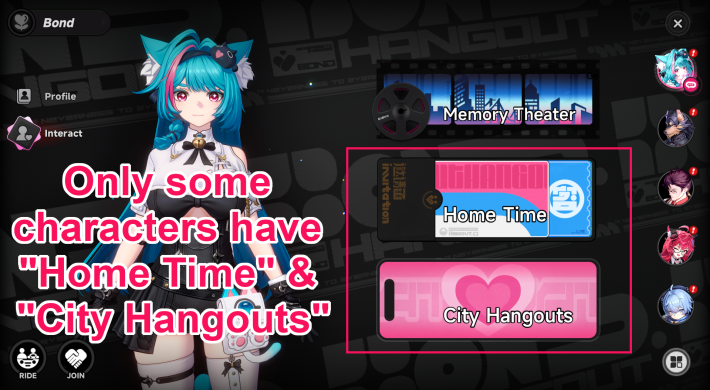
Date events can be accessed through "Bond" in the Menu, then by selecting "Interact" and choosing "City Hangouts." Only certain characters are eligible for dates, and you must raise their Bond Level to at least 4 to unlock them. "Home Time" is also an interaction feature available only for characters who can go on dates.
How to Increase Bond LevelCharacters Who Can Go on Dates
 Mint Mint | Chiz | Jiuyuan |
| Fadia | Nanally | Hotori |
| Lacrimosa | Chaos | Shinku |
| Iroi |
Home Time Requires Specific Furniture
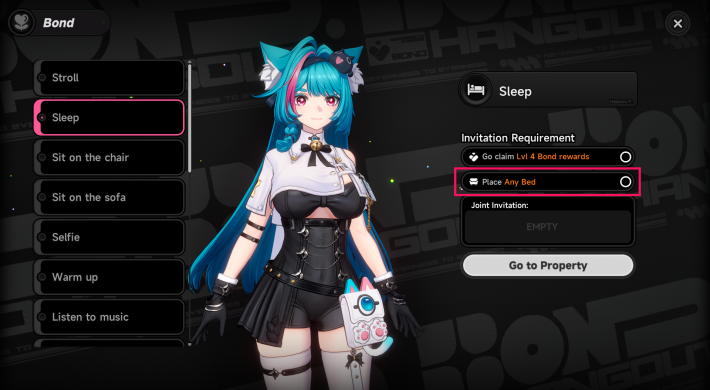
To interact with characters during Home Time, you must meet the Bond Level requirement and purchase the required furniture. Since the same furniture can be shared across multiple Home Time interactions, it is recommended to collect them early if you plan to use the feature often.
How to Get FurnitureAll Characters Have Memory Theater
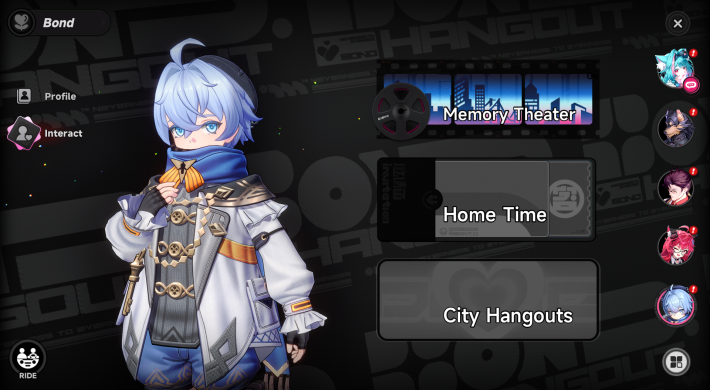
While separate from date events, the "Bond" and "Interact" menus also include Bond Quests and Memory Theater, which help deepen your relationship with characters. Unlike date events, these features are available for many more characters, making them a good way to steadily raise Bond Levels.
List of Date (City Hangout) Locations
Each eligible character has their own date spots scattered across Hethereau. Tap any date below to jump straight to its location, then interact with the marked object or NPC to start it.
Soft and Sweet (Iroi)
| Alice's Bakery | Map Location |
 |  |
Enter Alice's Bakery near Saint Torres Avenue in Miguel District and inspect the kitchen to go on a date with Iroi.
Cloudbound (Iroi)
| Hethereau Skytower | Map Location |
 |  |
Inspect the binoculars on the rooftop of Hethereau Skytower in Miguel District to go on a date with Iroi.
Tipsy Breezy (Shinku)
| Bluegaze Campground | Map Location |
 |  |
Trigger this date at Bluegaze Campground in Unheard Shores.
Early Dawn at the Beach (Shinku)
| Sunward Island Seashore | Map Location |
 |  |
Call Shinku at the beach on Sunward Island, which unlocks after you clear Chapter 5 of the main story.
Chapter 5: Dreamwalk Corridor GuidePaper Boat Day (Chaos)
| Nautili Beach | Map Location |
 |  |
Trigger this date at the beach near Nautili Tunnel in the New Herland District, beside a Sea Angler fishing spot.
A Day by the Water (Chaos)
| Sunward Island Fishing Spot | Map Location |
 |  |
Investigate the fishing spot at the northwesternmost tip of Sunward Island to start this date with Chaos.
Two Ice Creams, Please (Lacrimosa)
| Felicita Gelato | Map Location |
 |  |
Head to Felicita Gelato, an ice cream shop in the Miguel District. Talk to Orange and pick Two ice creams, please to start the date with Lacrimosa.
Claw Machine Challenge (Lacrimosa)
| Xtreme Arcade | Map Location |
| | |
Head to Xtreme Arcade in Bridge Crossings and use the Claw Machine on the right side of the building, then select Claw Machine Challenge.
Wish Together (Hotori)
| Fortune Fair | Map Location |
 |  |
Head to the Fortune Fair at Yuanmu Hill. Talk to Zhilan, the Fortune Shades administrator, and pick Wish Together to start the date with Hotori.
Invite to Sightsee (Hotori)
| Raindrop Court Fishing Spot | Map Location |
 |  |
Head to the Raindrop Court Fishing Spot and look for the fishing shelter with a deck overlooking the lake, then invite Hotori to a sightseeing event.
Arcade Duel (Nanally)
| Xtreme Arcade | Map Location |
 |  |
Head to Xtreme Arcade in the Miguel District and find the arcade game Tetrominoes to start the date with Nanally.
Arcade Shop Is Located Inside Cubox Leon

Enter the arcade through the passageway at the Cubox Leon building, then head up the stairs.
Meteor Shower Viewing (Nanally)
| Miguel District Cherry Blossom Tree | Map Location |
 |  |
Use the Rerorero Phone Booth near the railroad tracks in the Miguel District, then head up to a small clearing with a giant Cherry Blossom tree. Interact with the swing beside it to start a meteor shower event with Nanally.
Dinner at Budori (Mint)
| Budoriya | Map Location |
 |  |
Head to Budoriya in the Miguel District and interact with one of the counter seats by the Octopus cook.
How to Go on Dates (City Hangouts)
Cinema Date
- Head to "Floe Cinema"
- Invite a character at the 2F ticket counter
- Watch the movie together
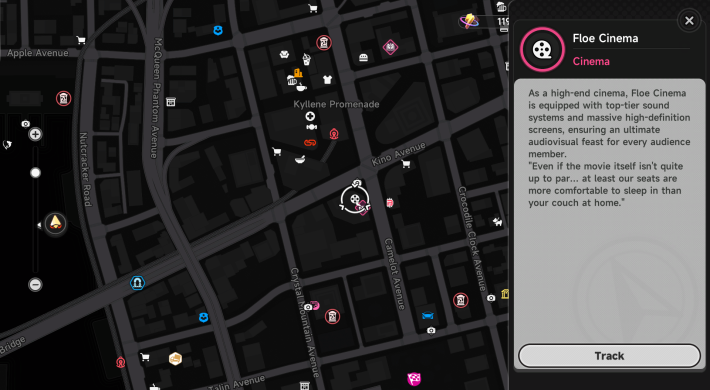
Cinema dates take place at "Floe Cinema" in the New Herland District. Start by heading to the cinema.
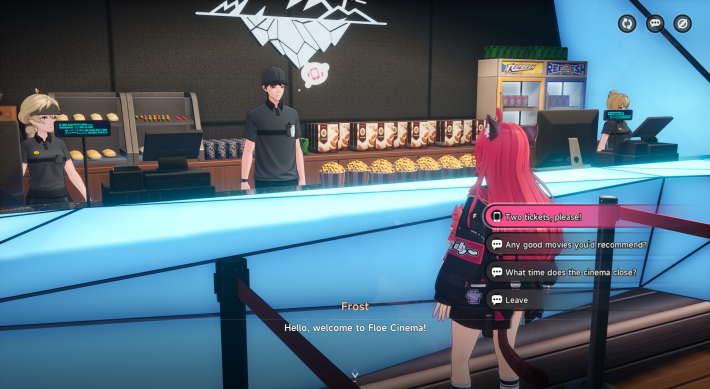
At the ticket counter on the second floor, select "Two tickets, please!" to invite a character to the movie. Then choose the character you want to spend time with.
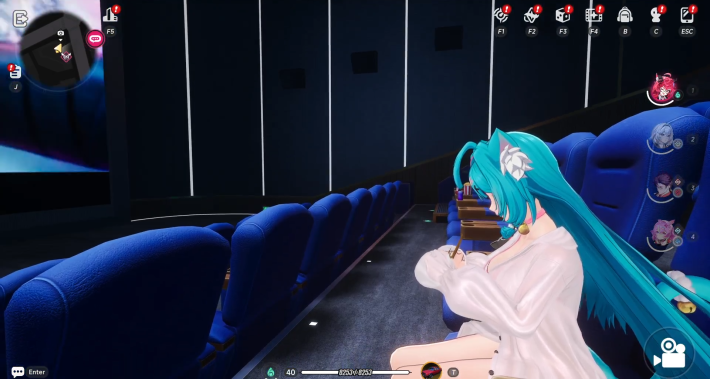
After inviting a character, you will move into the theater and watch the movie together. The date automatically ends after a short time.
Ferris Wheel Date
- Go to Floe Cinema's rooftop
- Talk to Tory
- Spend the Date on a Ferris Wheel

Go to the rooftop of Floe Cinema to reach the Ferris Wheel.

Talk to Tory and select the option Can I have tickets for two, please. Select your date from a list of characters.

After inviting a character, you will move into the theater and watch the movie together. The date automatically ends after a short time.
Dates Can Be Done Once Per Day
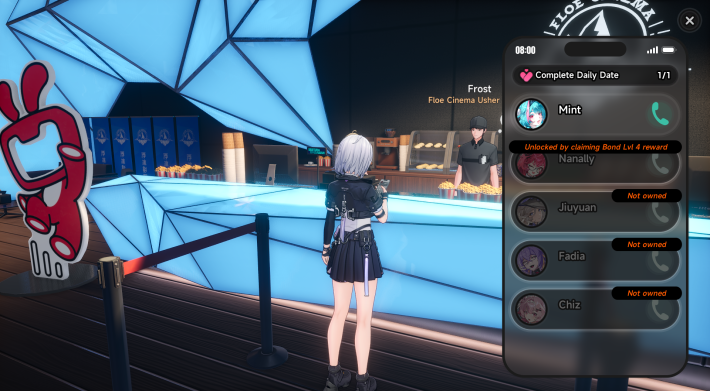
City Hangouts let you invite an eligible character on a date once per day. These events include unique conversations and interactions while also helping increase Affection.
Higher Bond Unlocks More Date Spots
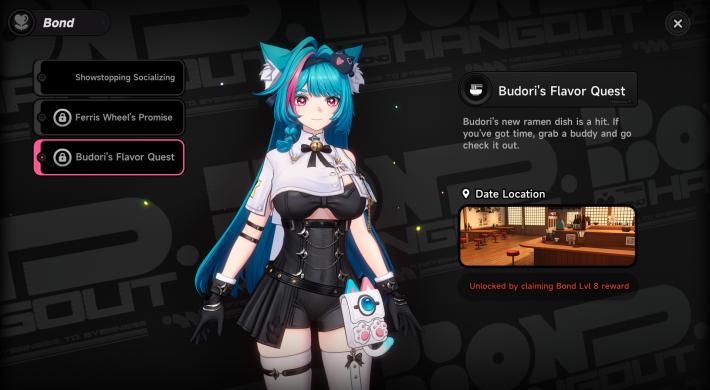
As Bond Level increases, additional date spots such as restaurants and the Ferris wheel become available for each character. Some locations require up to Bond Level 8, so keep building Affection consistently to unlock every spot.
Dates Increase Bond
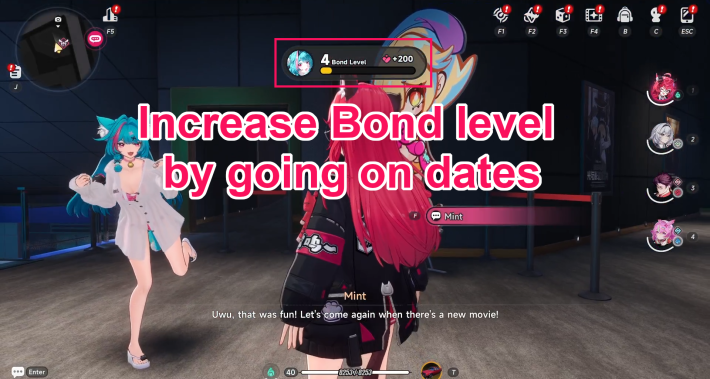
Going on City Hangouts increases the Affection of the invited character. To raise Bond Levels more efficiently, make it a habit to go on daily dates once City Hangouts are unlocked.
How to Do Home Time and Benefits
Interactive Actions at Home
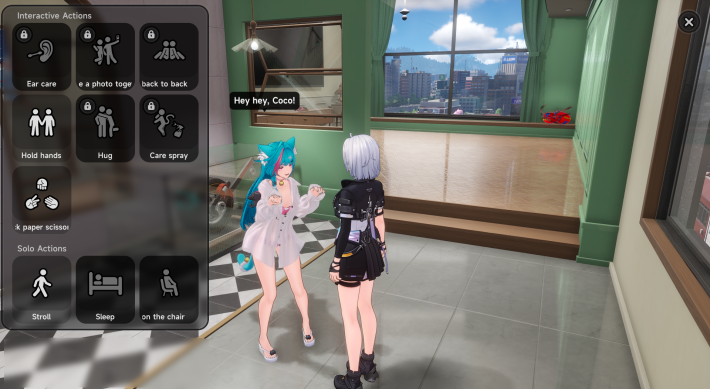
During Home Time, you can invite a character to your home which unlocks the Interactive Action feature. Your home becomes available for purchase through Property once your Tycoon Level reaches 5.
Property Guide: How to Buy HomesApproach the Character and Interact
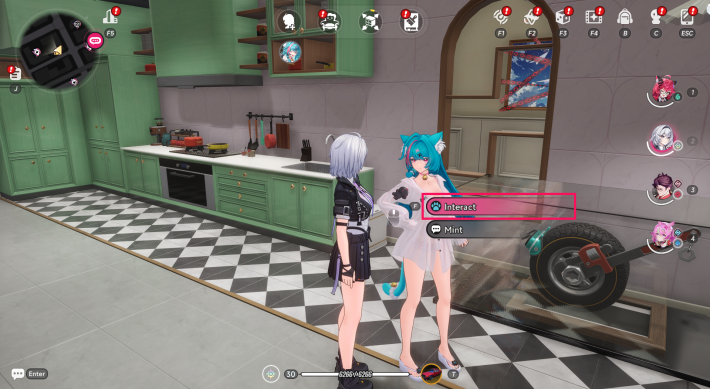
The Interactive Actions screen opens when you approach the invited character and select Interact.
Can Invite or Swap Characters
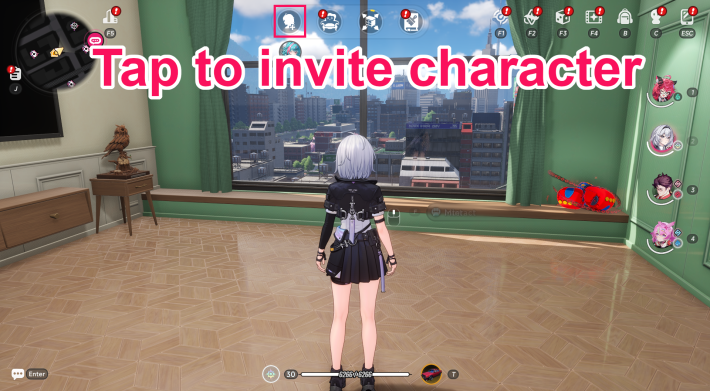
While at home, tap the invite icon displayed at the top of the screen to choose which character to invite.
Interactive Actions While Joined
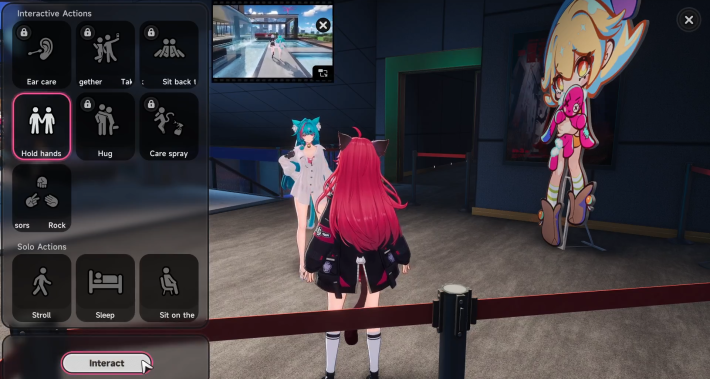
Some Interactive Actions that do not require furniture can also be performed outdoors while in Join mode. You can switch to this mode by selecting "Join" from the "Bond" screen.
First-Time Actions Grant Affection
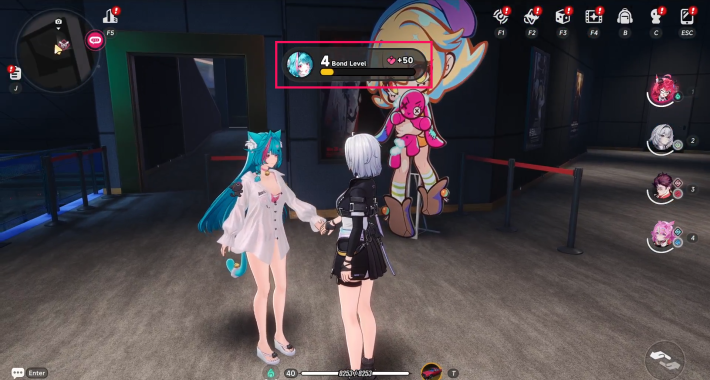
The first time you perform each Interactive Action, you'll earn a small amount of Affection. It's worth trying each one at least once to help raise your Bond Level more efficiently.
Memory Theater and Bond Quest Rewards
Bond Quests Trigger via Messages
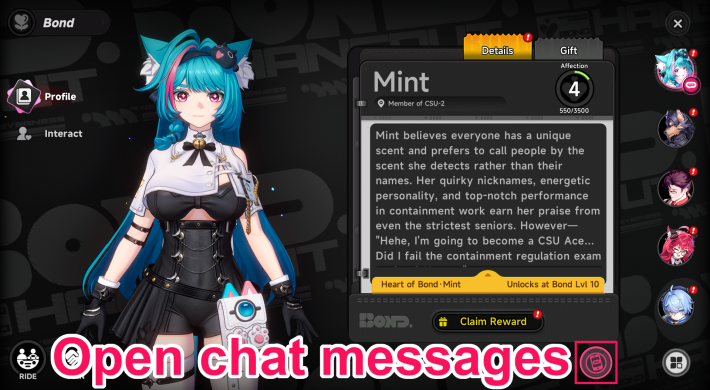
Bond Quests are triggered after reaching the required Bond Level and completing specific prerequisite quests. When a Bond Quest becomes available, the icon in the bottom-right of the Bond screen will glow red, so make sure to check it regularly. You can also view the unlock conditions from the same icon.
Bond Quest Rewards Annulith & EXP
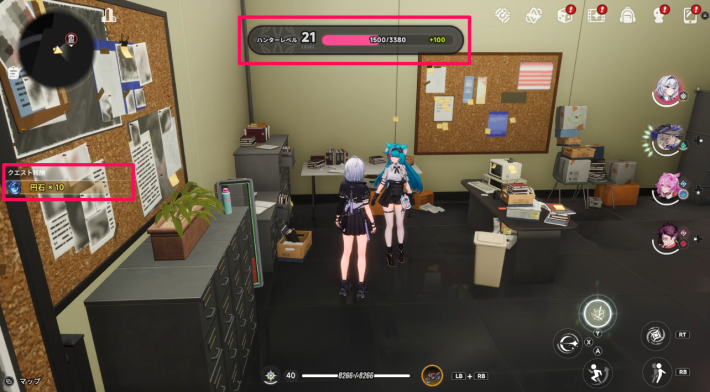
Once a Bond Quest is triggered, head to the marked destination and follow the quest objectives to clear it. Completing the quest rewards you with Annulith and Hunter Level EXP.
Memory Theater Events Appear on Map
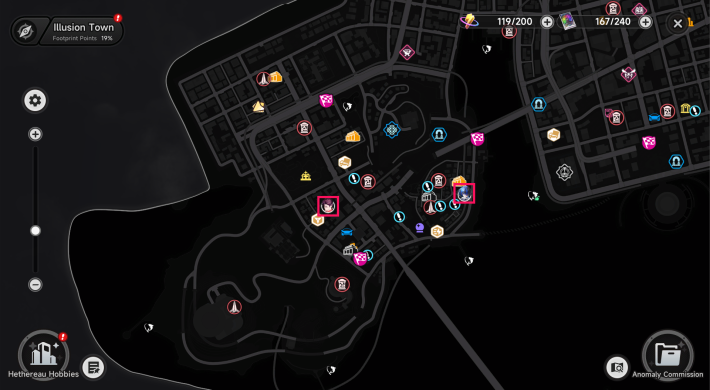
Memory Theater events appear at character icon locations on the Map after meeting the required conditions. If multiple events are available, the event that appears is random, so it's best to clear them whenever you come across one.
Clear Memory Theater for Affection
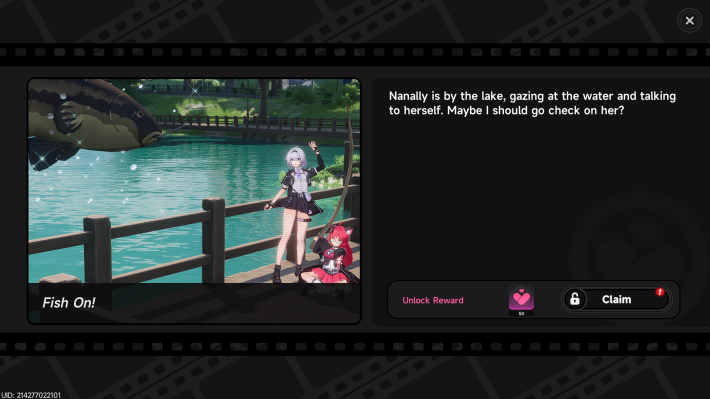
Once an event begins, head to the marked destination and follow the instructions to progress. After completing a Memory Theater event, you can claim the Affection reward from that event's screen in the Memory Theater menu.
Replay Memory Theater Anytime
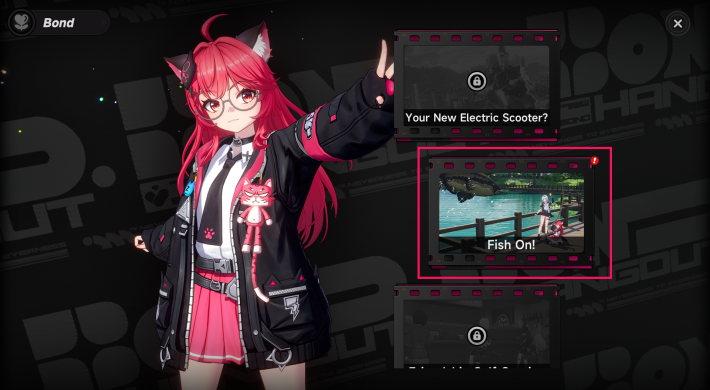
After claiming the Affection reward, you can reopen the event screen and select "Meet in the City!" to replay the same event. Keep in mind that Affection rewards cannot be claimed again, so this feature is mainly for rewatching your favorite scenes.
NTE Related Articles
Return to HomeRecommended Articles
Recommended Guide Articles
 Early Game Guide
 Mid-Game Guide
 Daily Things to Do
 Team Building Tips
 Hunter Level
 Appraisal Level
 Anomaly Commission List
 Beyond the Rails
 Get Chiz for Free
 Get Free S-Rank Arcs
 Mall Guide
 Oracle Stone
 Interactive Map
 Best In-Game Purchases
 How to Min-Max Consoles
 Hunter Exchange
 Latest Updates
Database
 All Items List All Items List |  All Furniture List All Furniture List |  Fish List Fish List |
 Vehicles List Vehicles List |  Hidden Achievements Hidden Achievements |  Voice Actor Cast Voice Actor Cast |
 Outfits and Skins Outfits and Skins |  Arcs Weapon List Arcs Weapon List |  All Cartridges List All Cartridges List |
 Gacha Machine Locations Gacha Machine Locations |  Achievements List Achievements List |  Common Enemy List Common Enemy List |











