











Start your coffee business in NTE (Neverness to Everness)! We explain how to unlock The Cafe by Origen, restock ingredients, assign employees, and activate Life Skills to earn Fons.
Table of Contents
| Related Articles | ||
| Dailies | Stamina Guide | City Stamina |
| Nacupeda's Pool | The Witch's House | The Cafe by Origen |
| Security Office | Fons Farming | How to Get Chiz |
Cafe Features & Management Mechanics
Accessing the Shop Management Screen


All of your business operations are handled through the dedicated Shop Management screen. You can open this interface by either walking up to the shop counter in person or by accessing the Hethereau Hobbies menu from anywhere in the world.
Why Management Level Matters

Raising your Management Level is the single most important factor in boosting your Fons income. The Management Level increases automatically based on the cumulative revenue you collect from the shop, so be sure to claim your Fons regularly to keep leveling up.
Certain Level Unlocks Features

In addition to unlocking more items and upgrades in the existing menu, reaching certain Management Levels also unlocks additional convenience features.
| Level 2 | Delivery Unlocked. 80% Fee Required |
|---|---|
| Level 15 | Delivery Fee Drops to 60% |
| Level 20 | Delivery Fee Drops to 40%. Trends Unlocked |
| Level 25 | Delivery Fee Drops to 20% |
| Level 30 | Delivery is Free |
| Level 40 | Auto Restock Unlocked |
Unlocking & Assigning Products

You must assign products to your Menu in order to start earning Fons over time. While your initial revenue will be small, leveling up your Management Level unlocks additional display slots and gradually improves your earning efficiency.
High-Tier Products and Upgrades

As your Management Level climbs, you will unlock new, high-tier menu items with significantly higher selling prices. Once you reach Management Level 22, you will also unlock the ability to directly upgrade your existing menu items to make them even more profitable.
Restocking Ingredients

Simply assigning products is not enough. If you do not restock ingredients, your shop will stop selling and your revenue will drop to zero. Your warehouse can hold up to 72 hours' worth of ingredients, so buy from city shops and restock frequently.
▼How to Restock IngredientsAssigning Employees

You can assign up to two of your characters to work as employees at each shop. If the assigned character has a management-related Life Skill that is already unlocked, you will gain powerful buffs such as increased sales prices.
▼Best Life Skills for Cafe EmployeesRedecorating the Cafe

You can redecorate your shop across three categories: Tables & Chairs, Walls, and Decor. Swapping these out raises your shop's Popularity and boosts your Fons earning efficiency, so customize aggressively whenever you can.
How to Get Cafe FurnitureOpen Store Renovation Menu

To access the store renovation screen, open the item selection menu from "Management" under Shop Management, then switch to the tab at the top of the screen to enter the renovation menu.
▼How to Furnish Stores CheaplyTips for Maximizing Your Fons Income
Best Team For Owner's Selection
Special Tomato Juice Team

The best way to clear Owner's Selection in the least amount of time is selecting the 1-1 New Product Practice - I stage. Technically, you're only going to need Lacrimosa and Daffodill to serve her Special Tomato Juice once, but you can also slot in Baicang just in case the customers have a different order. Serve Lacrimosa's Special Tomato Juice to a customer, and that will instantly complete the stage, including all Management Targets, in one go.
Hammer Combo Team

To do the "Hammer Combo", start by selecting stage 3‑10 Pianist!. The only characters you'll ever need here are Baicang and Nanally. Baicang will allow you to keep your combo count as you smack customers with the hammer, while Nanally will grant you 115% of the dish price if you hit a customer with a hammer. Aurelia is optional but lets you earn additional fons by way of customer tips. You can also use Mint as a substitute for Aurelia.
Keep Your Ingredients Fully Stocked
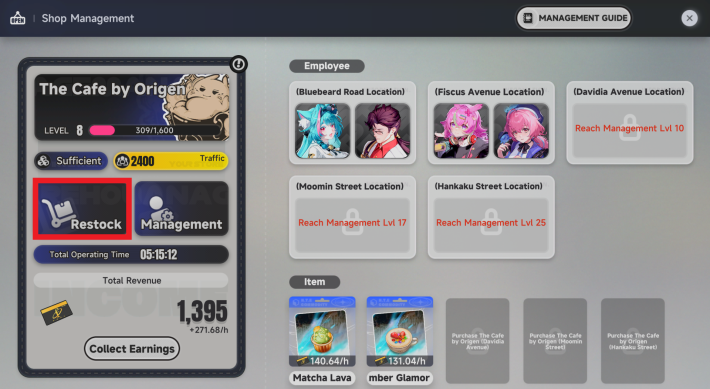
While your shop is out of stock, Fons earnings stop completely. The warehouse holds 72 hours' worth of materials, so make it a habit to fill it to the brim before going idle so your shop keeps running for as long as possible.
▼How to Restock IngredientsUpgrade Your Displayed Menu Items

Higher-tier menu items earn Fons more efficiently than your initial offerings. Whenever your Management Level rises and a new product unlocks, swap out your old display items immediately as a rule.
Expand and Buy More Shops

More shops mean more total customer traffic and more menu display slots running at once. Whenever a new property unlocks as you raise your Management Level, buy that property as your top priority to expand your business.
Activate Life Skills

The Life Skills of employees assigned to your store provide powerful buffs, such as increasing sales prices and reducing ingredient consumption. Prioritize assigning employees you've enhanced through Owner's Selection, then continue upgrading Life Skills across your staff to improve overall efficiency.
▼Best Life Skills for Cafe EmployeesIncrease Popularity via Redecorating

The Popularity gained from redecorating directly increases your hourly revenue. Once you have some cash to spare, invest in new interior decor (especially Tables & Chairs) to upgrade both your shop's looks and its profits.
▼How to Furnish Stores CheaplyCheck Daily Trending Menu Items

Once your Management Level reaches 20, the Trends updates daily, increasing the prices of specific product types. Since these products usually generate higher profits than newly added menu items, checking which products are trending each day can help maximize your earnings.
How to Furnish Stores Cheaply
Stay Within Each Store's Popularity Cap

Each store has its own Popularity Value, and revenue increases only up to a certain cap. Raising it beyond the cap provides no additional benefit. To avoid wasting Fons, keep each store's target value in mind and purchase only the Home Decors you need.
Popularity Value Cap and Revenue Increase Per Store
| Store | Popularity Value | Revenue Multiplier |
|---|---|---|
| Bluebeard Road | 150 | +0.01 |
| Fiscus Avenue | 500 | +0.015 |
| Davidia Avenue | 500 | +0.015 |
| Moomin Street Location | 750 | +0.025 |
| Hankaku Street | 750 | +0.025 |
Buy Home Decor Based on Popularity

Purchase Home Decors based on the Popularity Value each store still needs. It is recommended to prioritize Tables & Chairs first, as they provide Popularity Value at a relatively low cost. In general, it's most efficient to buy tables that provide 100 Popularity Value first, then make up the remaining amount with Walls.
| Note! | For the 4th and 5th stores, purchasing a 2-person Rustic Double Seat that provides 80 Popularity Value slightly reduces the total Fons required. |
|---|
Cheapest Home Decor Setup by Store
| Store | Interior | Price |
|---|---|---|
| Bluebeard Road | Cream Double Seat×1 Boss's Approval×1 | 8,500 |
| Fiscus Avenue/ Davidia Avenue | Rustic Four-Seat×2 Cream Double Seat×1 Boss's Approval×2 | 17,500 |
| Moomin Street Location/ Hankaku Street | Rustic Four-Seat×3 Rustic Double Seat×2 Boss's Approval×6 | 35,500 |
| Total | Rustic Four-Seat×10 Cream Double Seat×3 Rustic Double Seat×4 Boss's Approval×17 | 114,500 |
The quantities and prices listed in the table are the minimum required for each store.
The minimum amount of Fons required to raise all five stores to their Popularity Value caps is 114,500. For Boss's Approval, you can substitute any other wall decoration that costs 4,000 Fons for the same total cost.
Get 1 Decor Item from Excited Student

By clearing Excited Student (Demon's Shadow), you can obtain "Gigafluff - The Strong" as a Decor item. This lets you skip buying one Boss's Approval wall decoration, saving 4,000 Fons. Be sure to pick it up if you want to cut renovation costs.
Demon's Shadow Lost Tale GuideBest Places to Buy Interiors
Where to Buy Tables
| Map | Store Clerk |
|---|---|
 |  |
Tables can be purchased from DeLuxur Decor. Since every table is available at the Illusion Town branch, it's the best place to shop. Also, selecting the first menu option opens the regular furniture catalog, so choose the second option if you're shopping for The Cafe by Origen interiors.
Where to Buy Walls
| Map | Store Clerk |
|---|---|
 |  |
To make up any remaining Popularity Value after placing tables, you'll need either Walls or Decor. Since both provide the same 50 Popularity Value, but Walls cost less, Walls are the better option. Prices vary slightly between wall decorations, but the cheapest one can be purchased at any Moby-Dick Bookstore for 4,000 Fons.
| Note! | If you prefer displaying Decor (figures) regardless of cost, you can purchase them at the DSD POP Mall. |
|---|
How to Restock Ingredients
Sales Stop When Ingredients Run Out

If you don't restock the ingredients for your displayed products, your sales will come to a stop. Be sure to restock ingredients whenever you replenish your displays, and always restock before your inventory runs out.
How to Restock Using the Shopping List
- Select Restock from the Shop Management screen
- Add items to the Shopping List
- Tap the indicator icon to open the list
- Check where each item is sold
- Visit the store and purchase the items
- Select Restock after buying all ingredients

From the Shop Management screen, select "Restock," choose either the 24-hour or 72-hour option, then confirm. The 4-hour option requires frequent check-ins, and forgetting to restock will stop your sales, so using the 24-hour or 72-hour option is recommended.
Even if you switch products after purchasing ingredients, any leftovers can still be used as materials for other menu items. In addition, once you reach Management Level 22, you'll continue selling the same products at higher rarities, so your ingredients won't go to waste over time.

A list of ingredients you're missing will appear, so select "Add to Shopping List." From this screen, you can also use the Delivery option to purchase them immediately for an additional fee.

After returning to the normal screen, a shopping cart icon will appear at the top. Tap it anytime to open your Shopping List.

Selecting an ingredient from the Shopping List lets you check where it is sold. You can also tap the location to view the corresponding Mall on the map.

Head to the marked Mall and purchase the required ingredients. The items you need are highlighted with an indicator, making them easy to find.
After purchasing all the required ingredients, return to the Shop Management screen, choose the restock duration again, and select "Restock" to finish the process.
Unlock Delivery at Management Level 2

Reaching Management Level 2 unlocks the Delivery function, which sends missing ingredients straight to your shop. It saves you the trip, but a delivery fee is added on top, so balance convenience with your budget before using it.
| Note! | If shopping becomes too time-consuming, consider using the Delivery feature to maintain your daily revenue while prioritizing your Management Level progression. |
|---|
Add Ingredients to Shopping List
From the restock screen, you can add any missing ingredients to your Shopping List. The list shows you exactly what materials and how many you need at a glance, and the item screen even tells you where to find them, so you can gather materials efficiently.
Delivery Fees by Management Level
| Management Level | Delivery Fee |
|---|---|
| 15 | 60% |
| 20 | 40% |
| 25 | 20% |
| 30 | Free |
Delivery fees decrease as your Management Level increases. Since Delivery becomes free at Management Level 30, you'll no longer need to shop for ingredients manually once you reach Level 30.
Auto Restock Unlocks at Management Level 40
At Management Level 40, ingredient restocking becomes fully automatic, replacing manual restocking. From that point onward, you won't need to worry about shopping or using Delivery, as your inventory will be managed automatically.
Best Life Skills for Cafe Employees
| Character Name | Details |
|---|---|
| Lacrimosa | Recommendation:★★★★★ - Increases dish prices - Reduces ingredient consumption rate - "Special Tomato Juice" appears in Owner's Selection |
| Baicang | Recommendation:★★★★★ - Increases the number of customers at the assigned shop - During Shop Owner SP, Combos will not break - Use together with Nanally |
| Sakiri | Recommendation:★★★★★ - Increases the Menu unit price of the assigned shop - Decreases the ingredient consumption speed of the assigned shop - Drives away Danzaburou during Shop Owner SP |
| Skia | Recommendation:★★★★☆ - Increases the number of customers at the assigned shop - Decreases the ingredient consumption speed of the assigned shop - Increases a Customer's Patience during Shop Owner SP |
| Chiz | Recommendation:★★★★☆ - Increases the number of customers at the assigned shop - Decreases the ingredient consumption speed of the assigned shop - During Shop Owner SP, each correct dish increases the unit price |
| Adler | Recommendation:★★★★☆ - Increases the Menu unit price of the assigned shop - Decreases the ingredient consumption speed of the assigned shop - Automatically creates coffee during Shop Owner SP |
| Nanally | Recommendation:★★★★☆ - Increases the Menu unit price of the assigned shop - During Shop Owner SP, using a Hammer increases the unit price - Use together with Baicang |
| Daffodill | Recommendation:★★★☆☆ - Increases the number of customers at the assigned shop - Decreases the ingredient consumption speed of the assigned shop - During Shop Owner SP, expensive Menus are more likely to appear |
| Mint | Recommendation:★★★☆☆ - Increases the Menu unit price of the assigned shop - Decreases the ingredient consumption speed of the assigned shop - During Shop Owner SP, grants additional tips per combo |
| Aurelia | Recommendation:★★★☆☆ - Increases the number of customers at the assigned shop - Decreases the ingredient consumption speed of the assigned shop - During Shop Owner SP, adds tips when a Customer leaves |
| Edgar | Recommendation:★★☆☆☆ - Increases the number of customers at the assigned shop - Decreases the ingredient consumption speed of the assigned shop - Greatly increases the number of customers at Max Lv |
| Haniel | Recommendation:★★☆☆☆ - Increases the Menu unit price of the assigned shop - Decreases the ingredient consumption speed of the assigned shop - Greatly increases the Menu unit price at Max Lv |
Upgrade With Owner's Selection in Mind

Upgrading employees' Life Skills not only improves sales at The Cafe by Origen, but also affects the difficulty of Owner's Selection. Until you can clear it consistently, prioritize developing your characters with Owner's Selection in mind.
Owner's Selection Mini-Game GuideHow to Get Life Skill Upgrade Materials

Life Skills provide valuable bonuses for Shop Management, and the materials needed to unlock them can be obtained from Daily Missions, Management Guide rewards, Property Renovation Guide rewards, and My Collection rewards. As you progress through Shop Management, make sure to develop your characters' management skills alongside it.
How to Buy and Purchase HomesThe Cafe by Origen Overview
Earn Passive Fons from the Cafe

The Cafe by Origen is a coffee shop minigame that allows you to passively earn Fons (in-game currency). Because the cafe generates money automatically over time while you play, it is one of the most efficient ways to build your wealth in NTE.
Unlocks at City Tycoon Level 4

You cannot access the cafe right away. The feature unlocks as you progress through Hethereau Hobbies and raise your overall City Tycoon rank to Lv. 4. In the early game, your top priority should be reaching Level 4 to start your coffee business as soon as possible.
How to Raise Tycoon LevelPurchasing the Shop

Once you hit Tycoon Lv. 4, you must travel directly to the designated Property location in the city to physically purchase the shop. You can check the exact locations of available Properties by opening your map screen at any time.
What You Can Do With PropertiesNTE Related Articles
Return to HomeRecommended Articles
Recommended Guide Articles
 Early Game Guide
 Mid-Game Guide
 Daily Things to Do
 Team Building Tips
 Hunter Level
 Appraisal Level
 Anomaly Commission List
 Beyond the Rails
 Get Chiz for Free
 Get Free S-Rank Arcs
 Mall Guide
 Oracle Stone
 Interactive Map
 Best In-Game Purchases
 How to Min-Max Consoles
 Hunter Exchange
 Latest Updates
Database
 All Items List All Items List |  All Furniture List All Furniture List |  Fish List Fish List |
 Vehicles List Vehicles List |  Hidden Achievements Hidden Achievements |  Voice Actor Cast Voice Actor Cast |
 Outfits and Skins Outfits and Skins |  Arcs Weapon List Arcs Weapon List |  All Cartridges List All Cartridges List |
 Gacha Machine Locations Gacha Machine Locations |  Achievements List Achievements List |  Common Enemy List Common Enemy List |











