











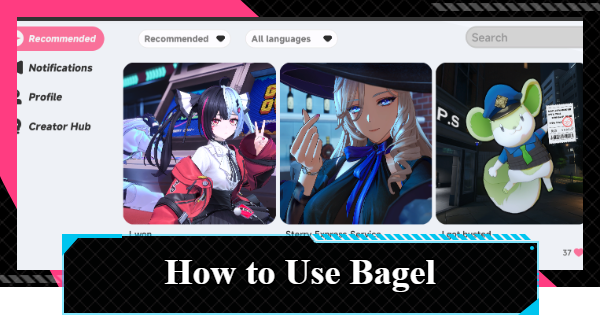
Bagel is the in-game social media app for NTE (Neverness to Everness). Read on to learn what you can do on Bagel, how to use Bagel, and how to earn Praise Jam for the Mall!
Table of Contents
Decor Blueprint Feature in Ver. 1.2


The Ver. 1.2 update introduced the Decor Blueprint feature, allowing players to generate Blueprint Codes for their home decor layouts and share them on Bagel. You can save up to 20 shared layout codes to quickly recreate housing setups with a single tap.
| Note! | You must still purchase the required furniture separately. |
|---|
How to Get Praise Jam
Get from Posts and Interaction

Praise Jam can be earned through interactions on Bagel, such as posting and reacting. Interaction data is updated daily at 12:00 AM Server Time.
You Can Earn Points Without Posting
You can earn Praise Jam by reacting to other players' posts even if you don't create any posts of your own. If you prefer not to post, make sure to actively browse and interact with other players' content.
Earn 2,000 Daily with Likes, Comments, and Views
| How to Obtain | Points Earned |
|---|---|
| Like a Post | 200 pts per Post (3 times) |
| Comment on a Post | 300 pts per Comment (3 times) |
| View a Post | 100 pts per View (5 times) |
| Total | 2,000 pts |
You can easily earn up to 2,000 Praise Jam each day by liking, commenting on, and viewing other players' posts the required number of times. Even if you don't create any posts yourself, regularly checking and interacting with others' content is enough to earn points. Additionally, reactions made to your own posts also count toward earning Praise Jam.
 Note! Note! | Points are tallied and reflected the next day. |
|---|
Liking and Commenting on Posts

You can complete this objective by viewing three different posts and using the reaction options at the bottom of the screen. Liking and commenting on the same post both count, so you can complete the requirement more efficiently by doing both at once.
Viewing Posts
You can complete the viewing task simply by opening five different posts. Since the posts you liked and commented on also count toward the total, you only need to view two additional posts to finish the requirement.
Collect Rewards at Your Own Pace
Items available through the Praise Jam exchange do not expire. If you're aiming for items with a limited exchange count, you can still obtain them by consistently earning the daily cap of 2,000 points through likes and comments.
▼Praise Jam Exchange ListCheck Earned Points from Creator Hub

You can view your accumulated points from the Creator Hub. The Creator Hub also provides a direct shortcut to the exchange shop, allowing you to quickly redeem your earned points for rewards.
▲ Back to Table of ContentsPraise Jam Exchange List
To exchange for all limited-quantity rewards, you will need a total of 55,380 Praise Jam.
| Item | Praise Jam | Stock |
|---|---|---|
| Fabricated Dice | 700 | 6 |
| Bagelism (Phone Case) | 12,000 | 1 |
| 200°C Baking (Phone Wallpaper) | 12,000 | 1 |
| Freshly Baked (Profile Theme) | 6,000 | 1 |
| Pistachio (Icon) | 3,000 | 1 |
| Just One Bite (Icon Frame) | 3,000 | 1 |
| Fons ×2500 | 20 | 120 |
| Elite Hunter Guide | 50 | 30 |
| Chaotic Dye | 30 | 50 |
| Manhole Boss | 30 | 50 |
| Senior Hunter Guide | 8 | 120 |
| Colorless Dye | 8 | 120 |
| Manhole Thug | 8 | 120 |
| Obscure Whispers | 9 | 15 |
| Blurred Silhouette | 9 | 15 |
| Unsolved Numeral | 9 | 15 |
| Yearning Delusions | 9 | 15 |
| Beetle Coin ×5000 | 15 | 200 |
| Lost Whispers | 3 | 30 |
| Fading Silhouette | 3 | 30 |
| Blurred Numeral | 3 | 30 |
| Suspended Delusions | 3 | 30 |
| Nestling's Longing | 15 | 20 |
| FNG | 15 | 20 |
| First Expectations | 15 | 20 |
| Synchronicity of Thought | 15 | 20 |
| Hesitation of the Waves | 15 | 20 |
| Beetle Coin ×100 | 100 | Unlimited |
36,000 Needed for Icons and Phone Cases

To exchange for all cosmetic items such as icons, wallpaper and phone cases, you need a total of 36,000 points. However, if you only want the limited-quantity enhancement materials and dice, you can obtain everything for 19,380 points.
| Note! | If you only want dice, you can exchange for all of them first for 4,200 points. |
|---|
What You Can Do with Bagel
See Other Players' Posts

NTE's Bagel is an in-game social media platform where players can view images and videos posted by other users. You can also interact with posts by liking, bookmarking, and replying to them.
Posts Can Be Filtered

You can filter Bagel posts using the menu in the top-left corner. While "Recommended" is selected by default, you can also switch to "Latest" to view recent posts or "Following" to see posts from users you follow.
Filter by Followed Players & Characters

Starting in Ver. 1.2, a filter feature has been added to Bagel, allowing you to view posts specifically from players you follow or characters.
Check Posts From In-Game Characters

Within Bagel, you can also view posts made by in-game characters. While you cannot interact with these posts, the reply section lets you see conversations and interactions between characters.
Can Follow Players

If you enjoy a player's posts, you can choose to follow them. Once you've followed a player, you can use the filter options to view only posts from the players you follow.
Easy to Check When Following

Posts from in-game characters are also included when viewing the "Following" feed. If you only follow a small number of players, this filter can make it easier to keep track of posts from in-game characters.
Can Post Screenshots and Videos

On Bagel, you can post photos and videos captured in-game. Share your adventures and memorable moments in Hethereau with other players through Bagel.
Post Text Has a Character Limit

Bagel posts have a character limit of 100 single-byte characters or 50 double-byte characters, so keep in mind that longer messages cannot be entered.
Audience Can Be Selected

You can select the post's audience from the button next to the post. You can limit it to specific followers or make a post that's only visible to you, like a memo.
Up to 5 Posts per Day
Bagel posts are limited to five posts per day. Keep this limit in mind, as frequent posting can quickly use up your daily allotment.
Earn Praise Jam

By creating posts and interacting with content on Bagel, you can earn Praise Jam. The Praise Jam you accumulate can be exchanged in the shop for various rewards, including Fabricated Dice and Wallpaper.
▲ Back to Table of ContentsTips for Getting Likes
Character Photos Get More Engagement

On Bagel, photos featuring characters tend to attract more attention than landscape shots. Try using your favorite character as the subject and experiment with different angles and poses to capture a memorable photo.
Select Poses & Expressions

When taking a photo, you can change your character's pose and expression using the button in the top-left corner of the camera mode. By choosing expressions and poses that fit the scene, your photos are more likely to attract attention.
How to Take Selfies and Drone ShotsTake Photos at Home

Characters invited to your home can perform special actions and interactions. If you want to make your photos more unique, consider taking them at home to take advantage of these exclusive poses and scenes.
Post 5 Times Every Day

The more frequently you post, the more opportunities your content has to be seen by other players. If you're aiming to earn reactions, try to use all five of your daily post slots whenever possible.
Actively Follow and Reply
By following other players and interacting with their posts, you increase the likelihood that they'll visit your profile. They may follow you back or react to your posts in return, so don't hesitate to engage with other users.
▲ Back to Table of ContentsHow to Use Bagel
Use from Bagel in the Menu Screen

The Bagel feature can be accessed from the in-game Menu screen.
Post from Bottom Left

When posting images or videos on Bagel, you can use the button in the bottom-left corner. When creating a post, you can set its visibility to public, or restrict it to yourself or only your followers.
React to Posts from the Bottom

You can like or bookmark other players’ posts using the icons below each post. Replies can be submitted through the input field located at the bottom right.
▲ Back to Table of ContentsHow to Fix Posting Issues
Restart the Game
If you are unable to post no matter what, the issue may be caused by a temporary in-game bug. Try restarting the game and check if you can post afterward.
Try Different Wording
Certain words may be detected as prohibited terms, preventing your post from being submitted. Review your title and post content, then try again. If the issue persists, it may also help to use a different image.
▲Back to Table of ContentsNTE Related Articles
Return to HomeRecommended Articles
Recommended Guide Articles
 Early Game Guide
 Mid-Game Guide
 Daily Things to Do
 Team Building Tips
 Hunter Level
 Appraisal Level
 Anomaly Commission List
 Beyond the Rails
 Get Chiz for Free
 Get Free S-Rank Arcs
 Mall Guide
 Oracle Stone
 Interactive Map
 Best In-Game Purchases
 How to Min-Max Consoles
 Hunter Exchange
 Latest Updates
Database
 All Items List All Items List |  All Furniture List All Furniture List |  Fish List Fish List |
 Vehicles List Vehicles List |  Hidden Achievements Hidden Achievements |  Voice Actor Cast Voice Actor Cast |
 Outfits and Skins Outfits and Skins |  Arcs Weapon List Arcs Weapon List |  All Cartridges List All Cartridges List |
 Gacha Machine Locations Gacha Machine Locations |  Achievements List Achievements List |  Common Enemy List Common Enemy List |











