











How to fix login issues in NTE (Neverness to Everness). See common login issues, what to do if you cannot log into the game, network connection errors, and more troubleshooting tips.
Table of Contents
See Device Compatibility
Check the System Requirements


First, check if your device meets the minimum system requirements to play NTE. You can find the official requirements on the store page for each platform.
System Requirements by Platform
| Item | Minimum Requirements | Recommended Requirements |
|---|---|---|
| OS | Windows 10 64-bit or later | Windows 10 64-bit or later |
| CPU | 10th Gen Intel Core i7-10700 | 12th Gen Intel Core i7-12700 or higher |
| Memory | 16GB or more | 32GB or more |
| GPU | Equivalent to NVIDIA GeForce GTX 1660 AMD Radeon RX 5600 | Equivalent to NVIDIA GeForce RTX 3060 AMD Radeon RX 6700 or higher |
| Storage | 60GB or more (+60GB required during decompression) | 60GB or more (+60GB required during decompression) |
| Item | Minimum Requirements | Recommended Requirements |
|---|---|---|
| System | iOS 15 or later | iOS 17 or later |
| Device | iPhone 12 Pro Max or later | iPhone 14 Pro or later |
| Memory | 6GB or more | 6GB or more |
| Storage | 20GB or more | 20GB or more |
| Item | Minimum Requirements | Recommended Requirements |
|---|---|---|
| System | Android 10 or higher | Android 10 or higher |
| CPU | Equivalent to Snapdragon 855 MediaTek Dimensity 8000 Kirin 990 | Snapdragon 8 Gen2 Snapdragon 8 Gen3 MediaTek Dimensity 9200 Kirin 9000S or higher |
| Memory | 6GB or more | 6GB or more |
| Storage | 20GB or more | 20GB or more |
| Item | Minimum Requirements | Recommended Requirements |
|---|---|---|
| Storage | Approx. 60GB or more | Approx. 60GB or more |
Check Network and System Updates
Check Your Network

Login or launch issues can occur due to problems with your internet connection. Try restarting your router and ensure your device is properly connected to the network.
Update Your OS

The game may not launch if your device is running an outdated OS. Make sure your operating system is updated to the latest version.
Check Your GPU Driver Version

An outdated GPU driver can cause login or launch issues. Updating it to the latest version often resolves these problems.
Best Graphics Settings to Fix Lag and CrashesTry Launcher Troubleshooting Tools
Repair the Game

Open the launcher and click the gear icon (Settings) in the top-right corner. Select the Game Repair option to check for and fix corrupted files.
Get and Submit Logs
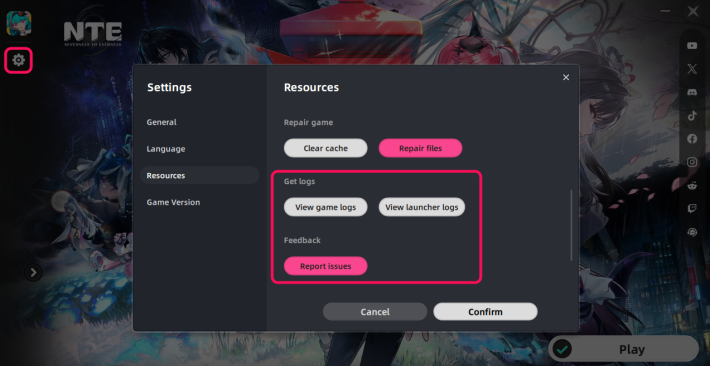
If the solutions above don't work, submit the game or launcher logs to the support team for further assistance.
NTE Related Articles
Return to HomeRecommended Articles
Recommended Guide Articles
 Early Game Guide
 Mid-Game Guide
 Daily Things to Do
 Team Building Tips
 Hunter Level
 Appraisal Level
 Anomaly Commission List
 Beyond the Rails
 Get Chiz for Free
 Get Free S-Rank Arcs
 Mall Guide
 Oracle Stone
 Interactive Map
 Best In-Game Purchases
 How to Min-Max Consoles
 Hunter Exchange
 Latest Updates
Database
 All Items List All Items List |  All Furniture List All Furniture List |  Fish List Fish List |
 Vehicles List Vehicles List |  Hidden Achievements Hidden Achievements |  Voice Actor Cast Voice Actor Cast |
 Outfits and Skins Outfits and Skins |  Arcs Weapon List Arcs Weapon List |  All Cartridges List All Cartridges List |
 Gacha Machine Locations Gacha Machine Locations |  Achievements List Achievements List |  Common Enemy List Common Enemy List |











