











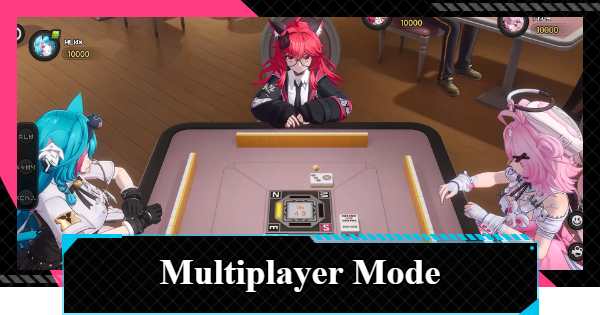
This article shows how to play multiplayer in NTE (Neverness to Everness). It covers activities available in NTE multiplayer and the advantages of playing with others.
Table of Contents
| Related Article | |
| Multiplayer Guide | Crossplay Guide |
| How to Add Friends | Guild System |
Host and Guest Reward Differences
| Item | Host | Guest |
| Dropped Items (Materials) | ★ | ★ |
| Anomaly Hunt | ★ | ★ |
| Anomaly Pilgrimage | ★ | ★ |
| Oracle Stones | ★ | ★ |
| Nightmare-Bound (Anomaly Commission) | ★ | ★ |
| Goodheart Crispy Mouse Cookie (Illegal Activity) | ★ | ❌ |
| Gifts from 21 | ★ | ❌ |
★ indicates that you can take on challenges and receive rewards in multiplayer mode, depending on the situation in your own world.
❌ indicates that you can take on the challenge, but guests cannot receive the rewards.
Dropped Items (Materials)
Items (materials) dropped by enemies can be received by everyone in the session. However, you may not receive them if you are too far, so if you want to farm materials, stick together.
Common Enemy Drops GuideAnomaly Hunt & Pilgrimage


The bosses in the Anomaly Hunt and Anomaly Pilgrimage quests can be fought cooperatively in multiplayer mode. Rewards can then be claimed individually once the boss is down, so only those who want the rewards can claim them.
Hethereau Boss List and Locations| Note | The Anomaly Zone cannot be challenged in multiplayer. |
Oracle Stones

Oracle Stones are independent of the host, so guests can pick up any that they find. Similarly, unlocking teleportation points also needs to be done individually, so be sure to pick up Oracle Stones and visit Phonebooths whenever you see them.
Hethereau Interactive Map GuideNightmare-Bound (Anomaly Commission)

All players participating in the session can receive rewards for completing the Anomaly Commission. Players who have already completed the quest cannot receive the reward again, but they can help other players who haven't completed it yet.
Nightmare-Bound WalkthroughGoodheart Crispy Mouse Cookie

The Goodheart Crispy Mouse Cookies rewarded for dealing with illegal activities can only be earned by the host.
How to Stop Illegal City ActivitiesGift from 21
The "Gifts from 21" obtained by defeating anomalies specific locations can only be acquired by the host of the world in which it was defeated.
Gift from 21 Locations & Map GuideHow to Play Multiplayer
Access from Phone Menu

You can access the multiplayer menu by selecting "Multiplayer" from the second page of the phone menu.
You Can Also Access from Friends List
You can also start a multiplayer session with friends by inviting players from your friends list. When playing multiplayer with friends, you can choose to either host a room or join one.
▼ Jump to How to Play With Friends
Approval is Required to Join Randoms

To join a random player, simply press the request button next to a player's name. If the other player accepts, you will join that player's session. Even if the person isn't a friend, you can search for them and request multiplayer approval if you know their UID.
The Applicant Can Never Host
When playing with random players, the person who approves the request will always be the host; therefore, the person making the request cannot play as the host. Note that you will not be able to receive rewards that are only available to the host, such as Anomaly Commissions that can be done in multiplayer.
You Cannot Chat Non-Friends
Joining random players requires approval, and text chat is currently limited to friends, so we recommend playing with in-game friends. If you're playing with someone who isn't your friend, send a friend request during the multiplayer session to facilitate communication and smoother gameplay.
You Can Leave at Anytime

To exit a multiplayer game, select the door button on the multiplayer screen and then press the exit button. If you are the host, you can remove participating players from the multiplayer screen by pressing the X button.
How to Play With Friends
- Add the player you want to play with as a friend
- Invite them from your Friends list
- A loading screen appears once the invite is accepted
- Enjoy world exploration with up to 4 players
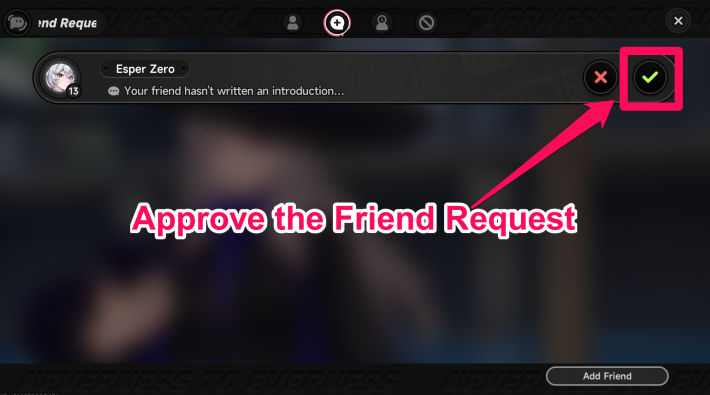
To play multiplayer, you and the other player must be friends in-game.
How to Add Friends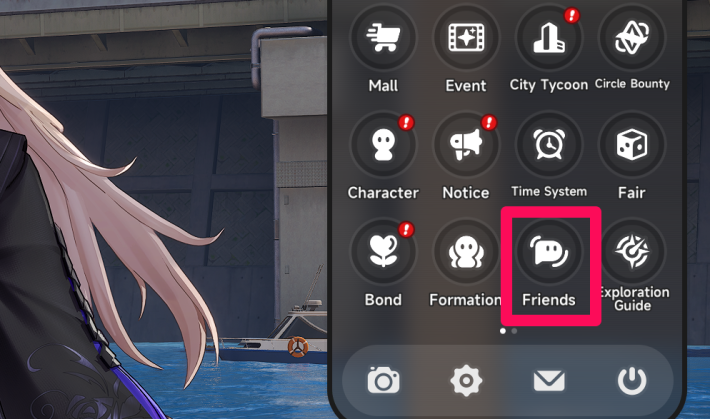
To open the Friends screen, open the Menu.
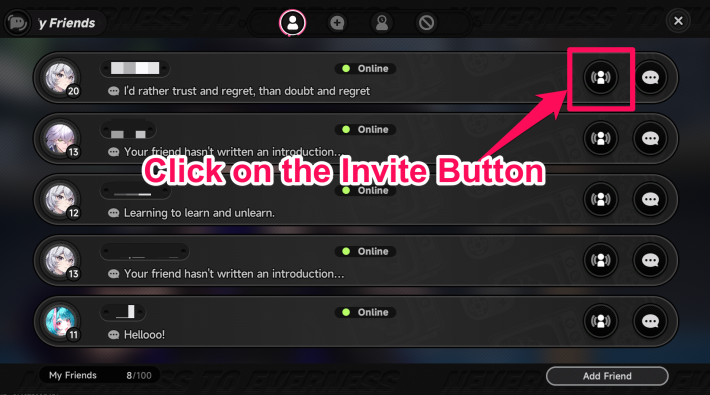
You can send invitations to players you have added as friends.
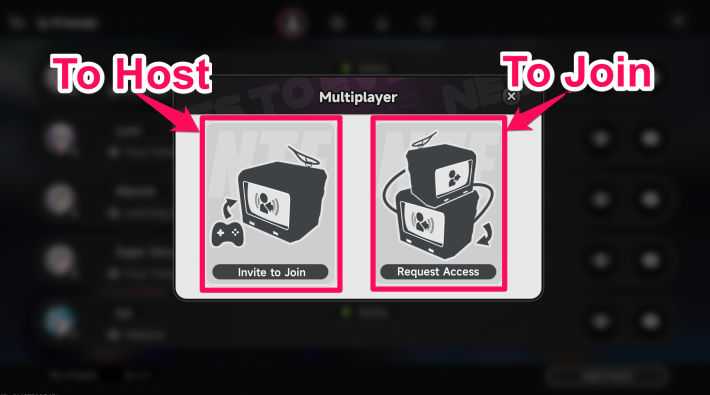
If you are hosting, choose "Invite to Join". If you are joining a room, choose "Request Access".
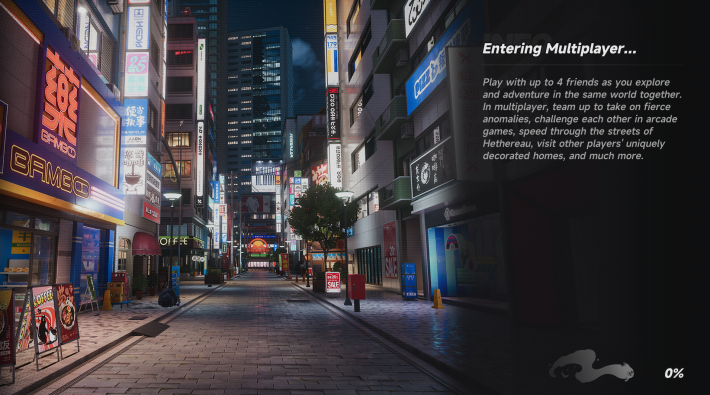
When the invite is accepted, the screen transitions to a loading screen.
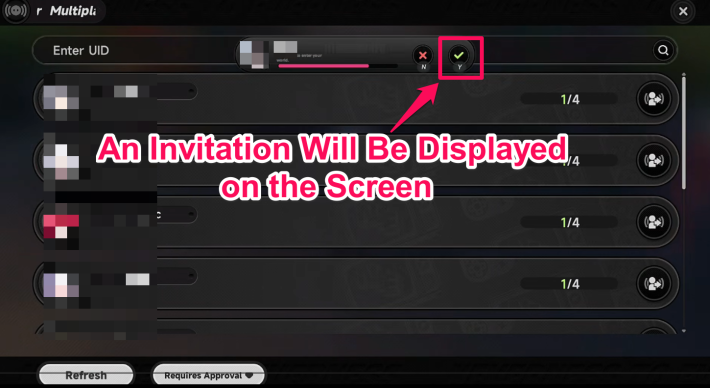
When a multiplayer invitation arrives, it is shown on the screen. Approve it to join the session.
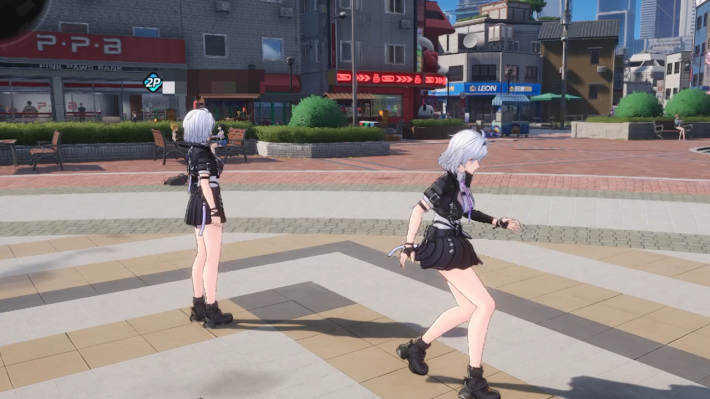
You can explore the world and battle together with the players you invite. Note that the multiplayer player limit is 4.

You can communicate with other players during multiplayer via Chat. Chat is accessed from the Friends screen in the Menu, and supports both private and team chat.
What You Can Do in Multiplayer
- Explore and play PvE together
- Compete in Racing
- Compete in Mahjong
- Compete in Tetrominoes
- Play Pink Paws Heist
1. Play PvE & Explore Together

In NTE, you can invite players into your world and explore Hethereau together. From PvE activities like fighting field enemies to taking photos and visiting My House, a wide range of content can be enjoyed in multiplayer.
2. Compete in Racing

| Unlock Conditions | Reach Tycoon Level 2 & Hunter Level 17 |
In the Hethereau Hobbies' Racing Friends mode, you can race against your friends through the city in vehicles. There are many courses, so be sure to try them all.
Racing GuideChoose from Multiple Vehicle Types

There are several vehicle types, and you can pick whichever you prefer. Each one differs in performance and durability.
How to Drive & Buy Vehicles3. Compete in Mahjong

| Unlock Conditions | Reach Hunter Level 11 |
In the Hethereau Hobbies' Mahjong, up to 4 players can play together. The rules are slightly unique—certain tiles are designated as Void Suit and cannot be used, and play continues until the wall is depleted even after a Ron or Tsumo. Review the rules in advance.
Mahjong Inferno Rules and LocationsRiichi Mahjong Added in Ver. 1.2

The Version 1.2 update added Riichi Mahjong, a popular Japanese style of mahjong. The tables are separated from Mahjong Inferno, so choose whichever table you prefer to play at.
Riichi Mahjong GuidePlay Mahjong at Little Sparrow

Mahjong is played inside the in-game Maid Café, Little Sparrow. Little Sparrow is shown on the map with a maid uniform icon.
4. Compete in Tetrominoes

| Unlock Conditions | Reach Tycoon Level 8 |
In the Hethereau Hobbies' Tetrominoes, up to 4 players can enjoy a Tetris-style match. You can also play with non-friends or solo, and a score-based leaderboard is shown, so try it many times.
Tetris (Tetrominoes) Guide and RewardsPlay Tetrominoes at the Arcade

Tetrominoes is played at the in-game Arcade. The Arcade is shown on the map with a joystick icon.
5. Play Pink Paws Heist

| Unlock Conditions | Reach Tycoon Level 12 |
The mini-game "Pink Paws Heist" also supports multiplayer. In multiplayer mode, it becomes easier to find keys and phone booths, reducing the risk of running out of time.
Pink Paws Heist GuideMultiplayer Tips & Cautions
Fast Travel Depends on the Host

Teleport Points usable during multiplayer depend on which ones the host has unlocked. For smooth travel during co-op, it is recommended to set the player with the most unlocked Teleport Points as the host.
| Note | Activating a new Teleport Point during multiplayer does not apply to other players' maps. Only Teleport Points unlocked at the start of the multiplayer session can be used. |
Appraisal Level Tied to Host
The host's Appraisal Level—which affects enemy levels and the rewards you receive—applies to everyone in the session. When a player with a high Appraisal Level hosts, enemies will also be higher level, so be careful when joining a co-op with players whose levels differ greatly from yours.
| Note | Anomaly Pilgrimage is adjusted to suit lower-level players. |
All Players Need Entry Reqs

For multiplayer activities such as Mahjong and Tetrominoes, every participating player must meet the entry requirements to play. Raise your City Tycoon Level and Hunter Level to satisfy the requirements before you start playing.
| Related Articles | |
 How to Raise Tycoon Level How to Raise Tycoon Level |  How to Raise Hunter Level How to Raise Hunter Level |
Things You Can't Do in Multiplayer
No Matchmaking System
There is no matchmaking or queueing system that automatically pairs you with other players. Therefore, to access multiplayer, you need to share your UID to send and receive invitations.
| Note | For specific activities like some Hethereau Hobbies, boss battles, or mahjong, you can play with random players through online matchmaking. |
No Anomaly Requests in Multiplayer

While in multiplayer, Anomaly Commissions do not appear. To progress Anomaly Commissions, you must play solo.
Anomaly Commission ListNo In-Game Voice Chat

NTE does not have a built-in voice chat function. To communicate within the game, you will need to use the chat function available to your friends or use a separate voice chat app.
Wanted Level Won't Increase

During multiplayer, your Wanted Level (Warrant Value) does not rise. As a result, you cannot be sent to the Prison or fight a Justice Executioner while in a co-op session.
How to Raise Wanted LevelNo Quest Progress
You cannot progress through the main story quests or other quests alongside other players during multiplayer mode.
No Multiplayer Fishing Content
Currently, the fishing content does not include any multiplayer elements such as competing based on the size or quantity of fish caught.
How to Fish and Fishing LocationsNo Friend Battles in Fight Club

Hethereau Hobbies "Fight Club" is a PvP mode, but only random matchmaking is currently available. A feature for battling friends has not been confirmed at this time.
Fight Club Guide & How To UnlockHow to Leave Multiplayer
- Open the Menu screen
- Select Multiplayer
- Leave via the Door icon
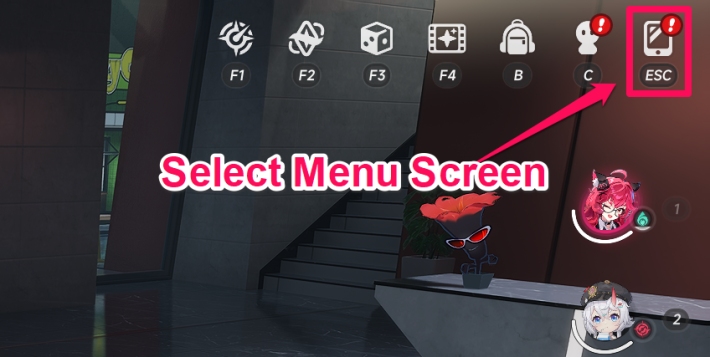
To leave multiplayer, open the Menu screen.
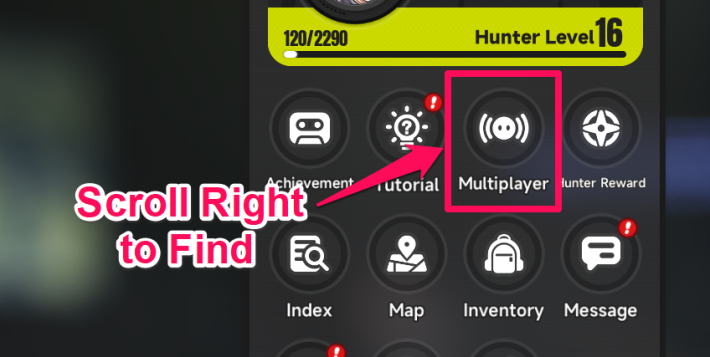
Scroll right on the Menu screen to find the "Multiplayer" icon.
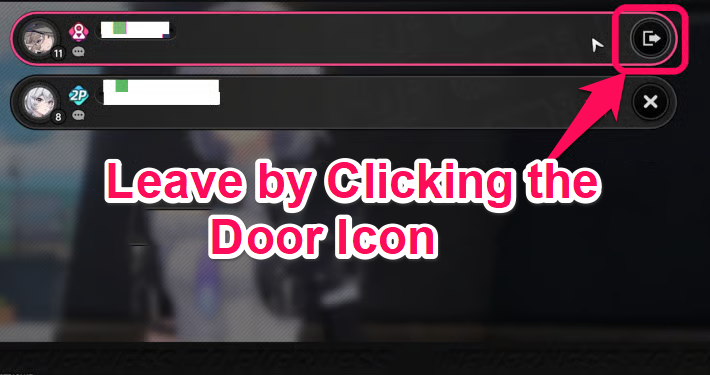
After selecting the Door button, press the confirm button to end the multiplayer session.
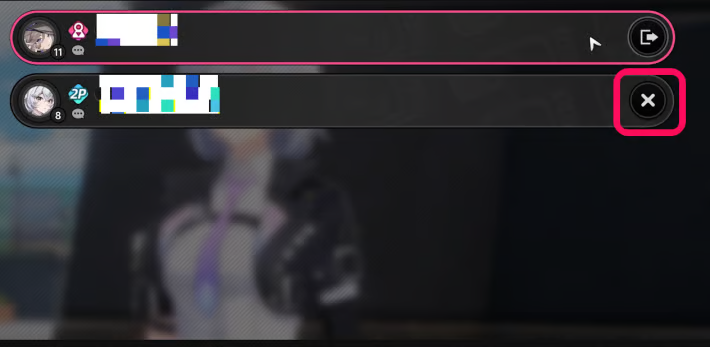
The host can kick participating players from the multiplayer screen.
How to Unlock Multiplayer
Unlocks After Clearing Prologue II

NTE Multiplayer becomes available after clearing the main story chapter "Prologue II: Good Business, Better Treasure." If you have not unlocked it yet, progress through the main story first.
Prologue II WalkthroughNTE Related Articles
Return to HomeRecommended Articles
Recommended Guide Articles
 Early Game Guide
 Mid-Game Guide
 Daily Things to Do
 Team Building Tips
 Hunter Level
 Appraisal Level
 Anomaly Commission List
 Beyond the Rails
 Get Chiz for Free
 Get Free S-Rank Arcs
 Mall Guide
 Oracle Stone
 Interactive Map
 Best In-Game Purchases
 How to Min-Max Consoles
 Hunter Exchange
 Latest Updates
Database
 All Items List All Items List |  All Furniture List All Furniture List |  Fish List Fish List |
 Vehicles List Vehicles List |  Hidden Achievements Hidden Achievements |  Voice Actor Cast Voice Actor Cast |
 Outfits and Skins Outfits and Skins |  Arcs Weapon List Arcs Weapon List |  All Cartridges List All Cartridges List |
 Gacha Machine Locations Gacha Machine Locations |  Achievements List Achievements List |  Common Enemy List Common Enemy List |











