










คุณสามารถเล่น Neverness to Everness (NTE) ด้วยคอนโทรลเลอร์ได้หรือไม่? ตรวจสอบการรองรับคอนโทรลเลอร์สำหรับ PC และมือถือ, รูปแบบปุ่มเริ่มต้น และวิธีเปลี่ยนการตั้งค่า
สามารถใช้คอนโทรลเลอร์ใน NTE ได้หรือไม่?
สามารถเล่นด้วยคอนโทรลเลอร์ได้
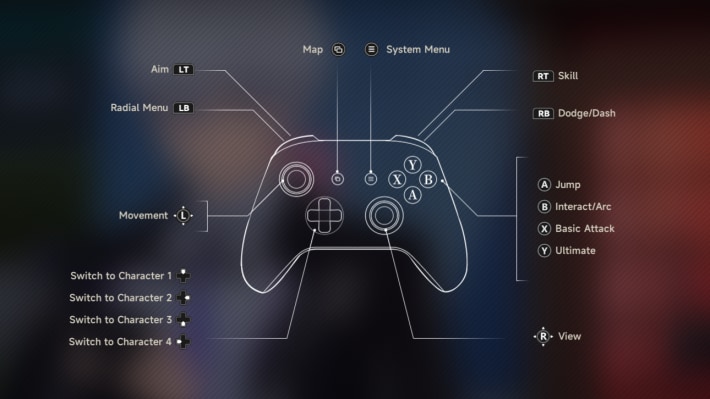
NTE สามารถเล่นด้วยคอนโทรลเลอร์ได้ทั้งบน PC และมือถือ เพียงเชื่อมต่อคอนโทรลเลอร์หรือเกมแพดที่รองรับเข้ากับอุปกรณ์ของคุณเพื่อเริ่มเล่น
สามารถใช้คีย์บอร์ดและเมาส์ได้เช่นกัน
เวอร์ชัน PC ยังรองรับการควบคุมด้วยคีย์บอร์ดและเมาส์อีกด้วย เลือกวิธีการป้อนข้อมูลที่คุณถนัดที่สุด
รายการปุ่มควบคุม
ภาพรวมการควบคุม
*การควบคุมที่ระบุไว้ด้านล่างอ้างอิงจากการตั้งค่าเริ่มต้น
| การกระทำ | ปุ่มควบคุม |
| กระโดด | ✕ or A Button |
| โจมตีพื้นฐาน | □ or X Button |
| หลบหลีก/พุ่งตัว | R1 or RB Button |
| สลับตัวละคร | D-Pad Up/Down/Left/Right |
| เปลี่ยนทิศทางสกิล | R2 or RT Button |
| อัลติเมท | △ or Y Button |
| โต้ตอบ/สำรวจ | ◯ or B Button |
| เล็งโจมตี | R2 or RT Button |
| ค้นหา/ยกเลิกการค้นหา | Right Stick Click |
| รีเซ็ตกล้อง | Right Stick Click |
| ยืนยัน/ยกเลิก | ✕/◯ or A/B |
| เมนูวงล้อ | L1 or LB Button |
| เมนู | OPTIONS or START |
| ติดตามเควส | Left Stick Click |
| ออก | SHARE or BACK |
เปลี่ยนรูปแบบปุ่มในการตั้งค่า
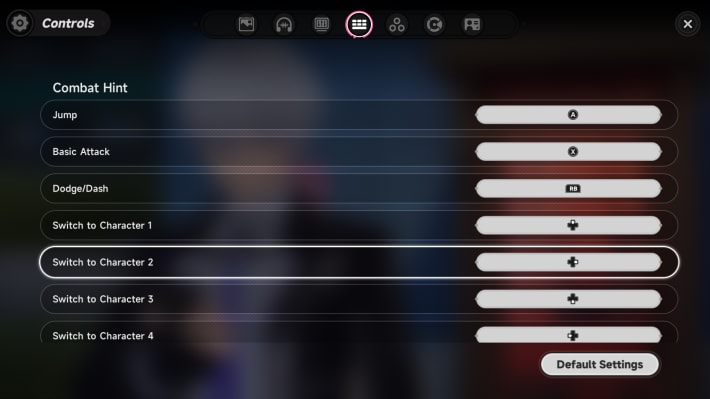
คุณสามารถเปลี่ยนรูปแบบปุ่มได้จาก หน้าจอ "Button" โดยเปิดการตั้งค่า (ไอคอนรูปเฟือง) จากเมนู ปรับรูปแบบให้เข้ากับการตั้งค่าการควบคุมที่คุณรู้สึกถนัดที่สุด
ปรับการตั้งค่าในหน้าจอการควบคุม
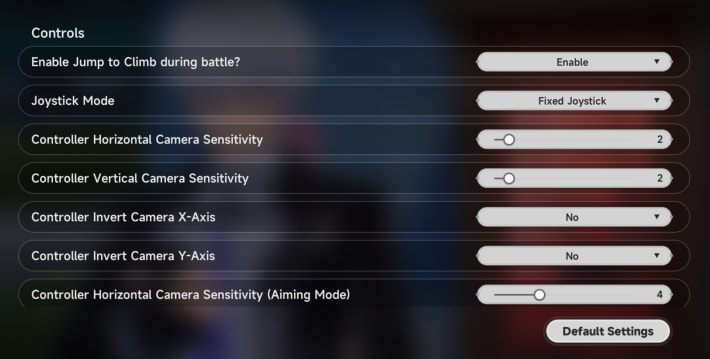
ความไวของกล้องและการตั้งค่าอินพุตอื่นๆ นอกเหนือจากรูปแบบปุ่มสามารถปรับได้จากส่วน "Controls" ในการตั้งค่า คุณยังสามารถปรับแต่งการสั่นของหน้าจอ, ตัวเลือกการแสดงผล, มุมกล้อง, โหมดล็อกเป้า และอื่นๆ เพื่อปรับปรุงประสบการณ์การเล่นเกมของคุณได้
