
Main Menu
Article Menu
Tier List & Reroll Guide
Featured Articles
Event Articles
Umbral Monument Articles
Inorganic Construct
Bolts and ShadowsRampaging Shields
Rock Solid
Forsaken by the Land
Survive the GasUnorthodox Tactics
Ballista and Axe
Narrative Event Articles
Map Articles
Gacha Articles
AIC Factory
Simulations
Simulation Guide Electric Mining Rig Logistics Connections Belt-Free Transfer Shredding Unit Material Production
Strategy Guide
Area Defense Guide
Valley Pass
Level 1Level 2
Level 3
Originium Science Park
Level 1Level 2
Level 3Level 4
Jingyu Valley
Level 1Level 2
Boss Guides
RhodagnMarble Aggelomoirai
Triaggelos
How to Obtain Items
Combat System and Tips
Character & Weapon Upgrade
Beginner Guides
Dijiang
Useful Information
Other Articles
Characters
6-Star Characters
5-Star Characters
4-Star Characters
List by Attack Type
List by Element
List by Rarity
Weapons
List by Weapon Type
List by Rarity
Story
Prologue
Chapter 1: Process I
Chapter 1: Process II
Chapter 1: Process III
Chapter 1: Process IV
Side Mission
JP Guide
Shredding Unit Simulation Guide

Shredding Unit Simulation Guide

Last Updated:
Shredding Unit Simulation Guide | Arknights: Endfield - GameWith

This is a simulation guide for the Shredding Unit in Arknights: Endfield. It covers how to clear the Shredding Unit simulation and rewards for clearing it in AKEF.

Table of Contents

Simulation Guide

Shredding Unit Simulation Overview

Unlock ConditionsNone
Main Goals- Use the Shredding Unit to produce Buckflower Powder x3 and store the products in the Depot
- Use the Shredding Unit to produce Origocrust Powder x3 and store the products in the Depot
Bonus Goals- Place only 1 Electric Pylon to power the Shredding Unit, Refining Unit, and the target Stash
Rewards- Oroberyl x25
- Operational EXP x100
- Oroberyl x15 (Bonus Goals)

Shredding Unit Simulation Guide

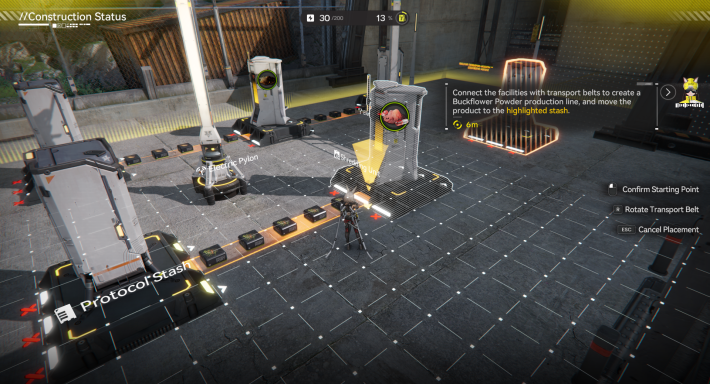
Connect the Protocol Stash and the Shredding Unit
Connect the Protocol Stash and the Shredding Unit

Once the simulation begins, start by linking the Protocol Stash in front of you to the Shredding Unit using a Transport Belt.

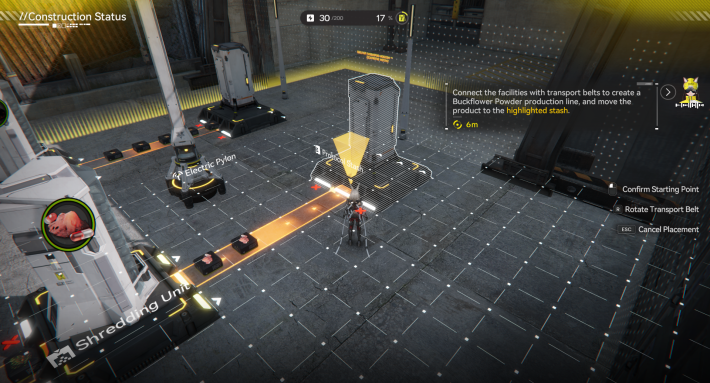
Connect the Shredding Unit and the Protocol Stash
Connect the Shredding Unit and the Protocol Stash

With the first link complete, continue the production chain by connecting the Shredding Unit to the second Protocol Stash using another Transport Belt.

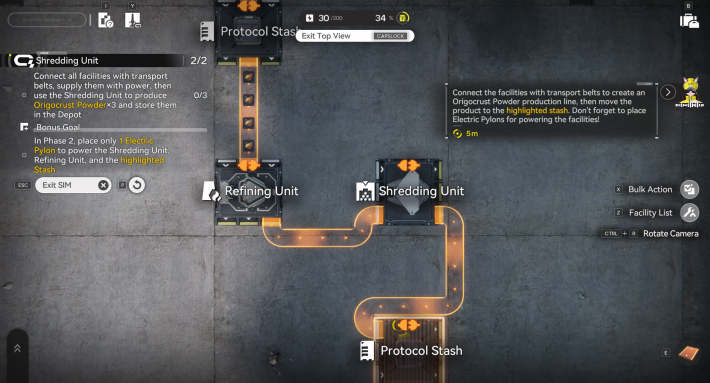
Connect the Facilities in Area 2
Connect the Facilities in Area 2

Once Area 2 becomes available, connect the Transport Belts in this order: Protocol Stash → Refining Unit → Shredding Unit → Protocol Stash. Switching to top view makes placement much easier and more accurate.

Place the Electric Pylon
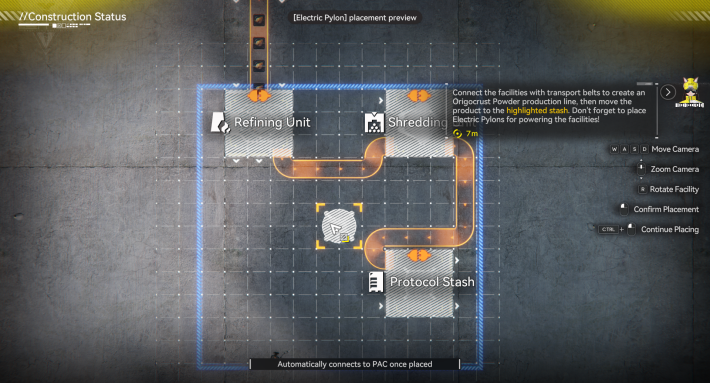
Place the Electric Pylon

After all facilities are connected, place a single Electric Pylon so its range covers the Refining Unit, Shredding Unit, and the final Protocol Stash. Once the Origocrust Powder arrives at the stash, you’ll complete both the main and bonus goals.

Related Arknights: Endfield Articles

Back to Top Page

Valley IV Simulations

Electric Mining RigMaterial ProductionLogistics Connections
Shredding UnitBelt-free TransferMeds Production
Moulding UnitFitting UnitGearing Unit
Industrial ExplosiveThermal BankPlanting Unit and Seed-Pickikng Unit
SplitterDepot BusBelt Bridge
Depot Bus IntegrationElectric Mining Rig IIConverger
Grinding UnitImproved CannerySC Valley Battery
Buck Capsule [A]Transport Belt-

Wuling Simulations

Pipes and FluidsReactor CrucibleFilling Unit (Fluid)
Planting Unit and Pipe SplitterSprinklerPipe Logistics
Reactor ExpansionForge of the SkySeparating Unit

Have some feedback? Click here

Your feedbacks will be checked by our staffs and will be attended to accordingly. Please be advised that we may not reply to every individual feedbacks.


Article Written by
Arknights: Endfield Strategy Team

Arknights: Endfield Strategy Team

Reader Comments
Max. 300 Characters

By clicking Submit you are agreeing to the Terms of Use.
*Offensive, insulting or inappropriate use of forum may lead to ban/restriction.
To avoid griefing, you will not be able to post or report for the first %d hours upon visiting this forum for the first time.

Close

Looks like nobody posted here yet...

Copyright Notice

© GRYPHLINE. All Rights Reserved.
The copyrights, trademarks, and other intellectual property rights of the game images used on this website belong to the respective content providers. All content information within the articles is created by the GameWith strategy team.








