

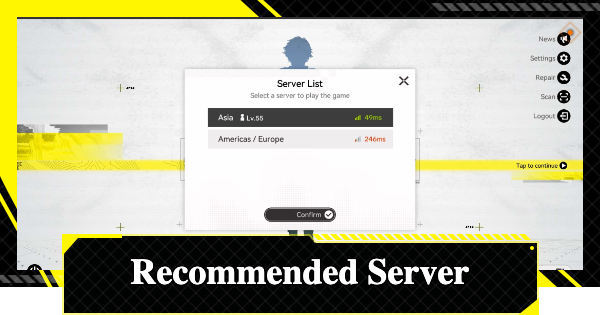
Recommended Server guide in Arknights: Endfield. This guide includes recommended servers, which server to choose, cross platform data sharing, can you change servers, and more.
Table of Contents
Recommended Server
Choose the Server with the Lowest Ping


| Available Servers | Asia Americas/Europe |
|---|
In the server selection screen, you will see the available servers and their corresponding pings. It is recommended to choose the server with the lowest ping for a better game experience.
PS5 Server is Based on PSN Account Region
For those playing on the PS5, you cannot manually select the server to play on. This is automatically set based on the region your PSN account is set to. For example, if you are in Japan, it will automatically use the Asia server.
Can You Change Servers?
Servers Cannot be Switched
There is currently no way to switch Servers in Arknights: Endfield. Once you start a game on a server, it is set to that permanently. Make sure to select the right server for you before progressing in the game.
Data Cannot be Shared
There is also no data sharing or game progress sharing between server saves. For example, data progress on the Asia server cannot be used when on the Americas server.
Blueprint Codes are Server Exclusive
It is also worth noting that blueprint codes are server exclusive. This means that you can only use codes from the same server you have. Codes from other servers will not work when you try to use them.
| Blueprint Related Articles | |
|---|---|
| How to Create Blueprints | How To Share Blueprints |
| Blueprint Code List | Best Farming Blueprints |
How to Know Your Server?
Check from the Login Screen

The server your save is in will be displayed on the lower right corner of the login screen.
What to Do When the Server Times Out?
Wait a While Before Logging In
You may experience server timeouts when there is high traffic in the game. This is likely to happen during new patches since a lot of players will be loggin in. Check for announcements on official Arknight: Endfield social media pages and try logging in at a later time.
Troubleshoot On Your End
If there are no announcements of an outage, you can troubleshoot your connection for any issue. Try restarting your internet connection or try logging in on another device.
Related Arknights: Endfield Articles
Back to Top PageTier List
 Characters Tier List
 Reroll Tier List
 Best Weapons Tier List
Gacha Information
 Which Banner Should You Pull?
 Gacha Pity System & Rates
 Gacha Currency
 Basic Headhunting Permit
Recommended Articles
 Early Game Guide
 Redeem Codes List
 How to Add Friends
 Points of No Return
 Authority Level Guide
 Daily Tasks To Do
 Starter Banner Best Weapon
 How to Farm T-Creds
 How to Get Aketine
 How to Get 2 Stock Redistributors
 Depot Nodes Location
 How to Get Origeometry
 Monthly Pass Guide
 Trust & Operator Gift Guide
Events
 Umbral Monument Event Guide Umbral Monument Event Guide |  Survive the Gas Survive the Gas |  Unorthodox Tactics Unorthodox Tactics |
 Ballista and Axe Ballista and Axe |  Bolts and Shadows Bolts and Shadows |  Rampaging Shields Rampaging Shields |
 Rock Solid Rock Solid |  Supply: Exploration Day Supply: Exploration Day |
Things to Know Before Release
 Release Date Release Date |  How to Pre-Download How to Pre-Download |  PS5 Pre-Order Bundle PS5 Pre-Order Bundle |
 How to Link Account How to Link Account |  Is Cross-Play Available? Is Cross-Play Available? |  How to Reroll How to Reroll |
 Operator Class Guide Operator Class Guide |
 Combat System Guide
 How to Win Battles
 Dodge and Perfect Dodge
 Elemental Weakness Chart
 Arts Reactions / Physical Status
 Team Composition Tips
 Best Team Comps
 Potential
 Talents and Base Skills
 How to Craft Gear
 Best Food List
 Artificing and Stats Priority
 All Fast Travel Points
 Protocol Datalogger
 Aurylene
 Interactive Map
 Ferrium Ore Map Location











