

How to Fix Performance Issues & Lag in Arknights: Endfield. Covers what you can check or change to fix when the game is laggy.
Table of Contents
How to Fix Performance Issues
- Lower Graphics Settings
- Check if the Device is Overheating
- Free Storage Space
- Restart the Device or the App
- Update OS to the Latest Version
- Close Other Apps
- Get Better PC, Tablet, or Smartphone
- [PC] Set to High Performance
- [PS5] Contact the Manufacturer
Lower Graphics Settings
Review your in-game settings. Lowering demanding settings like motion effects can often reduce lag.
Check if Your Device is Overheating
Your device may overheat due to long play sessions or excessive load. This poses a risk of damaging your hardware, so you should stop playing for a while.
Consider Cleaning Your Device
If your device is overheating despite not being used much, check for dust buildup in the intake/exhaust vents or keyboard. You can find specialized cleaning tools for this in stores.
Free Storage Space
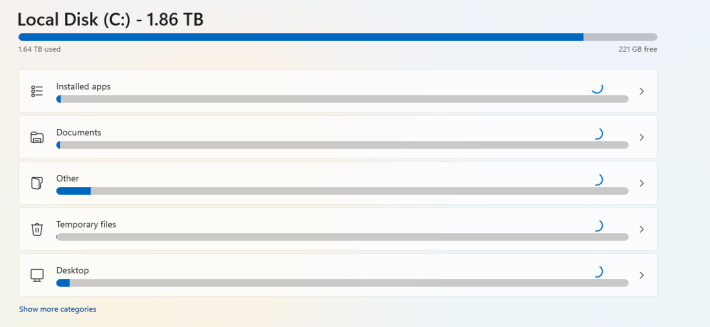

If you have low storage space, it can slow down processing. If your storage is nearly full with games and other files, try to free up some space.
Can Also Be Checked In-Game
Depending on your platform, you can check the "Device Load" or "Estimated Memory Usage" in-game.
Restart Your Device or the App
Restarting your device or the app may solve the problem. It seems that for iOS, restarting the device often helps. If that doesn't work, you can also try reinstalling the app.
Update Your OS to the Latest Version
If your OS is outdated, the game may not run properly. Check to make sure it's up to date.
Close Other Apps
Having other apps running in the background can cause performance issues. Be sure to close any unnecessary ones.
Get Better PC, Tablet, or Smartphone
If you can't enjoy the game fully due to hardware limitations, check the specs of any other devices you own to see if you can play on them. If that's not an option, you may need to consider upgrading your PC, tablet, or smartphone.
Recommended Specs & System Requirements
[PC] Set to High Performance
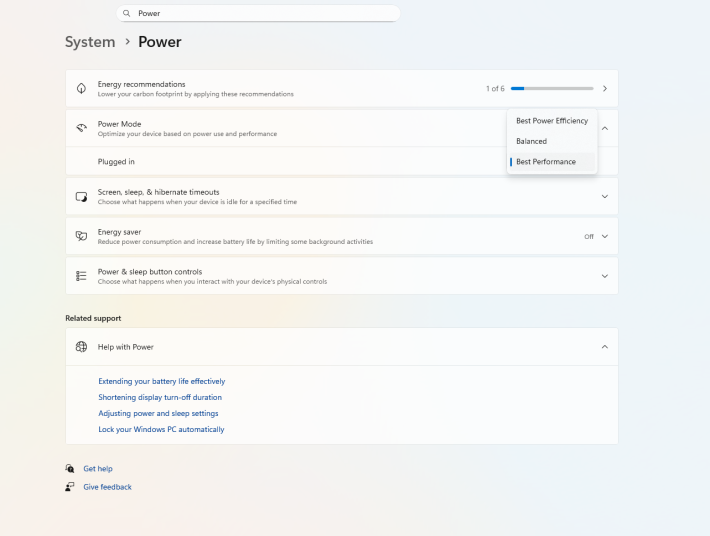
Setting your power options to High Performance can make the game run smoother. However, this will increase power consumption, so make sure you have a suitable charging setup.
[PS5] Contact the Manufacturer
If you can't find the cause, it could be due to issues like SSD degradation caused by heat buildup. Contact the manufacturer and arrange for repairs if necessary.
How to Fix Lag
Use a Wired Connection or Change Internet Plan
| Platform | Speed |
| PS5 / PC / Tablet / iPad / iOS / Android | 30 Mbps or higher *Ideally 70Mbps or higher |
There are free tools available online to check your internet speed, so use one to see if your connection is suitable for gaming. If your wireless connection is unstable, try using a wired connection for more stability. If it's still slow, you may need to consider changing your internet plan itself.
Related Arknights: Endfield Articles
Back to Top PageTier List
 Characters Tier List
 Reroll Tier List
 Best Weapons Tier List
Gacha Information
 Which Banner Should You Pull?
 Gacha Pity System & Rates
 Gacha Currency
 Basic Headhunting Permit
Recommended Articles
 Early Game Guide
 Redeem Codes List
 How to Add Friends
 Points of No Return
 Authority Level Guide
 Daily Tasks To Do
 Starter Banner Best Weapon
 How to Farm T-Creds
 How to Get Aketine
 How to Get 2 Stock Redistributors
 Depot Nodes Location
 How to Get Origeometry
 Monthly Pass Guide
 Trust & Operator Gift Guide
Events
  Umbral Monument Event Guide Umbral Monument Event Guide |  Survive the Gas Survive the Gas |  Unorthodox Tactics Unorthodox Tactics |
 Ballista and Axe Ballista and Axe |  Bolts and Shadows Bolts and Shadows |  Rampaging Shields Rampaging Shields |
 Rock Solid Rock Solid |  Supply: Exploration Day Supply: Exploration Day |
Things to Know Before Release
 Release Date Release Date |  How to Pre-Download How to Pre-Download |  PS5 Pre-Order Bundle PS5 Pre-Order Bundle |
 How to Link Account How to Link Account |  Is Cross-Play Available? Is Cross-Play Available? |  How to Reroll How to Reroll |
 Operator Class Guide Operator Class Guide |
 Combat System Guide
 How to Win Battles
 Dodge and Perfect Dodge
 Elemental Weakness Chart
 Arts Reactions / Physical Status
 Team Composition Tips
 Best Team Comps
 Potential
 Talents and Base Skills
 How to Craft Gear
 Best Food List
 Artificing and Stats Priority
 All Fast Travel Points
 Protocol Datalogger
 Aurylene
 Interactive Map
 Ferrium Ore Map Location











