

Metastorage Transfer is a type of Regional Transfer in Arknights: Endfield. Read on to learn how to use and unlock Metastorage, the best items to transfer, and additional info!
Table of Contents
What is Metastorage?
A Type of Regional Transfer


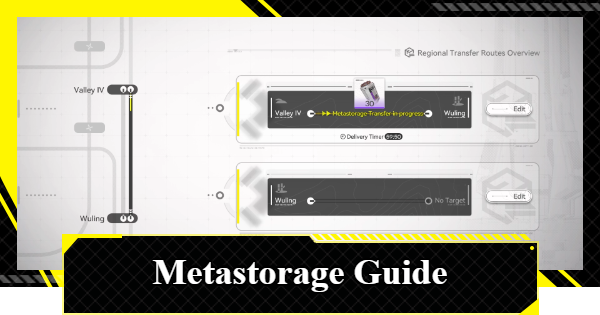
Metastorage Transfer is one of the two types of Regional Transfers that allows for automated relocation of your resources from one region to another, such as moving items from your Valley IV Depot to your Wuling Depot.
Metastorage and Stockpile Differences
| Metastorage Transfers | Stockpile Transfers |
|---|---|
|
|
Metastorage Transfers and Stockpile Transfers are almost the same. The only difference is that Metastorage Transfers do not require you to have the items in your depot.
Essentially, Metastorage Transfer creates items from nothing
before sending them to your destination region.
 Tips! Tips! | Because Metastorage Transfer doesn't take items from your local depot, you can even send items you don't own! As long as you have the item unlocked, you can use Metastorage Transfer to send it even if you have 0. |
|---|
How to Use Metastorage Transfer
Metastorage Transfer is accessed via the Regional Transfer option inside your PAC. From there, players can Edit the source region
, and then select the type of Regional Transfer, which items to move, and the destination region
.
Access Protocol Management

Head to your PAC and select the Protocol Management
option.
Select Regional Transfer

Select the Regional Transfer option from the bottom-right side of the screen.
Edit Regional Transfer Routes

Press on Edit on the right side of your source region
, the region where your goods will be coming from.
Switch to Metastorage

Switch to Metastorage if you already have it unlocked, as Stockpile is selected by default.
Choose Item to Transfer

Select an item that will be transferred using Metastorage Transfer. Note the TTV cost per item, as this limits the number of items that can be transferred per interval.
Wait for Transfer

Once everything has been set up, all that's left to do is wait for the transfer to finish. Regional Transfers are completed in 1-hour intervals, so it generally takes a long time to transfer large amounts of items between regions.
Best Items to Regional Transfer
Ferrium is considered to be the best item to transfer since Wuling doesn't have as many Ferrium Mineral Beds.
But in general, Batteries and Healing Items are always useful since new regions will have power issues in the beginning, and healing items allow for stable exploration.
Freely Transfer Items Aboard Dijiang
| Transfer All Controls: Hold CTRL + Left Click (PC) This fills up your bag with the selected item, and also deposits all items from your bag into the connected depot. |
If you don't have Metastorage unlocked yet, or when Stockpile Transfers are too slow, you can manually transfer items from one region to another while aboard the OMV Dijiang.
Simply open up your bag (B), and click the Switch Depot on top of the bag UI to swap between the regions.
| Tips! | While this requires manual input from the player, this version of manual transfer is faster than Regional Transfer. |
|---|
How to Unlock Metastorage
Reach Regional Development Lv. 12

Regional Transfers is unlocked at Regional Development Level 8, but the Metastorage Transfer feature is unlocked once your Regional Development Level reaches Lv. 12.
Note that reaching this level will be a lengthy process since there are limited sources of RDM (regional exp).
How to Raise Regional Development LevelRelated Arknights: Endfield Articles
Back to Top PageTier List
 Characters Tier List
 Reroll Tier List
 Best Weapons Tier List
Gacha Information
 Which Banner Should You Pull?
 Gacha Pity System & Rates
 Gacha Currency
 Basic Headhunting Permit
Recommended Articles
 Early Game Guide
 Redeem Codes List
 How to Add Friends
 Points of No Return
 Authority Level Guide
 Daily Tasks To Do
 Starter Banner Best Weapon
 How to Farm T-Creds
 How to Get Aketine
 How to Get 2 Stock Redistributors
 Depot Nodes Location
 How to Get Origeometry
 Monthly Pass Guide
 Trust & Operator Gift Guide
Events
 Umbral Monument Event Guide Umbral Monument Event Guide |  Survive the Gas Survive the Gas |  Unorthodox Tactics Unorthodox Tactics |
 Ballista and Axe Ballista and Axe |  Bolts and Shadows Bolts and Shadows |  Rampaging Shields Rampaging Shields |
 Rock Solid Rock Solid |  Supply: Exploration Day Supply: Exploration Day |
Things to Know Before Release
 Release Date Release Date |  How to Pre-Download How to Pre-Download |  PS5 Pre-Order Bundle PS5 Pre-Order Bundle |
 How to Link Account How to Link Account |  Is Cross-Play Available? Is Cross-Play Available? |  How to Reroll How to Reroll |
 Operator Class Guide Operator Class Guide |
 Combat System Guide
 How to Win Battles
 Dodge and Perfect Dodge
 Elemental Weakness Chart
 Arts Reactions / Physical Status
 Team Composition Tips
 Best Team Comps
 Potential
 Talents and Base Skills
 How to Craft Gear
 Best Food List
 Artificing and Stats Priority
 All Fast Travel Points
 Protocol Datalogger
 Aurylene
 Interactive Map
 Ferrium Ore Map Location











