

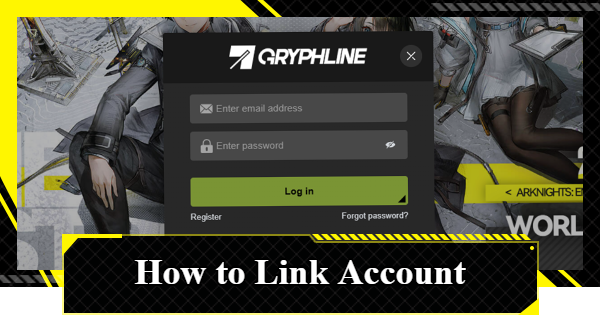
บทความนี้จะอธิบายวิธีเชื่อมต่อบัญชี Arknights: Endfield ของคุณกับ GRYPHLINE รวมถึงขั้นตอนการลงทะเบียนด้วยอีเมลและรายละเอียดสำคัญเกี่ยวกับการสำรองข้อมูลเกมของคุณ
วิธีสร้างบัญชี
การลงทะเบียนบัญชีผ่านสมาร์ทโฟน
| คู่มือการสร้างบัญชี |
| 1. เปิดเมนู ≡ บนเว็บไซต์ทางการ |
| 2. เลือก 'เข้าสู่ระบบ' (Login) จากเมนู |
| 3. สร้างบัญชีด้วยที่อยู่อีเมล |
เปิดเมนู ≡ บนเว็บไซต์ทางการ
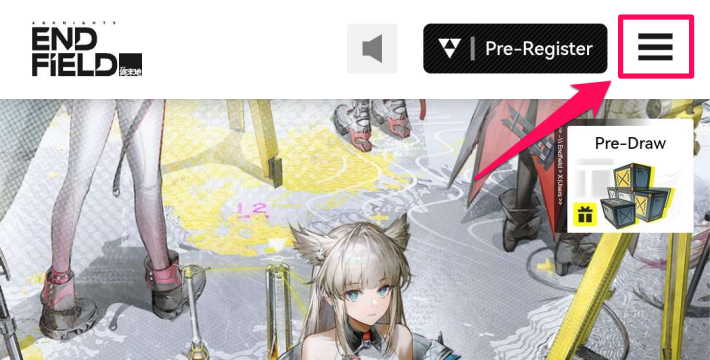
คุณสามารถสร้างบัญชี Arknights: Endfield ได้ผ่านเว็บไซต์ทางการ สำหรับเวอร์ชันมือถือ ให้เริ่มจากเปิด เมนูโดยการแตะที่ไอคอน '≡' ที่มุมขวาบน
เลือก 'เข้าสู่ระบบ' (Login) จากเมนู
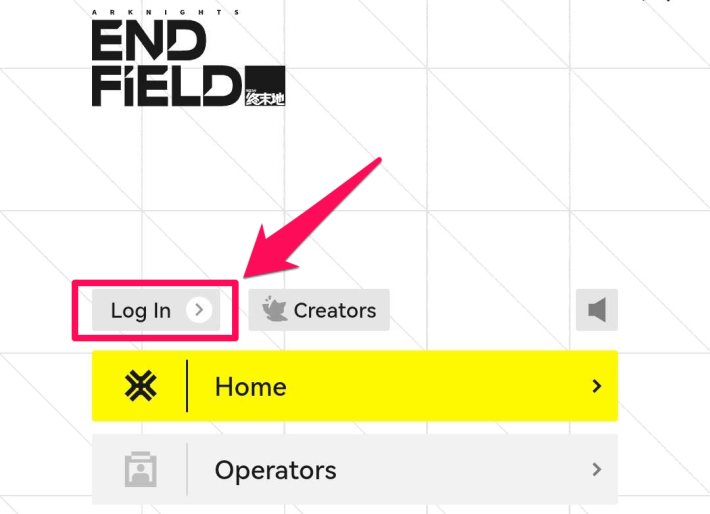
หากต้องการสร้างบัญชี ให้เลือก 'เข้าสู่ระบบ' (Log In) จากเมนูที่ปรากฏขึ้นหลังจากแตะไอคอน '≡'
สร้างบัญชีด้วยที่อยู่อีเมล
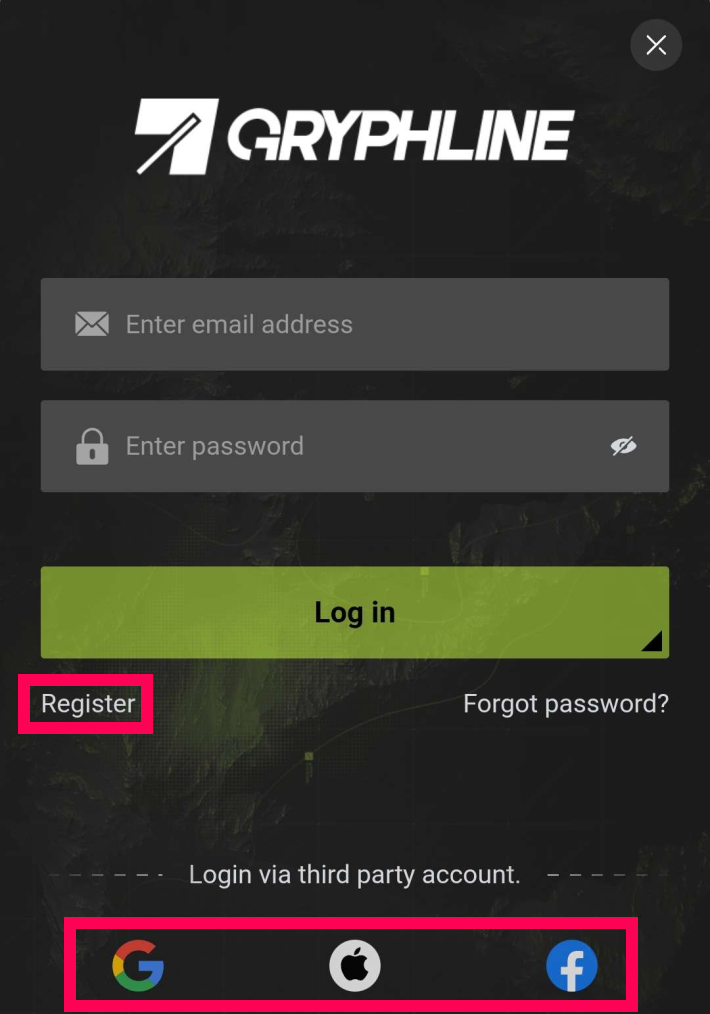
คุณสามารถสร้างบัญชี GRYPHLINE ได้จากหน้าจอการลงทะเบียนใหม่ นอกเหนือจากอีเมลแล้ว คุณยังสามารถสมัครใช้งานได้โดยการเชื่อมต่อกับบัญชี Google, Apple หรือ Facebook
การลงทะเบียนบัญชีผ่าน PC
| คู่มือการสร้างบัญชี |
| 1. เลือก 'บัญชี' (Account) จากเมนูทางด้านซ้าย |
| 2. สร้างบัญชีด้วยที่อยู่อีเมล |
เลือก 'บัญชี' (Account) จากเมนูทางด้านซ้าย
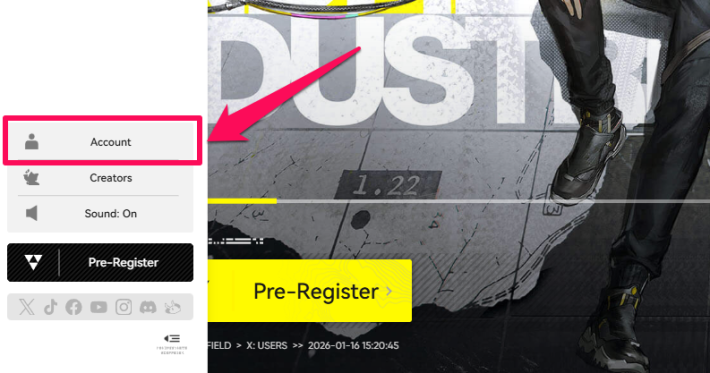
สำหรับ PC คุณสามารถสร้างบัญชีได้โดยการเลือก 'บัญชี' (Account) จากเมนูทางด้านซ้ายบนเว็บไซต์ทางการ
สร้างบัญชีด้วยที่อยู่อีเมล
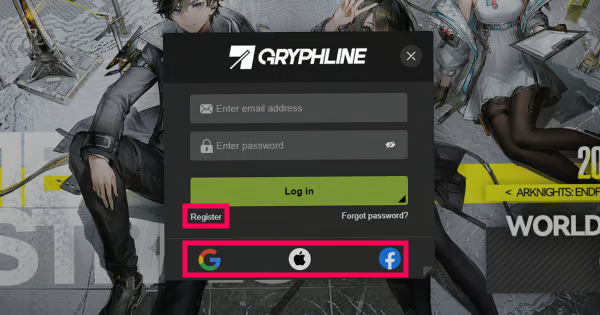
คุณสามารถลงทะเบียนบัญชี GRYPHLINE ได้จากหน้าจอการลงทะเบียนใหม่ นอกเหนือจากอีเมลแล้ว คุณยังสามารถเข้าสู่ระบบได้โดยการเชื่อมต่อกับบัญชี Google, Apple หรือ Facebook
วิธีเชื่อมต่อบัญชี
- เชื่อมต่อเมื่อสร้างบัญชี GRYPHLINE |
- เชื่อมต่อจากหน้าบัญชี |
เชื่อมต่อเมื่อสร้างบัญชี GRYPHLINE
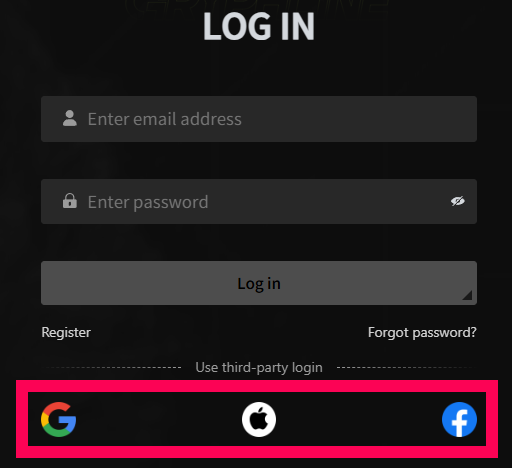
คลิกไอคอนของบริการภายนอก (เช่น บัญชี Google, Apple หรือ Facebook) บนหน้าจอเข้าสู่ระบบเพื่อเข้าสู่ระบบ บัญชี Gryphline จะถูกสร้างขึ้นโดยอัตโนมัติและเชื่อมต่อกับบริการที่เลือก
เชื่อมต่อจากหน้าบัญชี
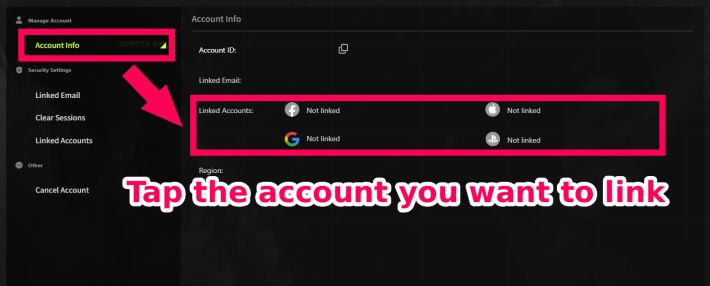
คุณยังสามารถเชื่อมต่อบัญชีบริการภายนอกกับบัญชี Gryphline ที่มีอยู่แล้วในภายหลังได้ หลังจากเข้าสู่ระบบแล้ว คุณสามารถเชื่อมต่อได้โดยการแตะไอคอนของแต่ละบริการในหน้าบัญชี
วิธีเชื่อมต่อและยกเลิกการเชื่อมต่อบัญชี PS5
จำเป็นต้องสำรองข้อมูลหรือไม่?
ไม่จำเป็นต้องสำรองข้อมูล
คุณไม่จำเป็นต้องสำรองข้อมูลด้วยตนเอง ข้อมูลบัญชีที่ลงทะเบียนไว้จะถูกเก็บไว้ในเซิร์ฟเวอร์ทางการ ดังนั้นคุณสามารถกลับเข้าสู่ระบบได้ทุกเมื่อตราบใดที่คุณยังจำที่อยู่อีเมลได้
วิธีเปลี่ยน / ลบข้อมูลบัญชี
เปลี่ยนหรือลบอีเมลของคุณบนเว็บไซต์ทางการ
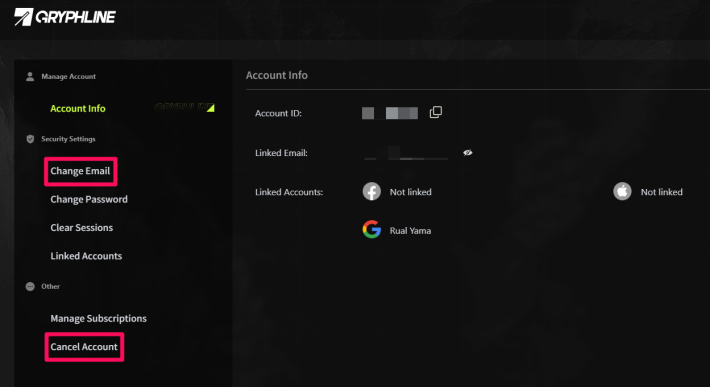
คุณสามารถเปลี่ยนที่อยู่อีเมลที่ลงทะเบียนไว้หรือลบบัญชีของคุณได้จากเว็บไซต์ทางการ เข้าไปที่หน้าบัญชีของคุณจากหน้าจอเข้าสู่ระบบเพื่ออัปเดตอีเมลหรือดำเนินการลบบัญชี



