

All available text and voice languages in Subnautica 2. See how to change your in-game language settings, change text size, and learn about future language support.
Table of Contents
Available Text and Voice Languages
Currently Supports 11 Text Languages
| Available Text Languages | ||
|---|---|---|
| English | Spanish | French |
| Italian | Japanese | Korean |
| Portuguese | Russian | Ukrainian |
| Chinese | German | |
Subnautica 2 currently includes full text and subtitle support for 11 languages. At the moment, you can only change the text language, and the developers have not announced any plans for additional text language support during Early Access.
Latest News and UpdatesOnly English Voice Language Available
As of the current Early Access build, English is the only available voice language for character dialogue, PDA narration, and voice logs. There are currently no official announcements regarding additional voiceover languages.
Voiceovers Likely to Remain English-Only
Subnautica 2 will likely continue using English-only voice acting through full release, similar to previous entries in the series. Both earlier games only supported English voiceovers, and there is currently no in-game setting to change spoken audio language.
How to Change In-Game Language
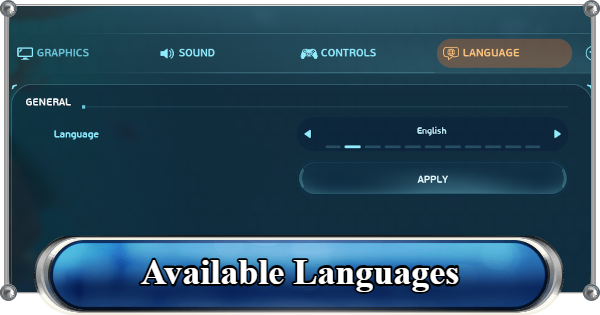
- Open Settings From the Title Screen
- Go to the Language Tab
- Select Your Preferred Language
- Click "Apply" to Save Changes
Open Settings From the Title Screen


From the Title Screen, open the Settings menu.
Go to the Language Tab

At the top of the Settings menu, select the "Language" tab.
Select Your Preferred Language

Use the arrow buttons beside the language option to cycle through all available languages. Keep in mind that this setting only changes text and subtitles.
Click "Apply" to Save Changes

After selecting your preferred language, click the "Apply" button to confirm the changes.
You Can Also Adjust Text Size

If the default font size feels too small, you can also increase the text size through the Accessibility tab. Open Accessibility, find the Text Scale option, then choose between Normal and Large depending on your preference.
Future Language Support
More Text Languages May Arrive Soon
Although the current version supports 11 text languages, the Subnautica series has historically expanded language support over time. Previous titles eventually added more than 20 text language options through later updates and post-launch improvements.
Early Access Overview and Update RoadmapPrevious Voiceovers Were English-Only
Looking back at previous installments such as the original Subnautica and Subnautica: Below Zero, developer Unknown Worlds has consistently kept character voices, PDA narration, and dialogue exclusive to English audio. Other voiceover language options were never officially added in past releases.
Related Articles
Recommended Guides
 Walkthrough (Early to Late-Game) Walkthrough (Early to Late-Game) |  Where to Go and What to Do Next Where to Go and What to Do Next |  Tadpole Pens: How to Open the Locked Door Tadpole Pens: How to Open the Locked Door |
 Plant Farming Guide Plant Farming Guide |  Cooking and Recipes Guide Cooking and Recipes Guide |  Best Biomods Best Biomods |
 Best Tadpole Upgrades Best Tadpole Upgrades |  Metal Farm Guide Metal Farm Guide |
| Progression & Priorities | ||
|---|---|---|
 Early Game Early Game |  Mid-Game Mid-Game |  Endgame Endgame |
Lists
 All Leviathans All Leviathans |  All Items List All Items List |  Biomes & PoI List Biomes & PoI List |
 Blackbox List Blackbox List |  Recipe Data Cards (Blueprints) Recipe Data Cards (Blueprints) |  Vehicle List Vehicle List |
 Buildings & Facilities List Buildings & Facilities List |  Best Base Locations Best Base Locations |  Best Tools to Craft Best Tools to Craft |
 Salt
Salt Silver
 Copper
 Lead
Lead Lucifer Rotsac
 Conduit Crystals
 Creature Enamel
 Enameled Glass
 Troilite
 Celestine
 Multiplayer Guide
 How to Eat Food (Digestion)
 How to Craft Items
 Drinking Water Guide
 How to Craft Air Tank?
 How to Get Basic Fins
 Scanner Station Guide
 How to Manage Your Oxygen?
 Base Guide
 Alien Ruins
 How to Use Coordinates
 Tadpole Guide
 How to Get More Storage
 How to Get a Rebreather
 Bioscanner Guide
 Night Survival Guide
 How to Heal
 Angel Comb Guide
 How to Power Your Base
 How to Recharge Batteries and Tools
 How to Get the Repair Tool
 World Tree Guide
 Flashlight Guide
 Strong Acid Guide
 How to Get Heat Tolerance
 Scanner Guide
 How to Get Tadpole Depth Module Mk. 2
 How to Get a Wakemaker
 How to Get Fibrous Pulp
 How to Get a Wiring Kit
 How to Get Advanced Wiring Kit
 How to Get the Entangled Power Cell
 How to Refund Bases
 Specs Requirements
 New Game Features
 Is There Crossplay?
 Supported Devices
 Update & Roadmap
 How Long to Beat?
 Can You Play Subnautica 2 on PS5 and PS4?
 Is Subnautica 2 on Xbox?
 Is Subnautica 2 on Steam?
 Is Subnautica 2 on Switch?










