

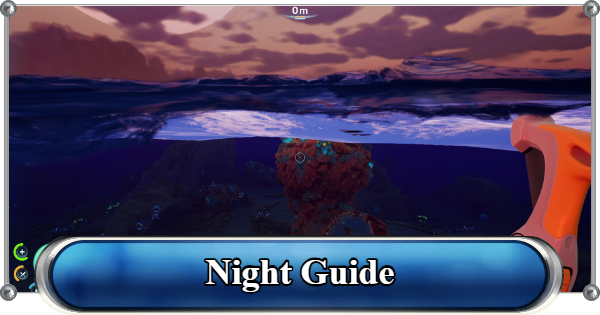
Night guide for Subnautica 2. Read on what to do at night, how to survive nighttime exploration, how to keep your base powered overnight, night cycle, tips, and more in this guide.
Table of Contents
Subnautica 2 Night Cycle
Day and Night System


When the sun sets, underwater visibility drops significantly, making exploration more challenging and increasing the danger of unexpected encounters with hostile creatures.
Full Day Cycle
| Daylight Phase | Approximately 16 Minutes |
|---|---|
| Night Phase | Approximately 8 Minutes |
A full day-night cycle in Subnautica 2 lasts approximately 24 real-time minutes.
How to Change and Skip TimeNighttime Difference

During this period, visibility is greatly reduced, making exploration more dangerous, and increasing the likelihood of getting lost or encountering predators unexpectedly.
Limited Visibility
Players can continue gathering resources, constructing bases, and exploring during the Night Cycle. However, reduced visibility makes preparation and the use of light sources important for safe nighttime exploration.
No Penalties or Special Mechanics

The increased danger comes primarily from the player's limited visibility and situational awareness, not from known changes in enemy behavior.
Cannot Skip Nighttime

Beds cannot be used to sleep or advance time, although you can craft and interact with them. There is currently no way to skip the Night Cycle, so players must either continue exploring in the dark or wait for daylight to return naturally.
Subnautica 2 Night Survival
How to Survive Night Exploration
Bring a Reliable Light Source
Flashlight
| Flashlight | Recipe |
|---|---|
 |  |
The Flashlight is the most basic portable light source and can be crafted early in the game. It is powered by a battery, which must be replaced when depleted.
See How to Change BatteriesHow to Change Batteries
- Press R.
- Right-click to unload the current battery.
- Press R again.
- Left-click to insert a replacement battery from your inventory.
Wakemaker
| Wakemaker | Recipe |
|---|---|
 |  |
In addition to improving mobility, the Wakemaker includes a built-in flashlight that helps illuminate dark areas. Using the light may consume battery power more quickly, so carrying spare batteries is recommended.
Vehicles
| Tadpole | Recipe |
|---|---|
 |  |
Vehicles are among the most reliable light sources. The Tadpole, the starter vehicle that can be obtained early in the game, is equipped with bright headlights that provide excellent visibility for navigating dark biomes and locating resources after sunset.
Secure a Safe Location
Head Back to the Lifepod

If visibility becomes too limited or you run low on oxygen, power, or supplies, returning to a safe location allows you to avoid unnecessary risks. Your Lifepod serves as your first shelter, providing oxygen, storage, and crafting access early in the game.
Create a Base

Creating a base is one of the best ways to prepare for the night. It serves as a safe shelter where you can replenish oxygen, store resources, and craft equipment until daylight returns.
▼ See Night BaseGather Resources Near Shelter
Staying close to your base or Lifepod while gathering materials makes nighttime exploration safer, since you can quickly replenish oxygen and retreat to safety when needed.
Best Base LocationsPlace Beacons

Beacons are especially useful at night because their HUD markers remain visible even in complete darkness, helping you navigate safely when landmarks are difficult to see.
No Traditional Map System

Without a map, it is easier to lose your sense of direction in the dark. Navigation is designed around exploring the environment using the HUD or PDA for direction rather than relying on a map screen.
How to Show and Use CoordinatesCraft Batteries and Power Cells

Carrying spare Batteries for handheld equipment and Power Cells for vehicles ensures that your Flashlight, Wakemaker, and Tadpole remain operational throughout your nighttime exploration.
| Note! | Keep an eye on the remaining charge of your vehicles and flashlight before they run out completely to avoid being stranded in the dark. |
|---|
Stay Near Shallow Waters if Possible
Shallow waters are generally safer to explore at night because they are closer to the surface and your Lifepod.
| Note! | Since visibility is already low in deep biomes, darkness makes navigation and threat detection even more difficult. |
|---|
Bioluminescent Flora and Fauna
These areas also tend to have fewer dangerous creatures and better visibility due to the glowing flora found here compared to deeper biomes, reducing the risks of nighttime exploration.
| Note! | Use light sources, audio cues, and careful movement to avoid being caught off guard by sudden encounters. |
|---|
Natural Lighting from Moonlight
Moonlight also helps improve visibility at night, making it slightly easier to navigate the ocean compared to completely dark areas. While it does not fully illuminate the environment, it can help you spot nearby terrain, resources, and movement more clearly in open waters.
Be Careful in Unknown Waters at Night
Exploring deep, unfamiliar waters becomes dangerous at night, as unknown creatures may be lurking nearby. Encounters with territorial leviathans can increase the risk of taking damage during an engagement.
Leviathans GuideSubnautica 2 Night Base
How to Power Your Base at Night
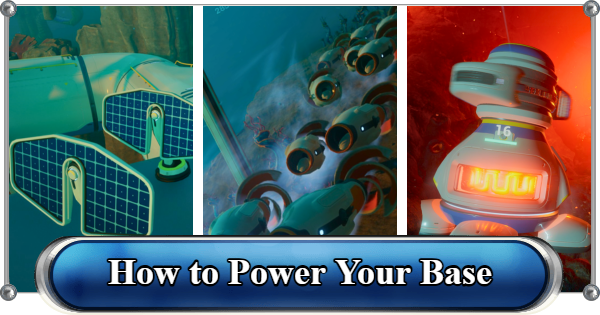
Set up a basic power source to keep your base operational. Without power, important systems like oxygen generation and crafting will not function.
Base BuildingPower Source List
| Equipment | Details |
|---|---|
| Solar Panel | Generates power using sunlight and is most effective during daytime. Energy is stored for nighttime use, making it a reliable early-game power source for surface or shallow bases. |
| Hydroelectric Turbine | Generates energy from water movement, providing a steady and passive power source. Works best in flowing water areas and helps supplement other generators during both day and night. |
| Thermal Plant | Converts geothermal heat into electricity, offering consistent and high-output power. Ideal for deeper bases near volcanic activity or thermal vents where sunlight is unavailable. |
| Power Transmitter | Transfers energy wirelessly between structures, allowing players to extend power from distant generators to their main base. Useful for optimizing base layouts and connecting multiple power sources efficiently. |
Combining multiple power sources keeps your base stable and functional throughout the night, while also providing backup energy if one source becomes less effective or depleted.
Use Old Outposts to Support Your Base
Old outposts can be repurposed as support stations for your main base, serving as storage, recharge points, or emergency shelters during nighttime exploration.
| Note! | There is no confirmed limit to how many bases you can build, as long as you have the required resources. |
|---|
Install Spotlights Around the Base

Spotlights and Exterior Wall Lights are especially useful when placed at key points such as entrances, docking areas, and resource storage zones.
Light Up Dark Areas
By covering multiple angles around your base, you can reduce blind spots and better detect movement in the water.
Related Articles
Recommended Guides
 Walkthrough (Early to Late-Game) Walkthrough (Early to Late-Game) |  Where to Go and What to Do Next Where to Go and What to Do Next |  Tadpole Pens: How to Open the Locked Door Tadpole Pens: How to Open the Locked Door |
 Plant Farming Guide Plant Farming Guide |  Cooking and Recipes Guide Cooking and Recipes Guide |  Best Biomods Best Biomods |
 Best Tadpole Upgrades Best Tadpole Upgrades |  Metal Farm Guide Metal Farm Guide |
| Progression & Priorities | ||
|---|---|---|
 Early Game Early Game |  Mid-Game Mid-Game |  Endgame Endgame |
Lists
 All Leviathans All Leviathans |  All Items List All Items List |  Biomes & PoI List Biomes & PoI List |
 Blackbox List Blackbox List |  Recipe Data Cards (Blueprints) Recipe Data Cards (Blueprints) |  Vehicle List Vehicle List |
 Buildings & Facilities List Buildings & Facilities List |  Best Base Locations Best Base Locations |  Best Tools to Craft Best Tools to Craft |
 Salt
Salt Silver
 Copper
 Lead
Lead Lucifer Rotsac
 Conduit Crystals
 Creature Enamel
 Enameled Glass
 Troilite
 Celestine
 Multiplayer Guide
 How to Eat Food (Digestion)
 How to Craft Items
 Drinking Water Guide
 How to Craft Air Tank?
 How to Get Basic Fins
 Scanner Station Guide
 How to Manage Your Oxygen?
 Base Guide
 Alien Ruins
 How to Use Coordinates
 Tadpole Guide
 How to Get More Storage
 How to Get a Rebreather
 Bioscanner Guide
 How to Heal
 Angel Comb Guide
 How to Power Your Base
 How to Recharge Batteries and Tools
 How to Get the Repair Tool
 World Tree Guide
 Flashlight Guide
 Strong Acid Guide
 How to Get Heat Tolerance
 Scanner Guide
 How to Get Tadpole Depth Module Mk. 2
 How to Get a Wakemaker
 How to Get Fibrous Pulp
 How to Get a Wiring Kit
 How to Get Advanced Wiring Kit
 How to Get the Entangled Power Cell
 How to Refund Bases
 Specs Requirements
 New Game Features
 Is There Crossplay?
 Supported Devices
 Update & Roadmap
 How Long to Beat?
 Can You Play Subnautica 2 on PS5 and PS4?
 Is Subnautica 2 on Xbox?
 Is Subnautica 2 on Steam?
 Is Subnautica 2 on Switch?










