

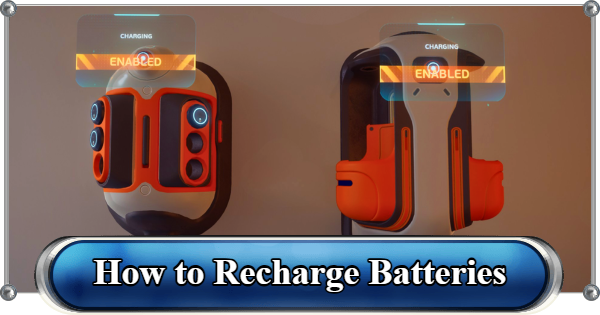
Learn how to recharge batteries and tools in Subnautica 2, where to find the Battery Terminal blueprint, how to craft it, and how to manage your Power Cells.
Table of Contents
How to Swap Batteries in the Field


Every tool you craft comes with a fully charged battery pre-installed. When it runs dry, you do not need to craft a new tool. You can swap the battery out directly.
To swap a battery, equip the tool on your hotbar and press R on PC or Up (D-pad) on controller to open the reload menu. From here you can:
Replace: select a charged battery from your inventory to slot in.
Unload: remove the current battery without replacing it. It goes straight into your inventory.
| Tip! | If you run out of battery mid-dive, you can use the battery from another tool you do not currently need. Unload the dead battery, then unload the charged one from a less critical tool like a Flashlight, then slot it into the tool you need. |
|---|
How to Unlock the Battery Terminal

The Battery Terminal blueprint requires scanning two Battery Terminal fragments. The most reliable location is the Old Habitat, approximately 380 meters north of the Lifepod.
| Location |
|---|
 Fragment 1 Fragment 1Inside the Old Habitat. Enter the northeast wing, find the long corridor connecting the two hab structures, and look to the wall on the right. The Battery Terminal is on the wall framed by yellow tubes. |
 Fragment 2 Fragment 2Also inside the Old Habitat. Swim up the ladder opposite the connecting tube and search the wall to the west-northwest. It is near the Quaker Blackbox signal. |
How to Craft a Battery Terminal

| BatteryTerminal Recipe | Tool |
|---|---|
| x2 Titanium x2 Quartz x1 Copper Wire | Habitat Builder |
Build the Battery Terminal on an interior wall of your base using the Habitat Builder. It's best to place it near the hatch or entryways.
How to Recharge Batteries

The Battery Terminal holds up to six batteries at once. Interact with it and place your depleted batteries to be charged.
| Tip! | The Battery Terminal consumes 1 energy per second per battery being charged. Six batteries at once draws 6 energy per second from your grid. Make sure your base power can support the load. |
|---|
How to Craft a Power Cell Terminal

| Power Cell Terminal Recipe | Tool |
|---|---|
| x3 Titanium x3 Copper x1 Wiring Kit | Habitat Builder |
Similar to the Battery Terminal, you can construct a Power Cell Terminal using a Habitat Builder. The best placement for a Power Cell Terminal is near Moonpools.
How to Recharge Power Cells

The Tadpole uses Power Cells rather than standard batteries. To remove one, go to the top of the Tadpole and interact with the Power Cell socket.
Recharge Power Cells using the Power Cell Terminal, a separate facility from the Battery Terminal. Each Power Cell takes 10 minutes to fully charge.
Battery and Power Cell Recipes

If you need to craft extra batteries or power cells from scratch, here are the recipes.
| Item | Ingredients | Station |
|---|---|---|
| Basic Battery | x2 Copper x1 Acidic Raion Pouch | Fabricator |
| Power Cell | x2 Basic Battery x1 Strong Acid x2 Salt | Fabricator |
| Notice! | Subnautica 2 is in Early Access. Battery and Power Cell Terminals' function and charging times may change in future updates. |
|---|
Related Articles
Recommended Guides
 Walkthrough (Early to Late-Game) Walkthrough (Early to Late-Game) |  Where to Go and What to Do Next Where to Go and What to Do Next |  Tadpole Pens: How to Open the Locked Door Tadpole Pens: How to Open the Locked Door |
 Plant Farming Guide Plant Farming Guide |  Cooking and Recipes Guide Cooking and Recipes Guide |  Best Biomods Best Biomods |
 Best Tadpole Upgrades Best Tadpole Upgrades |  Metal Farm Guide Metal Farm Guide |
| Progression & Priorities | ||
|---|---|---|
 Early Game Early Game |  Mid-Game Mid-Game |  Endgame Endgame |
Lists
 All Leviathans All Leviathans |  All Items List All Items List |  Biomes & PoI List Biomes & PoI List |
 Blackbox List Blackbox List |  Recipe Data Cards (Blueprints) Recipe Data Cards (Blueprints) |  Vehicle List Vehicle List |
 Buildings & Facilities List Buildings & Facilities List |  Best Base Locations Best Base Locations |  Best Tools to Craft Best Tools to Craft |
 Salt
Salt Silver
 Copper
 Lead
Lead Lucifer Rotsac
 Conduit Crystals
 Creature Enamel
 Enameled Glass
 Troilite
 Celestine
 Multiplayer Guide
 How to Eat Food (Digestion)
 How to Craft Items
 Drinking Water Guide
 How to Craft Air Tank?
 How to Get Basic Fins
 Scanner Station Guide
 How to Manage Your Oxygen?
 Base Guide
 Alien Ruins
 How to Use Coordinates
 Tadpole Guide
 How to Get More Storage
 How to Get a Rebreather
 Bioscanner Guide
 Night Survival Guide
 How to Heal
 Angel Comb Guide
 How to Power Your Base
 How to Get the Repair Tool
 World Tree Guide
 Flashlight Guide
 Strong Acid Guide
 How to Get Heat Tolerance
 Scanner Guide
 How to Get Tadpole Depth Module Mk. 2
 How to Get a Wakemaker
 How to Get Fibrous Pulp
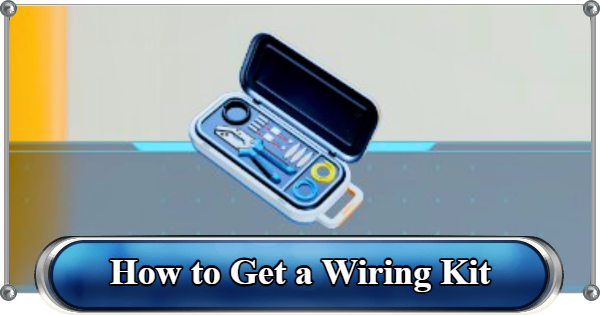 How to Get a Wiring Kit
 How to Get Advanced Wiring Kit
 How to Get the Entangled Power Cell
 How to Refund Bases
 Specs Requirements
 New Game Features
 Is There Crossplay?
 Supported Devices
 Update & Roadmap
 How Long to Beat?
 Can You Play Subnautica 2 on PS5 and PS4?
 Is Subnautica 2 on Xbox?
 Is Subnautica 2 on Steam?
 Is Subnautica 2 on Switch?










