

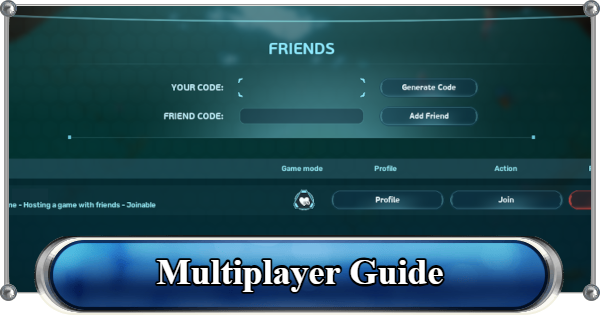
Multiplayer guide in Subnautica 2. See how to host a game, how to add friends, invite friends, and how to join a hosted session, and notes about limits of multiplayer sessions.
Table of Contents
How to Add Friends
Add Friends via Friend Code


In Subnautica 2, you can use the in-game Friends List to add players through Friend Codes for multiplayer.
| Note! | If you are already friends on Steam, they will automatically appear in your in-game Friends List without needing a Friend Code. |
|---|
- Click "Join Friends"
- Enter the Friend Code and Add Friend
- Wait for the Friend Request to Be Accepted

From the home screen, click "Join Friends" to open the Friends List.
In the Friends List, enter the Friend Code, then click "Add Friend."
Once the other player accepts your request, they will appear in your Friends List.
How to Host a Game (Invite Friends)
- Click "Host Multiplayer"
- Select a Game Mode
- Open the Friends List from the In-game Menu
- Invite Your Friend

From the home screen, click "Host Multiplayer."
Choose between Survival Mode and Creative Mode.

Once in-game, open the menu and select Friends List.

Find the friend you want to invite and click the "Invite" button beside their name.
How to Join a Hosted Game
- Return to the Title Screen (If Currently In-game)
- Click "Join Friends"
- Click "Join" Beside the Host Name
After receiving a multiplayer invitation, return to the Title Screen.
| Note! | The Friends List does not appear in the menu during Single Player mode. You must return to the Title Screen to join another player's session. |
|---|
Click "Join Friends" to access the Friends List.
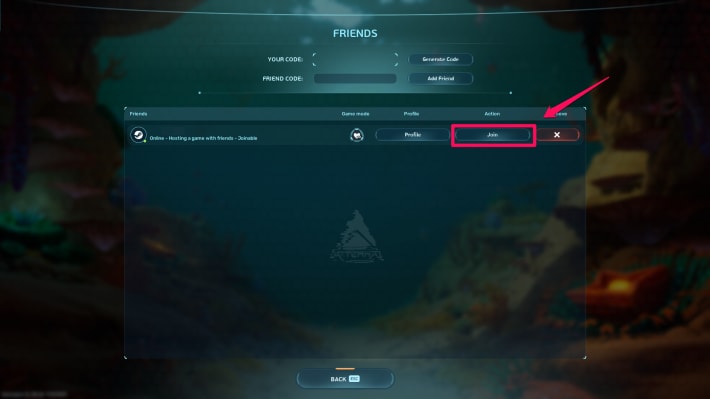
Click "Join" beside the host you want to play with.
Notes on Multiplayer Sessions
Maximum of 4 Players per Session

Subnautica 2 supports multiplayer sessions with up to 4 players. Since the game supports cross-play, you can seamlessly play with friends on different platforms.
Supported Devices & PlatformsConvert Single-player Worlds to Multiplayer
Subnautica 2 is designed to be fully playable solo, so multiplayer is entirely optional. You can freely convert your single-player world into a multiplayer session at any time and switch it back to single-player whenever you want.
Cross-Save Progress Between Players
A unique feature in Subnautica 2 is the ability to share world progress between players. During multiplayer sessions, the host can upload the world save data to the cloud, allowing other players to download the same save and continue the adventure even while the original host is offline.
Related Articles
Recommended Guides
 Walkthrough (Early to Late-Game) Walkthrough (Early to Late-Game) |  Where to Go and What to Do Next Where to Go and What to Do Next |  Tadpole Pens: How to Open the Locked Door Tadpole Pens: How to Open the Locked Door |
 Plant Farming Guide Plant Farming Guide |  Cooking and Recipes Guide Cooking and Recipes Guide |  Best Biomods Best Biomods |
 Best Tadpole Upgrades Best Tadpole Upgrades |  Metal Farm Guide Metal Farm Guide |
| Progression & Priorities | ||
|---|---|---|
 Early Game Early Game |  Mid-Game Mid-Game |  Endgame Endgame |
Lists
 All Leviathans All Leviathans |  All Items List All Items List |  Biomes & PoI List Biomes & PoI List |
 Blackbox List Blackbox List |  Recipe Data Cards (Blueprints) Recipe Data Cards (Blueprints) |  Vehicle List Vehicle List |
 Buildings & Facilities List Buildings & Facilities List |  Best Base Locations Best Base Locations |  Best Tools to Craft Best Tools to Craft |
 Salt
Salt Silver
 Copper
 Lead
Lead Lucifer Rotsac
 Conduit Crystals
 Creature Enamel
 Enameled Glass
 Troilite
 Celestine
 How to Eat Food (Digestion)
 How to Craft Items
 Drinking Water Guide
 How to Craft Air Tank?
 How to Get Basic Fins
 Scanner Station Guide
 How to Manage Your Oxygen?
 Base Guide
 Alien Ruins
 How to Use Coordinates
 Tadpole Guide
 How to Get More Storage
 How to Get a Rebreather
 Bioscanner Guide
 Night Survival Guide
 How to Heal
 Angel Comb Guide
 How to Power Your Base
 How to Recharge Batteries and Tools
 How to Get the Repair Tool
 World Tree Guide
 Flashlight Guide
 Strong Acid Guide
 How to Get Heat Tolerance
 Scanner Guide
 How to Get Tadpole Depth Module Mk. 2
 How to Get a Wakemaker
 How to Get Fibrous Pulp
 How to Get a Wiring Kit
 How to Get Advanced Wiring Kit
 How to Get the Entangled Power Cell
 How to Refund Bases
 Specs Requirements
 New Game Features
 Is There Crossplay?
 Supported Devices
 Update & Roadmap
 How Long to Beat?
 Can You Play Subnautica 2 on PS5 and PS4?
 Is Subnautica 2 on Xbox?
 Is Subnautica 2 on Steam?
 Is Subnautica 2 on Switch?










