
Main Menu
Article Menu
Tier List
Banners and Codes
Featured Articles
Activities / Resources
Pets
Boss Strategy Guide
TwigoAlbion
BanakroCorrupted Guardian Golem
Draco King DrakeMolbog
Red DemonGray Demon
Corrupted Warden OrgotScorpy Beast
Guila (Boss)Corrupted Ancient Dragon
Beginner Tips
Story Quest Guide
Main Story Walkthrough
Act 1Act 2
Act 3Act 4
Act 5Act 6
Act 7Act 8
Act 9Act 10
Act 11Act 12
Map Guides
Materials
Characters
Weapons
Items
5-Star Characters
ElaineGuila
JerichoKing
DianeDrake
MannieMeliodas
4-Star Characters
TristanTioreh
SlaterGilthunder
HowzerDredrin
BugDreyfus
HendricksonGriamore
Settings and Others

Interactive Map Guide

Last Updated:
7DS Origin | Interactive Map Guide | The Seven Deadly Sins: Origin - GameWith

This is an Interactive Map for The Seven Deadly Sins: Origin (7DS: Origin). It includes all items, Star Fragments locations, treasure chests, waypoints and viewpoints.

Interactive Map Guide

Table Of Contents

Interactive Map

All Items Interactive Map

※Data is currently being updated.

Click on the icon to see a photo or tips to find the item!

How To Open Map

Tap Mini-Map On The Screen
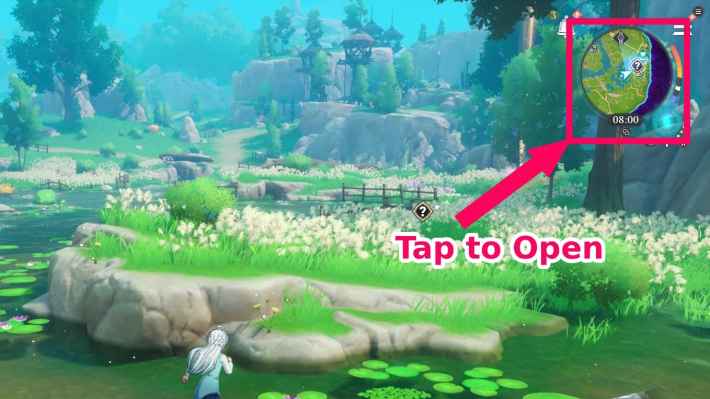
Tap the Mini-Map On The Screen To Open
PS5Touch Pad Button
PCM or Alt + Left Click with Mouse

The map can be opened by tapping the mini-map located in the top right of the field screen. For PS5, use the touch pad button. For the PC version, press the 'M' key, or hold the 'Alt' key and click the icon with your mouse cursor.

Fast Travel To Unlocked Waypoints
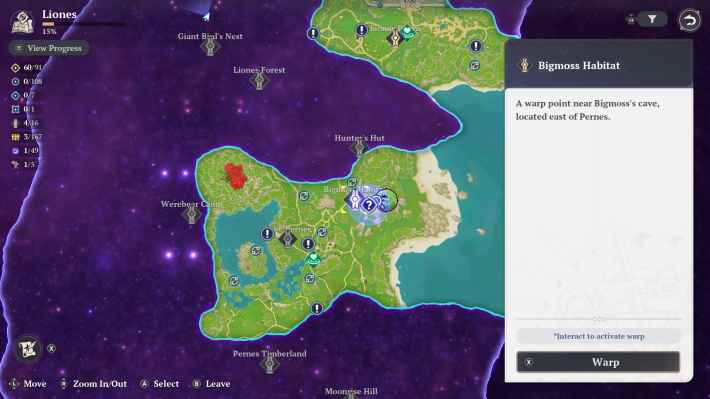
Fast Travel is Available To Unlocked Waypoints

You can warp (fast travel) to any unlocked Waypoint by selecting it on the map. Warping is not available for grayed-out Waypoints that have not yet been unlocked, so be sure to visit the location at least once to activate it.

Heal at Nearby Goddess Statues

Heal at Nearby Goddess Statues

You can restore your characters' HP by approaching a Goddess Statue. It is highly recommended to stop by Waypoints near a Goddess Statue before heading into battle.

Place Custom Markers
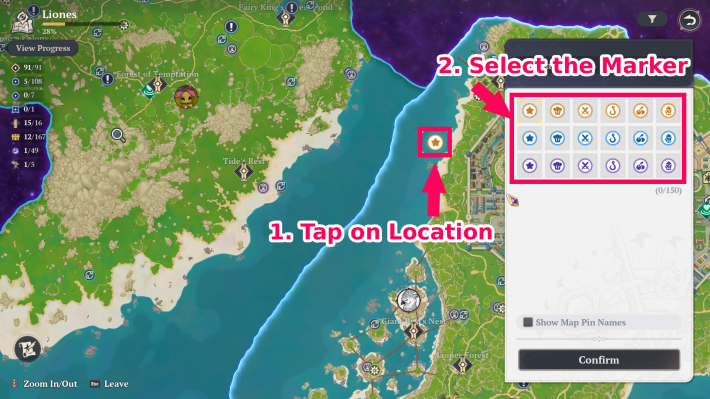
Custom Markers can be Placed on the Map

By tapping a specific location on the map, you can place a custom marker to serve as a landmark. It’s useful for keeping track of things like Star Fragments you found but couldn't collect yet, or locations you want to visit again.

Related Articles
7DSO - Back to Top
Have some feedback? Click here

Your feedbacks will be checked by our staffs and will be attended to accordingly. Please be advised that we may not reply to every individual feedbacks.


Article Written by
7DS Origin Strategy Team

7DS Origin Strategy Team

Reader Comments
Max. 300 Characters

By clicking Submit you are agreeing to the Terms of Use.
*Offensive, insulting or inappropriate use of forum may lead to ban/restriction.
To avoid griefing, you will not be able to post or report for the first %d hours upon visiting this forum for the first time.

Close
WaifuLover 3

falta uns 30 baus, 4 mirantes e 7 estrelas. arrumem isso por favor

anonim 2

Скорей-бы доделали, нигде ещё полной карты нету

Alyss 1

The map isn't 100% accurate

Copyright Notice

ⒸNS,K/TSDSRP,M ⒸNS,K/TSDSDJP,TX ⒸNS,K/TSDSFKAP ©Netmarble Corp. & Netmarble F&C Inc.
The copyrights, trademarks, and other intellectual property rights of the game images used on this website belong to the respective content providers. All content information within the articles is created by the GameWith strategy team.








