
All Codes for Seven Deadly Sins Origin (7DOS). This guide includes all available coupon codes, code rewards, code duration, how to redeem codes, and more about redemption codes.
Table of Contents
Coupon Code List
Livestream Coupon Codes
| Code/Period | Rewards |
|---|---|
LIONSINISBACK Until June 3, 2026 | - Elite Fine Trophies Chance Bundle x5 |
ESCANORINORIGIN Until June 3, 2026 | - Special Enhancement Stone x30 |
Available Coupon Codes
* Tap the green button to copy the code
| Code/Period | Rewards |
|---|---|
WELCOMEORIGIN To be announced separately | - Regular Hero Draw Ticket x5 - Highest Grade Mastery EXP x10 - Enhancement Stone (Highest Grade) x10 - Refinement Stone (Highest Grade) x10 - Gold x50,000 |
ORIGINX Until April 30, 2026, 15:00 (UTC) | - Regular Hero Draw Ticket x1 - Gold x50,000 |
ORIGINSTEAM Until April 30, 2026, 15:00 (UTC) | - Regular Hero Draw Ticket x1 - Mastery EXP (High Grade) x10 |
ORIGINDISCORD Until April 30, 2026, 15:00 (UTC) | - Regular Hero Draw Ticket x1 - Small Cube Key Bundle x 3 |
The coupon codes for 7DSO are "WELCOMEORIGIN", "ORIGINX", "ORIGINSTEAM", and "ORIGINDISCORD".
How to Redeem on Smartphone/PS5
Step-By-Step Guide
| 1 | Open Settings on the Left Side of the Menu |
|---|---|
| 2 | Check Your PID |
| 3 | Select Redeem Coupon & Enter the Code |
1. Open Settings on the Left Side of the Menu

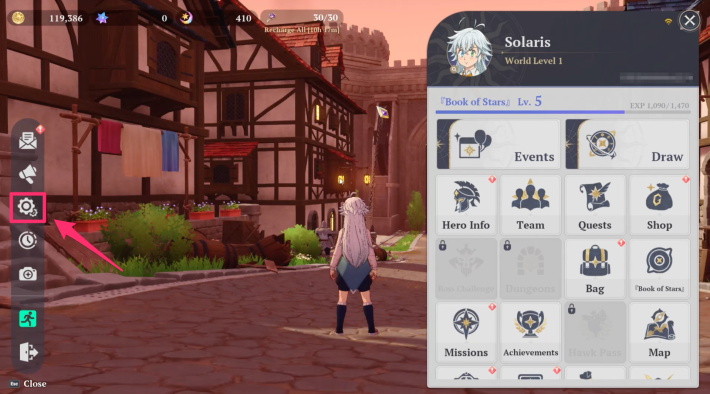
Open the menu in the game, then select the gear icon to open the Settings.
2. Check Your PID
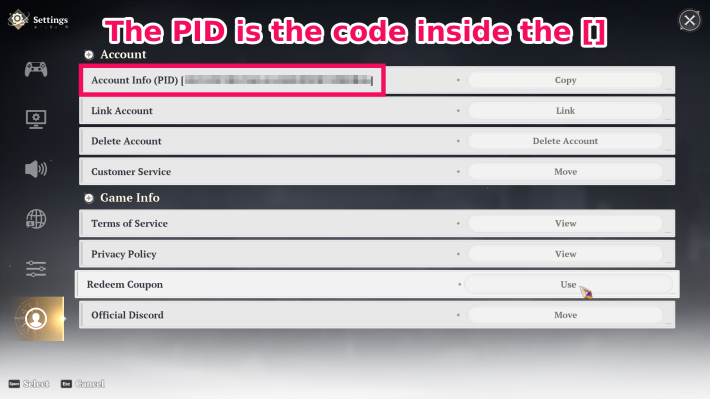
You can check your Player ID information in the Account section at the bottom left of the Settings screen.
3. Go to the Official Website
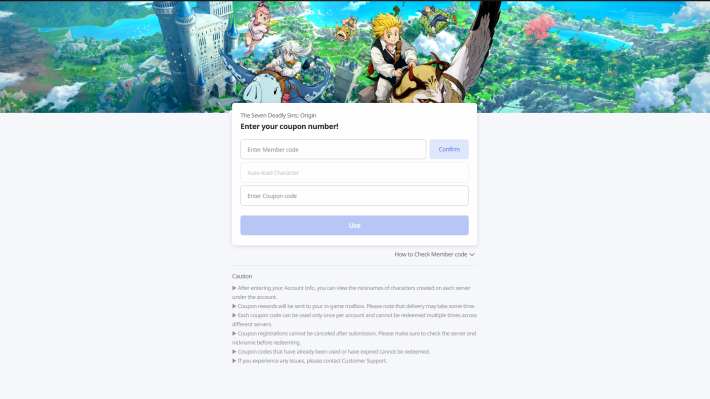
Go to the official website and enter the code. You will then receive an in-game mail with the rewards!
External Site to Claim Redeem CodesHow to Redeem on Steam
| 1 | Open Settings from the Menu |
|---|---|
| 2 | Select the Account/Game Info Tab. |
| 3 | Enter the Code to Get Items |
1: Open Settings from the Menu
Once you start the game and log in, open the game menu. Next, select the gear icon on the left side of the screen to open the Settings.
2: Select the Account/Game Info Tab

Select "Account and Game Info," which is the last option in the tabs on the left side of the Settings screen.
3: Enter the Code to Get Items
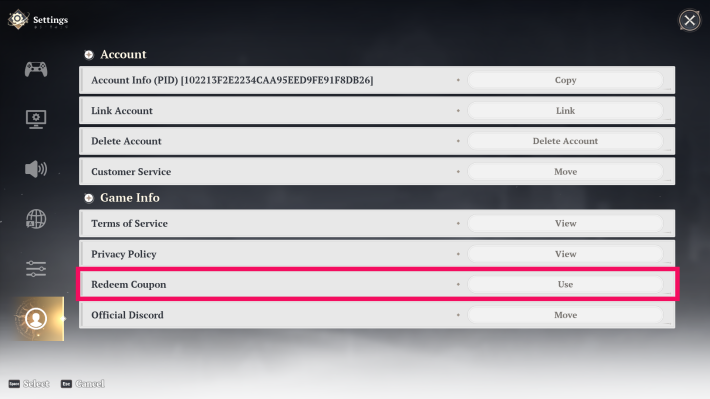
You can get items by selecting "Redeem Coupon" in the Game Info section and entering your code.
Related Articles