


This guide explains how to use Deathblows in LET IT DIE: INFERNO. Including how to increase and replenish your Rage Gauge, and how to activate Deathblows in LID.
| Combat Tips | |
| Deathblow | Guard Breaks |
| Dodge | Ranged Attacks |
Table of Contents
What is a Deathblow
A Special Attack Powered by the Rage Gauge
A Deathblow is a unique special attack tied to each weapon. By consuming a Rage Gauge bar, you unleash a powerful move specific to your currently equipped weapon.
How to Use Deathblows
Use Deathblows Once the Gauge is Full


The Rage Gauge fills quickly when attacking enemies, so don’t hesitate to use Deathblows as soon as the gauge is full. This special weapon ability allows you to defeat enemies faster and speeds up your exploration.
Combat Tips and Strategy GuideFor Controllers: Press △ + R1 or L1 Button

Deathblow consumes one Rage Gauge. On consoles, press △ + R1 or L1 to activate the Deathblow of the weapon equipped in that hand.
Controls GuideFor Mouse and Keyboard: Press Number 2 + Click Left or Right
For PC players, press the Number 2 key + Right or Left mouse click to trigger a Deathblow with the corresponding weapon.
How to Increase and Replenish the Rage Gauge
Deal Damage with Attacks
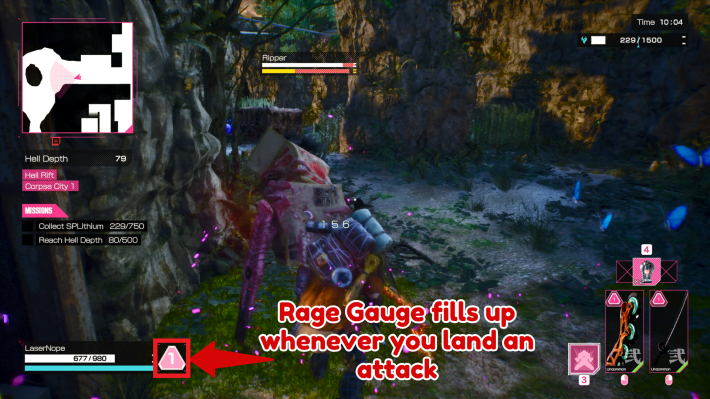
The Rage Gauge replenishes whenever you land attacks on enemies. The amount gained depends on the weapon and attack type.
Eat Flyolis

Eating a Flyoli restores about half of your Rage Gauge. Flyolis often appear near Judgment Gates, making them ideal for topping up before tough encounters.
Use Rage Shots

You can also replenish your Rage Gauge by using Rage Shot S and Rage Shot M.
- Rage Shot S restores about half a gauge.
- Rage Shot M restores a full gauge bar.
Use Timothy's Skill

Timothy’s Fire Up skill restores Health and recovers Rage Gauge by 1/3. With the Skill Upgrade Mastery, the recovery increases to 2/3.
Timothy Guide & MasteryEquip Rage Gauge Cores
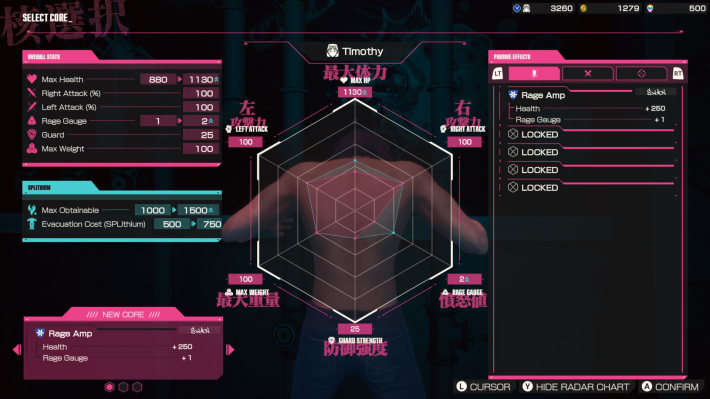
By equipping a Core with Rage Gauge +1, you can increase your max Rage Gauge from 1 to 2. Also, there are some Cores that can restore the Rage Gauge when Guard Breaks occur, making it possible to increase the frequency of Deathblow use depending on the Core combination.
Best Cores to Use










