

 Mina
Mina Fighter
 Destroyer
 Support
 Assassin
 Fire
Fire Ice
Ice Wind
Wind Earth
Earth Lightning
How to fix crash and issues in Mongil: Star Drive. Guide includes startup crash, loading issues, freezing, instant crashes on PC, Android.
Table of Contents
How to Fix Crash Issues on PC / Android
Update the Game to the Latest Version
Since Mongil has just been released, it can be unstable. There have been a few post-launch patches, so make sure you have auto-update enabled for the game to ensure you always have the latest version.
Check if You Meet System Requirements

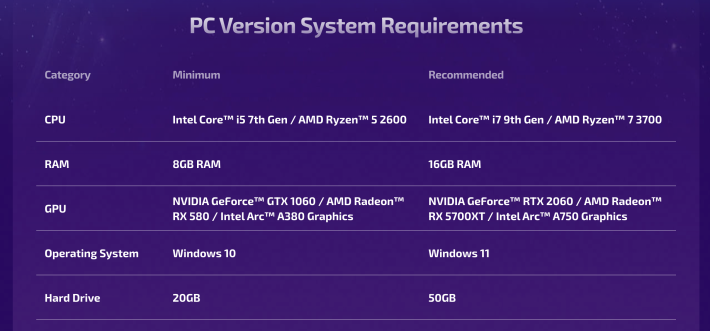
Crash issues can also stem from your device not meeting the game's minimum system requirements. Although you might be able to install it on a device with lower specs, it doesn't guarantee that the game will run smoothly.
Recommended Specs & System RequirementsMobile Requirements
| Mobile | Minimum Requirements | Recommended Requirements |
|---|---|---|
| AOS | AOS 10.0 Qualcomm Snapdragon 865 8GB RAM (Equivalent to Galaxy S20) | Qualcomm Snapdragon 8Gen2 12GB RAM (Equivalent to Galaxy S23) |
| iOS | iOS 15 or later iPhone 11 or equivalent device | iPhone 13 or later |
PC Requirements
| Minimum Requirements | Recommended Requirements | |
|---|---|---|
| OS/ DirectX | Windows 10 DirectX11 compatible | Windows 11 DirectX12 compatible |
| CPU | Intel Core i5 7th Gen / AMD Ryzen 5 2600 | Intel Core i7 9th Gen / AMD Ryzen 7 3700 |
| RAM | 8GB RAM | 16GB RAM |
| GPU | NVIDIA GeForce GTX 1060 / AMD Radeon RX 580 / Intel Arc A380 Graphics | GeForce RTX 2060 / AMD Radeon RX 5700XT / Intel Arc A750 Graphics |
| Storage | 20GB | 50GB |
Check Internet Connection
An intermittent or slow internet connection can also cause issues. If you keep getting disconnected from the game, check your internet connection.
Try Reinstalling the Game

If all other troubleshooting fails, try reinstalling both the launcher and the game. You will have to redownload the game, but this could solve the crashing issue.
Change Host Platforms
It's also worth trying to download the game from a different platform. For example, if you're on PC and downloaded it from the Epic Games Store, try uninstalling it and reinstalling it from the official website instead.
Contact Customer Support
If all else fails, sending a ticket to the game's official customer support might help fix the problem. To do this, head to the Customer Support center in the game and file a report.
- Open the Game's Menu
- Select the Gear Icon to Open Settings
- In Others, Go to Customer Support
- Read FAQs & Report Issues

First, launch the game and open the in-game menu.

In the menu, select the gear icon to open the Settings menu.

Head to the Others tab and scroll down to the Customer Support option.

This will open the game's Customer Support Center. You can find FAQs for common issues here. If your problem isn't listed or the solutions don't work, you can then report the issue yourself.
 Best Character Tier List
 Reroll Tier List
 How to Reroll Guide
 Raising Adventure Level
 Character Progression
 Role and Classes
 Recommended Gachas
 Game Difficulty Guide
 How to Cook and Best Recipes
 How to Capture Monsters
 How to Solve Oz's Puzzle
 Is Mongil a Gacha Game?
 How to Farm Starlight Crystals
 How to Get Compass of Promise










