

 Mina
Mina Fighter
 Destroyer
 Support
 Assassin
 Fire
Fire Ice
Ice Wind
Wind Earth
Earth Lightning
Can you play Mongil: STAR DIVE with a controller? See how to play Mongil using controllers guide, how to switch, change settings and keybinds.
Table of Contents
Can You Use a Controller?
Possible on PC Version
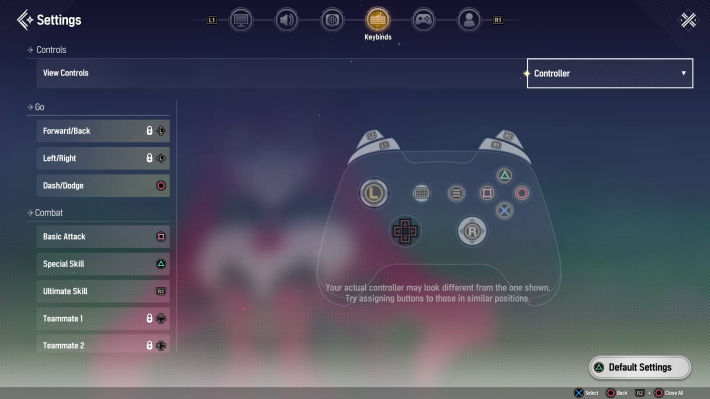

The PC version of Mongil can be played using a controller. Gamepads are also supported, and when you connect a controller, the game will automatically detect the type of controller you are using.
Keyboard & Mouse

The PC version supports not only controller input but also keyboard & mouse controls. Choose whichever is most comfortable for you.
Controller Settings
Settings Overview
The controls listed below are the default settings.
| Action | Controls |
| Move | Left Stick |
| Camera Control | Right Stick |
| Interaction | X or A Button |
| Shortcut Menu | R1 or RB Button |
| Basic Attack | □ or X Button |
| Dodge / Dash | 〇 or B Button |
| Switch Skill | L1 or LB Button |
| Switch to Specific Character | D-Pad Up / Down / Left / Right |
| Counter Attack | Before an enemy's special attack L1 or LB Button or 〇 or B Button |
| Airborne Counter | When Airborne by an enemy attack 〇 or B Button |
| Special Skill | △ or Y Button |
| Ultimate Skill | R2 or RT Button |
| Camera | Press Right Stick |
Changing Button Controls

Button layout changes can be made from the "Keybinds" tab, accessible by tapping the Options (gear icon) in the menu. Feel free to adjust the button layout as needed.
Controller Sensitivity Settings

Settings such as gamepad sensitivity and controller vibration can be adjusted from the Controller section in the Controls tab. Scroll down to reveal the controller settings screen and adjust as needed.

 Best Character Tier List
 Reroll Tier List
 How to Reroll Guide
 Raising Adventure Level
 Character Progression
 Role and Classes
 Recommended Gachas
 Game Difficulty Guide
 How to Cook and Best Recipes
 How to Capture Monsters
 How to Solve Oz's Puzzle
 Is Mongil a Gacha Game?
 How to Farm Starlight Crystals
 How to Get Compass of Promise










