

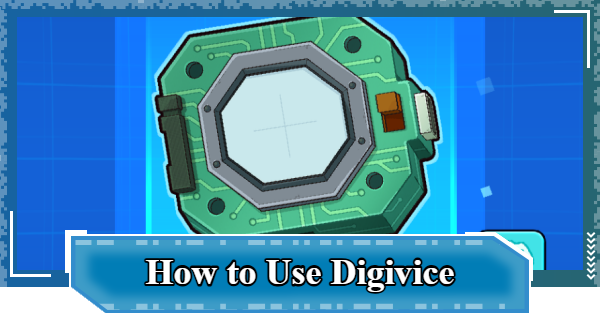
This is how to use the Digivice in Digimon UP. This guide explains how to use the Digivice in Digimon UP, including DigiChip priorities, Parts benefits, and how to obtain forms.
Table of Contents
Digivice Unlock Conditions
Unlocked when Challenging Stage 120
| Unlock Condition | 2 days after the Server Open When challenging Stage 120 |
|---|
The Digivice in Digimon UP will be unlocked when you challenge Stage 120 and 2 days have passed since the Server Open. First, proceed through the stages to meet one of the conditions.
| Related Articles | |
|---|---|
| Unlock Condition List | Stage Progression Guide |
How to Use the Digivice
| 1 | ▼Collect Parts with Function Research |
|---|---|
| 2 | ▼Equip Each Parts |
| 3 | ▼Raise the Parts level |
| 4 | ▼Collect Form |
1: Collect Parts with Function Research


Once the Digivice is unlocked, spend DigiChips to perform Function Research and obtain 'Parts'. There are a total of 6 external and internal items for Parts, and you will randomly obtain one Part each time you perform Function Research.
| Note! | The number of required DigiChips increases each time you perform Function Research. Also, Parts tend to be unlocked starting from the low-rarity external LCD (N). |
|---|
Main Ways to Obtain DigiChips
| 1 | Dungeon: Network Defense Ops |
|---|
6 Parts With 5 Types for Each
| External Parts | ||
|---|---|---|
| LCD | Button | Body |
| Internal Parts | ||
| Memory Storage | CPU APU GPU | Disc |
The Digivice has a total of 6 items for Parts: 3 external (top row) and 3 internal (bottom row). Also, there are 5 types of Parts for each item, and the rarity of the Parts is determined by the item.
Parts Rarity
| External Parts | ||
|---|---|---|
| | |
| Internal Parts | ||
| | |
2: Equip Each Part

Equip the obtained Parts to apply their Gear Effects. The Gear Effects differ for each Parts, and you need to choose one of the 5 types you own for each item
| Note! | Once you obtain the first Part of an item, it's recommended to equip it for the time being, even if it's not the effect you're looking for. |
|---|
Recommended Parts
| External Parts | ||
|---|---|---|
| LCD (Green) Critical Rate | Button (Orange) Combo Damage RESIST | Body (Blue) Critical Damage RESIST |
| Internal Parts | ||
| High-Capacity Memory Critical Damage | CPU Damage DOWN | Critical Enhancement Disc Critical Damage UP |
3: Raise the Parts Level

Once you've obtained a Parts with the desired equip effect, spend DigiChips to raise its Parts level. All Parts can be leveled up to level 100.
| Note! | When leveling up Parts, it's recommended to prioritize those with the Gear Effects you're aiming for. |
|---|
4: Collect Form

Be sure to also focus on collecting the Digivice Form that appeared in the anime and movies. Even if you don't plan to change the Form, you can gain a Passive Bonus just by obtaining them.
▼Click for How to Obtain & Use Form
Switch Using the Preset Function

The Digivice has 10 Preset slots, so use them when you want to switch between combinations of Parts depending on the content. You can also edit the Preset name to make its purpose easier to understand.
What is the Priority for DigiChips?
Prioritize Function Research

First, prioritize collecting Parts through Function Research. Since the gear effects differ for each Parts, increasing the variety of Parts you have will broaden your strategic options. Also, just obtaining them increases your Passive Bonus and strengthens your power.
Strengthen Frequently Used Parts
When raising the level of Parts, prioritize strengthening the ones you use frequently. Also, since the equip effect value of the LCD Parts does not increase even if the level goes up, it is recommended to level up Parts other than the LCD first.
Benefits of Collecting and Strengthening Parts
| 1 | ▼Gear Effects can be applied |
|---|---|
| 2 | ▼Passive Bonus increases by 4% each |
Gear Effects can be applied
The Gear Effects of the Parts equipped in each slot will be applied, strengthening your stats. Also, for Parts other than the LCD, it is also possible to increase the value of the equip effect by leveling them up.
Passive Bonus increases by 4% each
| Parts Level | 1 | 100 |
|---|---|---|
| Passive Bonus | 4.000% | 400.000% |
You gain a Passive Bonus by collecting Parts, and it increases by leveling them up. The initial value of the Passive Bonus for each Parts is 4%, but it increases by 4% with each level up, reaching 400% at level 100.
| Note! | Even for infrequently used Parts, level them up if you have extra DigiChips. |
|---|
How to Obtain and Use Form
Purchase at the Camp Shop
The Digivice Form that appeared in the anime and movies can be obtained by purchasing them with 'Camp Coins' at the Camp Shop. Therefore, join a Camp as early as possible and steadily collect Camp Coins.
How to Join Camp and What You Can DoTypes and Prices of Form
| Type | Price |
|---|---|
| Digivice | Camp Coin×3,500 |
| D-3 | Camp Coin×3,500 |
| D-Ark | Camp Coin×3,500 |
| D-Scanner | Camp Coin×7,000 |
| Digivice iC | Camp Coin×7,000 |
| Digimon Xros Loader | Camp Coin×10,500 |
| Digivice: | Camp Coin×10,500 |
Change Appearance

Pressing the Form change button displays a list of Forms, and you can change the appearance of your Digivice by selecting and equipping a Form you own. Even if the appearance changes, the effects of the equipped Parts will still apply.
Passive Bonus will be Applied

All Forms have a Passive Bonus that increases Attack, Defense, and HP by 16%. Obtain all the Forms to strengthen your power.
Function Research & Parts Enhancement
| Note! | You can collect all Parts in 30 tries, and the required number of DigiChips is a total of 251,000 |
|---|
| No. of Function Research Tries | Required DigiChips |
|---|---|
| 1st try | 150 |
| 2nd try | 250 |
| 3rd try | 400 |
| 4th try | 600 |
| 5th try | 850 |
| 6th try | 1,150 |
| 7th try | 1,500 |
| 8th try | 1,900 |
| 9th try | 2,350 |
| 10th try | 2,850 |
| 11th try | 3,400 |
| 12th try | 4,000 |
| 13th try | 4,650 |
| 14th try | 5,350 |
| 15th try | 6,100 |
| 16th try | 6,900 |
| 17th try | 7,750 |
| 18th try | 8,650 |
| 19th try | 9,600 |
| 20th try | 10,600 |
| 21st try | 11,650 |
| 22nd try | 12,750 |
| 23rd try | 13,900 |
| 24th try | 15,100 |
| 25th try | 16,350 |
| 26th try | 17,650 |
| 27th try | 19,000 |
| 28th try | 20,400 |
| 29th try | 21,850 |
| 30th try | 23,350 |
| Note! | Each Parts can be strengthened up to level 100, and the required number of DigiChips to reach level 100 is a total of 2,158,870 |
|---|
| Parts Level | Required DigiChips |
|---|---|
| 2 | 1 |
| 3 | 4 |
| 4 | 9 |
| 5 | 16 |
| 6 | 25 |
| 7 | 36 |
| 8 | 49 |
| 9 | 64 |
| 10 | 81 |
| 11 | 100 |
| 12 | 121 |
| 13 | 144 |
| 14 | 169 |
| 15 | 196 |
| 16 | 225 |
| 17 | 256 |
| 18 | 289 |
| 19 | 324 |
| 20 | 361 |
| 21 | 400 |
| 22 | 882 |
| 23 | 968 |
| 24 | 1,058 |
| 25 | 1,152 |
| 26 | 1,250 |
| 27 | 1,352 |
| 28 | 1,458 |
| 29 | 1,568 |
| 30 | 1,682 |
| Parts Level | Required DigiChips |
|---|---|
| 31 | 1,800 |
| 32 | 1,922 |
| 33 | 2,048 |
| 34 | 2,178 |
| 35 | 2,312 |
| 36 | 2,450 |
| 37 | 2,592 |
| 38 | 2,738 |
| 39 | 2,888 |
| 40 | 3,042 |
| 41 | 3,200 |
| 42 | 5,043 |
| 43 | 5,292 |
| 44 | 5,547 |
| 45 | 5,808 |
| 46 | 6,075 |
| 47 | 6,348 |
| 48 | 6,627 |
| 49 | 6,912 |
| 50 | 7,203 |
| 51 | 7,500 |
| 52 | 10,404 |
| 53 | 10,816 |
| 54 | 11,236 |
| 55 | 11,664 |
| 56 | 12,100 |
| 57 | 12,544 |
| 58 | 12,996 |
| 59 | 13,456 |
| 60 | 13,924 |
| 61 | 14,400 |
| 62 | 18,605 |
| 63 | 19,220 |
| 64 | 19,845 |
| 65 | 20,480 |
| 66 | 21,125 |
| 67 | 21,780 |
| 68 | 22,445 |
| 69 | 23,120 |
| 70 | 23,805 |
| 71 | 24,500 |
| 72 | 35,287 |
| 73 | 36,288 |
| 74 | 37,303 |
| 75 | 38,332 |
| 76 | 39,375 |
| 77 | 40,432 |
| 78 | 41,503 |
| 79 | 42,588 |
| 80 | 43,687 |
| 81 | 44,800 |
| 82 | 52,488 |
| 83 | 53,792 |
| 84 | 55,112 |
| 85 | 56,448 |
| 86 | 57,800 |
| 87 | 59,168 |
| 88 | 60,552 |
| 89 | 61,952 |
| 90 | 63,368 |
| 91 | 64,800 |
| 92 | 74,529 |
| 93 | 76,176 |
| 94 | 77,841 |
| 95 | 79,524 |
| 96 | 81,225 |
| 97 | 82,944 |
| 98 | 84,681 |
| 99 | 86,436 |
| 100 | 88,209 |
Digimon UP Related Articles
Return to HomeRecommended Articles
 How to Reroll
 Early Game Guide
 Recommended Partners
 Daily Tasks Guide
 How to Choose Server
 How to Create Character
 How to Change Name
 Idle Rewards
 Unlock Condition List
 Guide Quest
 Hologram Device
 Mission Guide
 Stage Progression
 How to Add Friends
 To-Do When Stuck
 How to Speed Up Battles
 Account Linking
 Customization Guide
 Gacha List
 Event List
 Latest Updates
Training Guide
 Training Guide Training Guide |  Raising Tamer Lv. Raising Tamer Lv. |  How to Raise Rank How to Raise Rank |
 Partner Training Partner Training |  Get Best Equipment Get Best Equipment |  Skill Cards Guide Skill Cards Guide |
 Get Support Digimon Get Support Digimon |  Buddies Guide Buddies Guide |  Get SP Support Get SP Support |
 Digivice Guide Digivice Guide |  Use Tactical Memory Use Tactical Memory |
 Dungeon Guide
 PVP Guide
 Camp Guide
 Digital World Search
 Ad Skip Pass
 Battle Pass
 Digimon List
 Skill Card List
 Equipment List











