

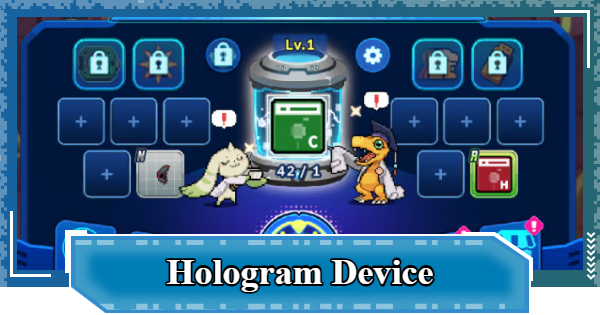
Hologram Device in Digimon UP. Learn how to unlock the Hologram Device, level up, use, increase Partner Level, get Partner gears, equipment rarity, guide rewards, tips, and more .
Table of Contents
 Early Game Guide
 Recommended Partners
 Daily Tasks Guide
 Idle Rewards
 Unlock Condition List
 Guide Quest
 Hologram Device
 Mission Guide
 Stage Progression
 Hologram Ticket
 DigiEmeralds
 Digimon That Can Digivolve
Hologram Device Overview
| Benefits | - Get Gear and Plugins - Increase Battle Power by equipping - Sell Gear and Plugins - Get Tamer, Partner EXP and Bit |
|---|---|
| Device Lv. UP | - Consumes a certain amount of Bit - There is a waiting time until level up - Waiting time can be shortened - View Ads, Acceleration Ticket, Help! to Camp |
| Mechanism | - Higher rarities added per Lv. - Lower rarities removed per Lv. - Drop rates per rarity change per Lv. |
| Efficiency UP | - Number of taps and rarity filter available in settings - Automate with the Auto function - Unlocked when challenging Stage 11 |
| Important Note | Used frequently to clear Guide Quests |
The Hologram Device in Digimon UP is used to obtain random equipment and Plugins. Increase your power by constantly updating your equipment and Plugins, then sell unnecessary items to gain EXP and Bit.
What is the Hologram Device?
Device to Get Equipment and Plugin


The Hologram Device is a system where you consume Hologram Tickets to get Equipment or Plugins. Each time the device is used or activated, you can get one item from a selection of 5 types of Equipment and 5 types of Plugins.
How to Get Equipment and PluginsExchange One Ticket for One Item
With the Hologram Device, you consume 1 ticket to get 1 piece of Equipment or a Plugin. The fundamental mechanics do not change even when the Hologram Device's level increases.
Main Sources of Hologram Tickets
| 1 | Idle Rewards |
|---|---|
| 2 | Stage Boss Defeat Rewards |
| 3 | Fight! DemiDevimon (Dungeon) |
Get XP by Selling Unwanted Equipment

For the Equipment you get, you can choose to either equip or sell it. Selling it will give you Tamer EXP, Partner EXP, and a certain amount of Bits. Therefore, you need to use it to level up your Tamer and Partner as well.
| Related Article Links | |
|---|---|
| How to Raise Tamer Level | How to Level up Partner |
| Note! | Equipment and Plugins don't have a Preset feature, so if you don't equip them, selling is your only option. |
|---|
More Rarities at Higher Device Levels

You can level up by consuming a certain amount of Bits for each level and waiting for a certain period of time. New rarities will be added at certain levels.
Best Ways to Farm BitsHow to Upgrade Hologram Device
| 1. | ▼Fill the Gauge by Consuming Bits |
|---|---|
| 2. | ▼Press Level Up to Start the Timer |
| 3. | ▼Wait for Timer or Accelerate |
| 4. | ▼Complete the Level Up |
1. Fill the Gauge by Consuming Bits

▲Displayed by tapping the level on the device.
Consume the required Bits for each level to advance the gauge. As the level increases, the amount of Bits per gauge increases, and the number of gauges also increases to a maximum of 6
Bit Costs and Waiting Times
| Lv. | Bit | Time | Added Rarity | Removed Rarity |
|---|---|---|---|---|
| 2 | 6,000×2 (12,000) | 1 minute | | - |
| 3 | 13,000×2 (26,000) | 5 minutes | - | - |
| 4 | 24,000×2 (48,000) | 30 minutes | | - |
| 5 | 30,000×2 (60,000) | 1 hour | - | - |
| 6 | 36,000×3 (108,000) | 2 hours | - | - |
| 7 | 43,200×3 (129,600) | 3 hours | | - |
| 8 | 51,840×3 (155,520) | 4 hours | - | - |
| 9 | 62,208×3 (186,624) | 6 hours | | - |
| 10 | 80,870×4 (323,480) | 8 hours | - | |
*1K = 1,000
| Lv. | Bit | Time | Added Rarity | Removed Rarity |
|---|---|---|---|---|
| 11 | 105.1K×4 (420,400) | 10 hours | - | - |
| 12 | 136.6K×4 (546,400) | 12 hours | - | - |
| 13 | 177.6K×4 (710,400) | 16 hours | | - |
| 14 | 230.9K×4 (923,600) | 20 hours | - | - |
| 15 | 300.2K×4 (1,200,800) | 24 hours | - | |
| 16 | 390.3K×4 (1,561,200) | 28 hours | - | - |
| 17 | 546.4K×5 (2,732,000) | 32 hours | - | - |
| 18 | 765K×5 (3,825,000) | 36 hours | - | - |
| 19 | 1,071.1K×5 (5,355,500) | 40 hours | - | - |
| 20 | 1,499.5K×5 (7,497,500) | 48 hours | | - |
| 21 | 2,099.3K×5 (10,496,500) | 56 hours | - | - |
| 22 | 3,149K×6 (18,894,000) | 64 hours | - | - |
| 23 | 4,723.5K×6 (28,341,000) | 72 hours | - | - |
| 24 | 7,557.6K×6 (45,345,600) | 80 hours | | - |
| 25 | 12,092.2K×6 (72,553,200) | 88 hours | - | |
| 26 | 19,347.6K×6 (116,085,600) | 96 hours | - | - |
| 27 | 30,956.2K×6 (185,737,200) | 104 hours | - | - |
| 28 | 52,625.6K×6 (315,753,600) | 112 hours | | - |
| 29 | 89,463.6K×6 (536,781,600) | 120 hours | - | - |
| 30 | 152,000K×6 (912,000,000) | 128 hours | - | - |
2. Press Level Up to Start the Timer

When all gauges are full, the Level Up Button will appear, so press it. Pressing it starts the waiting time required to level up.
3. Wait for Timer or Accelerate

At low levels, the time is short, so you can just wait. However, as your level increases and the research time gets longer, you should make use of the time-shortening features. There are three ways to shorten the time: View ads, use an Acceleration Ticket, or ask Camp members for Help!
| Related Articles | |
|---|---|
| How to Remove Ads | Camp Guide |
4. Complete the Level Up

After the research time has passed, press "Level Up" to raise your level. It does not level up automatically after the time passes; you need to press it manually.
How to Use the Hologram Device
| 1. | ▼Tap the Hologram Device |
|---|---|
| 2. | ▼Sort the Obtained Equipment |
| 3. | ▼Adjust Hologram Device Settings |
| 4. | ▼Utilize the Auto Function |
1. Tap the Hologram Device

Until the Auto feature is unlocked, you can tap the device to consume tickets and get Equipment or Plugins.
2. Sort the Obtained Equipment

Once you get a piece of Equipment or a Plugin, decide whether to keep or sell it. Basically, it's fine to equip it if your Battle Power increases, and sell it if your Battle Power decreases.
3. Adjust Hologram Device Settings

From the settings menu, you can specify the effects and rarity you want to keep, and the number of times to pull at once with a single tap. Equipment that doesn't meet the conditions will be sold automatically.
4. Utilize the Auto Function

| Unlock Condition | When challenging Stage 11 |
|---|
The Auto feature is unlocked when you challenge Stage 11, so make good use of it. It will automatically use the Hologram Device until a piece of Equipment or Plugin that meets your set conditions is dropped.
Unlock Condition ListBest Hologram Device Settings
Recommended Settings by Level
| Lv. | Matches | Options | Rank | Amount to Obtain |
|---|---|---|---|---|
| 1 | 0 | - | HR | Max Value |
| 2~8 | 0 | - | SR | |
| 9~12 | 0 | - | SSR | |
| 13~19 | Any | Any | UR or GR | |
| 20~23 | Any | Any | GR or LR | |
| 24~27 | Any | Any | LR or LR+ | |
| 28~30 | Any | Any | LR or EX+ |
Set to 1 or 2 Rarity Levels Below

It's recommended to set the rank to 1-2 levels below the highest rarity that drops at each level. Since Equipment level is updated according to your Tamer Level, even items that are 1-2 rarity levels lower can sometimes have higher stats than the highest rarity items.
| Note! | Since the values for options are determined by rarity, higher rarity means better performance. |
|---|
Set the Amount to the Maximum Value
This allows you to consume Hologram Tickets efficiently, so unless you have a special reason, it's recommended to set the amount to obtain to the maximum value. The further you progress in the game, the more tickets you will consume.
| Note! | The settings for Rank and Amount to Obtain are unlocked sequentially as the device levels up. |
|---|
Turn On Rarity Filtering Options
While rarities are changing frequently, set the number of matches to 0 to prioritize updating rarity. Once rarity updates slow down, it's recommended to specify the number of matches and your desired options to carefully select them.
Hologram Device Tips
Always Consider Guide Quests

Some Guide Quests require you to activate the Hologram Device a certain number of times. Avoid using all of your Hologram Tickets, as running out may prevent you from completing these quests. Keep a small reserve of tickets on hand so you can continue progressing smoothly.
How to Progress Guide QuestsDigimon UP Related Articles
Return to HomeRecommended Articles
 How to Reroll
 How to Choose Server
 How to Create Character
 How to Change Name
 How to Add Friends
 To-Do When Stuck
 How to Speed Up Battles
 Account Linking
 Customization Guide
 Gacha List
 Event List
 Latest Updates
Training Guide
 Training Guide Training Guide |  Raising Tamer Lv. Raising Tamer Lv. |  How to Raise Rank How to Raise Rank |
 Partner Training Partner Training |  Get Best Equipment Get Best Equipment |  Skill Cards Guide Skill Cards Guide |
 Get Support Digimon Get Support Digimon |  Buddies Guide Buddies Guide |  Get SP Support Get SP Support |
 Digivice Guide Digivice Guide |  Use Tactical Memory Use Tactical Memory |
 Dungeon Guide
 PVP Guide
 Camp Guide
 Digital World Search
 Ad Skip Pass
 Battle Pass
 Digimon List
 Skill Card List
 Equipment List











