
Best server to choose in Digimon UP. Check the best servers for new players, server recommendations, transfer guide, server restrictions, and account progression.
Table of Contents
Which Server is Recommended?
New Servers are Recommended
On new servers, there are many players who have just started the game, so you can play in an environment where everyone's progress is similar. Conversely, on existing servers, it's difficult to close the Battle Power gap with top players because the starting times are different.
| Note! | Some content is unlocked based on the number of days that have passed since the server opened. |
|---|
Same Content Across All Servers
There is no difference in game content between servers, so it doesn't matter which server you choose. Unless you have a reason like wanting to join the same Camp as a friend, feel free to choose any server you like.
What is a Server?
A server is an individual game world where your progress is saved. Players on different servers generally cannot interact with one another, and new servers are opened regularly to give new players a fresh start.
Reasons for Creating Multiple Servers
- To reduce server load and maintain stable performance
- To create an environment that is easier for new players to start in
Server Selection Tips
Camp Limited to the Same Server


Only Tamers on the same server can belong to the same Camp (guild). If you have someone you want to play with, you must choose the same server.
Camp GuideYou Cannot Join Full Servers
You cannot choose a server that has reached its player capacity. If you want to play on the same server as a friend, you may not be able to select that server if you start the game too far apart in time.
| Note! | If you have already created game Data on a server, you can enter it even if it's full. |
|---|
How to Change Servers
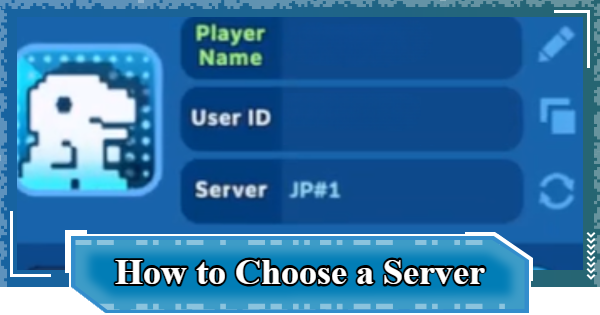
| 1 | ▼Tap your player icon in the top left of the screen |
|---|---|
| 2 | ▼Tap button next to server name |
| 3 | ▼Tap the server you want to move to |
1: Tap your player icon

First, tap your player icon in the top left of the screen.
2: Tap Button Next to Server Name
When your player information is displayed, tap the icon next to the server name.
3: Tap the Server You Want to Move to
A server list will appear. Tap the server you want to move to, and the process is complete.
Server Transfer Pointers
Save Data Cannot Be Transferred

Save Data is managed on a per-server basis, so it cannot be transferred to another server. When playing on another server, you will have to start the game over from the beginning.
| Note! | If you return to an existing server, you can play with the save Data you've already created. |
|---|
Digimon UP Related Articles
Return to HomeRecommended Articles
 How to Reroll
 Early Game Guide
 Recommended Partners
 Daily Tasks Guide
 How to Choose Server
 How to Create Character
 How to Change Name
 Idle Rewards
 Unlock Condition List
 Guide Quest
 Hologram Device
 Mission Guide
 Stage Progression
 How to Add Friends
 To-Do When Stuck
 How to Speed Up Battles
 Account Linking
 Customization Guide
 Gacha List
 Event List
 Latest Updates
Training Guide
 Training Guide Training Guide |  Raising Tamer Lv. Raising Tamer Lv. |  How to Raise Rank How to Raise Rank |
 Partner Training Partner Training |  Get Best Equipment Get Best Equipment |  Skill Cards Guide Skill Cards Guide |
 Get Support Digimon Get Support Digimon |  Buddies Guide Buddies Guide |  Get SP Support Get SP Support |
 Digivice Guide Digivice Guide |  Use Tactical Memory Use Tactical Memory |
 Dungeon Guide
 PVP Guide
 Camp Guide
 Digital World Search
 Ad Skip Pass
 Battle Pass
 Digimon List
 Skill Card List
 Equipment List











