

Looking for Roblox The Forge Totems? See all 5 Totem effects, costs, and how to get them. Discover the best Totem combo to find rare ores and level up fast!
Table of Contents
What Are Totems
Buff Items Placed on the Ground


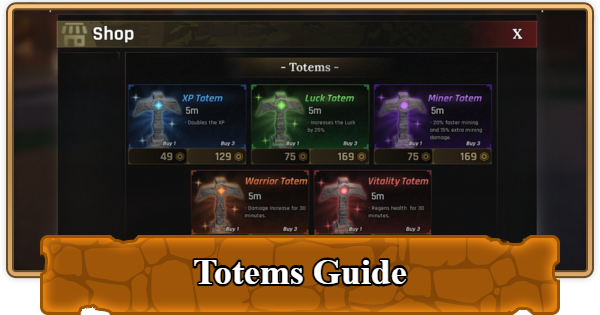
In Roblox The Forge, Totems are consumable items that you place on the ground to give you temporary AoE (Area of Effect) buffs, such as increased XP, better luck for rarer ore drops, faster mining, more damage, or health regeneration. They're not required to progress in the game, but they dramatically speed up those grinding sessions.
| Note! | Totems benefit all players within their radius, not just the person who placed them. If you place a Luck Totem, everyone nearby gets the boost. |
|---|
All 5 Totems in The Forge
| Totem | Effect | Duration | Cost |
|---|---|---|---|
| XP Totem | Double XP gain | - | 1 Totem: 49 Robux 3 Totems: 129 Robux |
| Luck Totem | +25% Luck | - | 1 Totem: 75 Robux 3 Totems: 169 Robux |
| Miner Totem | +20% mining speed, +15% mining damage | - | 1 Totem: 75 Robux 3 Totems: 169 Robux |
| Warrior Totem | Damage boost | 30 min. | 1 Totem: 75 Robux 3 Totems: 169 Robux |
| Vitality Totem | Health regen over time | 30 min. | 1 Totem: 75 Robux 3 Totems: 169 Robux |
If you're willing to spend some cash then the best Totem to use is the Miner and Luck Totem as a combo, since it will give you an extra 25% Luck to get rarer ores while being able to mine faster.
How to Get Totems
Buy Totems with Robux
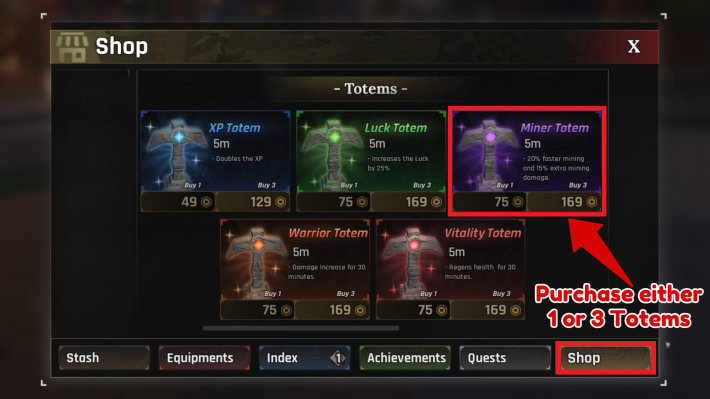
Buying Totems directly from the shop is the best way to get Totems.
| Step | Action |
|---|---|
| 1 | Open the menu (bag icon or press T). |
| 2 | Select the Shop tab. |
| 3 | Choose a Totem and click Purchase. |
| 4 | Confirm the Robux transaction. |
Redeem Codes

The Forge regularly releases codes and sometimes those comes with free Totems. These codes are the only way to get Totems without spending Robux.
Redeem Codes (December 2025)How to Use Totems
Equip to Hotbar
Once you have Totems in your inventory, here's how to activate them:
| Step | Action |
|---|---|
| 1 | Open your inventory ( press T). |
| 2 | Select the Totem you want to use. |
| 3 | Click Use or equip it to your hotbar. |
| 4 | Left‑click to place the Totem on the ground. |
| 5 | The Totem activates within a circle. |
| 6 | Stay inside its radius to receive buffs. |
You can also stack Totems or place them side-by-side. They don't replace or cancel existing buffs. For example, you can use an XP Totem and a Warrior Totem in areas where monsters spawn frequently to get the most out of hunting quests.
The Forge Related Articles
General Guides and Tips & Tricks
| Related Articles | ||
|---|---|---|
 Best Gamepasses Best Gamepasses |  Secrets & Hidden Spots Secrets & Hidden Spots |  How to Make Money Fast How to Make Money Fast |
 How to Get and Use Totems How to Get and Use Totems |  List of All Pickaxes List of All Pickaxes |  Enhancement Guide Enhancement Guide |  How to Add Runes How to Add Runes |  Things to Do If Stuck Things to Do If Stuck | - |












