
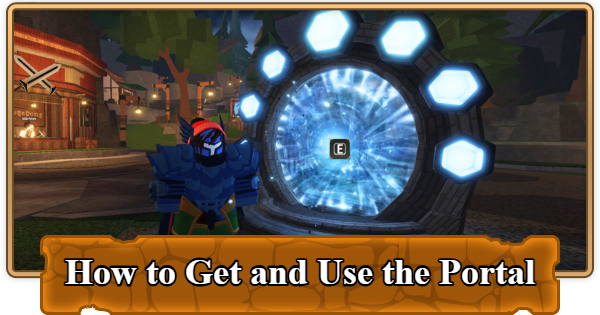
Unlock the Portal in Roblox The Forge to reach the Forgotten Kingdom! Learn how to finish Sensei Moro’s quests, reach Level 10, find the Wizard, and use the Portal tool effectively.
Table of Contents
What Is the Portal?
A Tool Used to Traverse Maps


The Portal is a tool that you can use to travel between maps such as the Forgotten Kingdom and the Frostpire Expanse in Roblox The Forge, and without it, you're stuck grinding in Stonewake's Cross forever. The Forgotten Kingdom has better ores like Basalt and Volcanic Rock, upgraded pickaxes, tougher enemies that drop valuable essences, and endgame content you can't access anywhere else.
How to Unlock the Portal
Complete Sensei Moro's Quests

You need to complete Sensei Moro's tutorial quests in Stonewake's Cross to be able to meet the Wizard and get the Portal. His tutorial quests teach you how to mine, forge, enhance, and use runes. You must complete every single one of his quests.
Reach Level 10

The Portal Tool won't work until you're Level 10, and even if you somehow get the tool earlier, you can't teleport to Forgotten Kingdom without hitting this level requirement. Reaching level 10 is very easy, and all you'll have to do is complete side quests from Umut and Nord inside The Cave or by simply playing the game naturally by mining ores and defeating enemies.
How to Level Up and Gain Exp FastFind the Wizard
The Wizard is living in a Tower north of The Cave in Stonewake's Cross. It's the same Wizard who helps you reroll your race. Once you're Level 10 and have completed the tutorial, the Wizard will automatically give you the Portal tool when you talk to him. It goes straight into your hotbar and inventory.
How to Use the Portal
Press 3 and Place It on the Ground
| Step | Action |
|---|---|
| 1 | Press 3 to select the Portal tool. |
| 2 | Left-click to place the Portal on the ground. |
| 3 | Walk up to the Portal and press E to interact. |
| 4 | Select your destination. |
| 5 | Click the "Teleport" button. |
Now that you have the Portal, all you need to do is press 3 to select the Portal tool and left-click to place it on the ground. Walk up to your placed portal, press E and select your next destination.
| Important! | The portal can only be placed on valid terrain. You'll see a green highlight when placement is valid. If you see a red highlight, the ground is invalid, and you need to move to a flatter and unobstructed surface. |
|---|
The Forge Related Articles
General Guides and Tips & Tricks
| Related Articles | ||
|---|---|---|
 Best Gamepasses Best Gamepasses |  Secrets & Hidden Spots Secrets & Hidden Spots |  How to Make Money Fast How to Make Money Fast |
 How to Get and Use Totems How to Get and Use Totems |  List of All Pickaxes List of All Pickaxes |  Enhancement Guide Enhancement Guide |  How to Add Runes How to Add Runes |  Things to Do If Stuck Things to Do If Stuck | - |












